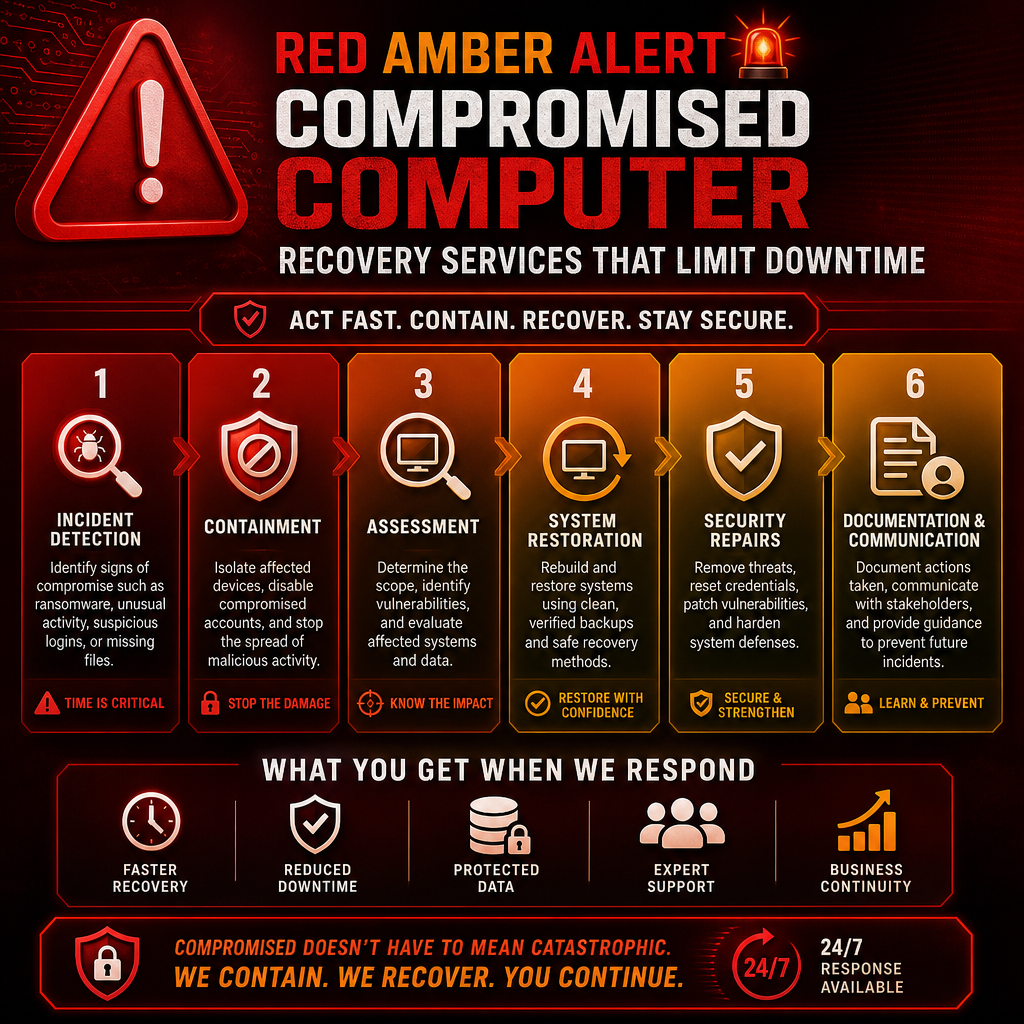
A staff member clicks what appears to be a routine document, and minutes later shared files will not open. Or an unfamiliar login appears in Microsoft 365, a workstation begins sending suspicious email, or a critical application suddenly stops working. These are not problems to “wait and see” with. Compromised computer recovery services are designed to help organizations contain the incident, understand what happened, restore safe operations, and reduce the chance of a repeat.
For a small or midsize organization, the pressure is immediate. Employees cannot work normally, clients may be waiting for answers, and the business must make sound decisions before a manageable incident becomes a larger disruption. The right response is calm, prompt, and methodical.
What a Computer Compromise Can Look Like
A compromised computer is any device, account, or system that may have been accessed, altered, or controlled without authorization. Ransomware is one well-known example, but it is far from the only one. A compromised email account can be used to send convincing payment requests. A stolen password can give an outsider access to cloud files. An unpatched computer may be infected with malware that quietly collects information over time.
The first signs are often practical rather than technical. You may notice repeated password prompts, missing or renamed files, unexpected antivirus warnings, slow performance, unfamiliar software, or emails sent from an employee’s account that they did not write. Financial teams may receive an unusual invoice request that appears to come from an executive or vendor.
Not every issue is a security incident. A failing hard drive, internet outage, or software update can also interrupt work. That distinction matters, but it should not delay action. If unauthorized access is possible, treat the situation seriously until it has been assessed.
The First Hours Matter Most
A rushed response can accidentally spread an infection or erase evidence needed to understand the incident. At the same time, waiting too long can allow an attacker to move between computers, access backups, or use a compromised account to target customers and partners.
If you suspect a workstation has been compromised, disconnect it from the network if you can do so safely. Do not power it off unless directed by your IT provider, as active information may help with investigation. Avoid logging in from that device, opening suspicious attachments, or attempting random fixes found online.
Let employees know what to do in plain language. They should report suspicious activity right away and avoid forwarding questionable messages to others. If an email account may be involved, use a known-safe device to contact your IT team. A clear internal message can prevent a single incident from becoming an organization-wide problem.
For potential ransomware, payment fraud, or exposure of sensitive client, patient, or employee information, leadership should be involved early. Your recovery process may also require legal, insurance, or privacy guidance depending on the information affected and the rules that apply to your organization.
What Compromised Computer Recovery Services Should Include
Effective recovery is more than removing a virus and putting a computer back on a desk. The goal is to restore trust in the environment. That requires investigation, containment, remediation, and follow-through.
Containment and assessment
The recovery team begins by limiting access to affected devices and accounts. This may include isolating computers, disabling suspicious user sessions, resetting passwords, reviewing administrator access, and checking whether the issue has spread to file servers, cloud services, or other workstations.
They also assess the scope of the incident. Which accounts were used? What systems were accessed? Was data copied, deleted, encrypted, or exposed? When did the activity begin? Clear answers are not always available immediately, but a disciplined assessment creates a safer recovery plan than guesswork.
Safe system restoration
Depending on the incident, a compromised device may need a complete rebuild rather than a quick cleanup. Reinstalling the operating system, applying current updates, and restoring verified data can take longer, but it reduces the risk of leaving hidden malicious tools behind.
Backups are central to this stage, provided they are intact and protected from the compromise. Recovery specialists should verify backup dates and integrity before restoring. Restoring the newest backup without checking it can reintroduce the same issue or overwrite useful evidence.
The right restoration approach depends on the business impact. A single standard workstation may be rebuilt quickly. A line-of-business server, shared database, or specialized healthcare or professional-services application may require a phased plan that protects data consistency and keeps critical operations moving.
Account, network, and cloud security repairs
Many incidents begin with a stolen password, not a damaged computer. Recovery should therefore include password resets for affected users, stronger sign-in protections such as multifactor authentication, review of email forwarding rules, and removal of unauthorized application access.
The network also needs attention. Security professionals may review firewall activity, remote access settings, device permissions, software patches, and administrator accounts. In cloud environments, they should examine login history, sharing settings, mailbox rules, and retention options. A computer can be clean while the account connected to it remains exposed.
Clear documentation and business communication
Decision-makers need practical information, not a flood of unexplained technical alerts. A useful recovery partner explains what is known, what remains under review, what actions are being taken, and what employees should do next.
Documentation is valuable after the emergency as well. It supports insurance conversations, compliance obligations, vendor communications, and future security planning. It also helps leadership understand the true cost of the event, including downtime, staff time, data recovery, and operational disruption.
Recovery Is Not the Same as Resuming Work
Getting systems online is an urgent milestone. It is not always the finish line. A business that resumes work without correcting the entry point may face the same threat again within days or weeks.
After the immediate recovery, take time to review the cause. Perhaps an employee was targeted with a convincing phishing email. Perhaps a former employee’s account remained active. Perhaps a remote-access tool was exposed, software had not been updated, or backups were connected in a way that made them vulnerable.
The purpose of this review is not to blame employees. People are regularly targeted by well-crafted messages, and even careful teams can make mistakes under pressure. The better question is: what controls would make one mistake less damaging next time?
Reducing the Risk of a Repeat Incident
Prevention is most effective when it becomes part of normal operations. Managed updates, monitored security tools, protected backups, access reviews, and employee awareness training work together. No single product can guarantee safety, but layered protections make an attacker’s job harder and improve your ability to recover.
A practical plan should fit the size and complexity of your organization. A five-person office does not need the same approach as a multi-site operation, but both need dependable backups, secure accounts, current devices, and a clear process for reporting concerns. The trade-off is usually between the cost of preventive support and the much greater uncertainty of emergency downtime.
It also helps to define responsibilities before an incident occurs. Who can authorize account changes? Who contacts the bank if payment fraud is suspected? Who communicates with staff, clients, or vendors? Who has access to backup credentials? When these answers are documented, the response is faster and less stressful.
When to Call for Help
Call an IT security professional promptly if you see ransom notes, suspicious account activity, unexplained file encryption, repeated failed logins, unfamiliar remote-access software, or possible exposure of confidential information. You should also seek help if a workstation behaves oddly after an employee opens a questionable attachment or enters credentials on an unexpected sign-in page.
Do not wait for certainty. Early assessment can reveal that the issue is limited, which is good news. If it is not limited, early containment can protect more of your organization.
For Fraser Valley organizations, Myriad Technologies approaches recovery with the urgency an operational interruption deserves, while explaining each step in language your team can act on. The goal is not simply to get a computer working again. It is to help your people return to work with greater confidence in the systems they depend on.
A security incident can feel personal because it interrupts the relationships and responsibilities that keep your organization moving. A prepared recovery partner gives you a clear next step: protect what is affected, restore what is safe, and build a stronger foundation for tomorrow.