A staff member clicks what appears to be a legitimate Microsoft 365 login page. They enter their credentials, unaware that the website is fraudulent. Within minutes, a cybercriminal has access to their account.
In a traditional network, a single compromised password can provide access to email, shared files, financial systems, and sensitive business data. Zero Trust Security is designed to prevent that scenario by verifying every access request and limiting how far an attacker can go if an account is compromised.
For small and mid-sized businesses, Zero Trust is not about creating an enterprise-scale security operation. It is about implementing practical cybersecurity measures that protect client information, financial records, healthcare data, business applications, and critical systems. The objective is simple: verify access, minimize risk, and strengthen your organization’s overall security posture.
What Is Zero Trust Security?
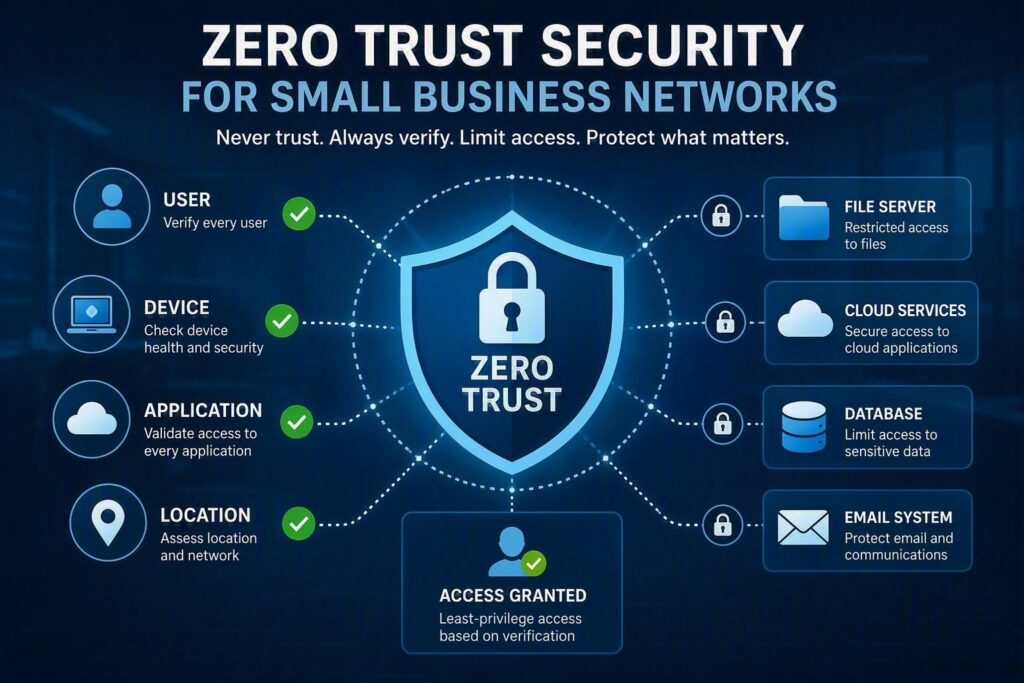
Zero Trust Security is a cybersecurity framework built on the principle of “never trust, always verify.” Instead of automatically trusting users, devices, or applications because they are connected to the company network, every access request is validated before permission is granted.
Traditional security models relied heavily on a secure network perimeter. If a user was inside the office or connected through the corporate network, they were often considered trustworthy. As organizations increasingly use cloud services, remote work environments, mobile devices, and third-party collaboration tools, this approach is no longer sufficient.
A Zero Trust model continuously evaluates:
- Who is requesting access?
- Can their identity be verified?
- Is the device secure and up to date?
- Does the user require access to the requested resource?
- Is there any unusual activity associated with the request?
In many cases, these security measures happen seamlessly. Employees simply sign in using multifactor authentication, access approved business applications, and receive permissions based on their job responsibilities.
Why Small Businesses Need Zero Trust Security
Many small businesses believe they are unlikely targets for cybercriminals. In reality, attackers often focus on smaller organizations because they may have limited IT resources while still storing valuable data.
Law firms manage confidential client records. Healthcare providers store sensitive patient information. Nonprofits maintain donor databases and payment details. Professional service firms rely heavily on email, cloud storage, and financial systems that can be disrupted by a single compromised account.
Most cyberattacks begin with something relatively simple:
- A stolen password
- A phishing email
- A reused login credential
- An unpatched computer
- A malicious file attachment
Once inside the environment, attackers attempt to move through systems, access sensitive data, create unauthorized accounts, or launch ransomware attacks.
A Zero Trust approach limits these opportunities. If a compromised account only has access to the resources necessary for that employee’s role, the damage can be significantly reduced.
For example, if a login attempt comes from an unfamiliar location or device, additional verification can be required before access is granted. In many cases, a stolen password alone becomes useless.
Learn more about password-related security risks here:
Are Your Business Passwords Putting You at Risk?
Key Components of a Zero Trust Security Strategy
Zero Trust is not a single tool or software platform. It is a collection of cybersecurity best practices working together to protect users, devices, and data.
Strong Identity and Access Management
Identity protection is one of the most important aspects of Zero Trust Security.
Every employee should have an individual account rather than sharing credentials. Access to Microsoft 365, cloud applications, remote access platforms, accounting software, and other sensitive systems should be secured with multifactor authentication.
Multifactor Authentication (MFA) provides an additional layer of protection by requiring a second verification method, such as an authentication app or approval prompt.
Organizations should also regularly review:
- Former employee accounts
- Vendor accounts
- Privileged administrator credentials
- Unused system accounts
Removing unnecessary accounts reduces potential attack surfaces.
Secure and Managed Devices
Even the strongest account security can be undermined by an infected, outdated, or unmanaged device.
A Zero Trust approach includes device management practices such as:
- Operating system updates
- Endpoint protection
- Disk encryption
- Security monitoring
- Device compliance checks
Many organizations allow employees to use personal devices for work activities. While bring-your-own-device (BYOD) programs can increase flexibility, access levels should align with security controls.
For instance, a personal smartphone may be allowed to access email, while sensitive accounting systems or confidential client data may require a managed company-issued device.
Least-Privilege Access Controls
The principle of least privilege means employees receive only the access necessary to perform their jobs.
Examples include:
- Administrative staff accessing scheduling and billing systems
- Contractors accessing only specific project files
- Team members viewing only department-relevant data
While broad permissions may seem convenient, they increase cybersecurity risk.
Administrator privileges deserve special attention. IT administrators should use dedicated administrative accounts for managing systems instead of conducting everyday tasks, such as browsing the web or checking email, with elevated privileges.
Network and Data Segmentation
Zero Trust limits the impact of security incidents through segmentation.
Guest Wi-Fi networks should remain separate from internal business systems. Devices such as printers, security cameras, and other connected equipment should not share unrestricted access with company workstations and servers.
Data segmentation is equally important.
Highly sensitive information such as:
- Employee records
- Financial reports
- Client documentation
- Healthcare information
should be stored with stricter access controls than general business documents.
Cloud storage environments should also be reviewed regularly to eliminate excessive permissions and unnecessary sharing.
Security Monitoring and Threat Detection
Monitoring provides visibility into suspicious activity before significant damage occurs.
Examples include:
- Multiple failed login attempts
- Sign-ins from unusual locations
- Unexpected mailbox forwarding rules
- Unauthorized file access attempts
- New devices connecting to business systems
However, monitoring alone is not enough. Alerts must be reviewed and acted upon promptly.
For businesses without dedicated cybersecurity personnel, managed monitoring services can help identify threats, investigate suspicious activity, and provide guidance when security incidents occur.
Balancing Security and Productivity
One common concern about Zero Trust Security is that it may create friction for employees.
Users may occasionally need to:
- Approve MFA requests
- Verify new devices
- Request additional permissions
- Re-authenticate during sensitive activities
Without proper planning, these processes can feel inconvenient. However, when implemented correctly, Zero Trust improves security without significantly disrupting workflows.
The most effective approach is to start with high-risk areas such as:
- Microsoft 365 accounts
- Administrative access
- Remote access services
- Financial platforms
- Sensitive business applications
From there, organizations can expand protections gradually while maintaining a positive user experience.
How to Get Started with Zero Trust Security
A practical Zero Trust implementation begins with understanding:
- Where critical business data is stored
- Who has access to it
- Which devices connect to company resources
- What would happen if a password were stolen today
Once that assessment is complete, organizations should:
- Enable multifactor authentication everywhere possible.
- Eliminate shared user accounts.
- Review administrative privileges.
- Secure and manage business devices.
- Strengthen cloud-sharing permissions.
- Segment networks and sensitive data.
- Create documented onboarding and offboarding procedures.
Employee education is equally important. Staff should know how to identify suspicious login requests, recognize phishing attempts, and report security concerns quickly.
For additional guidance on email protection, read:
Protect Your Business with a Practical Zero Trust Strategy
Zero Trust Security is not about adding unnecessary complexity. It is about reducing opportunities for cybercriminals and strengthening your organization’s ability to prevent, detect, and respond to security threats.
For businesses throughout Chilliwack and the Fraser Valley, implementing Zero Trust principles can dramatically improve cybersecurity resilience while supporting modern work environments.
Rather than investing in every available security tool, start by evaluating how employees access systems each day. Identify where a single compromised account could cause the most damage and implement sensible controls to minimize that risk.
A stronger, more secure business often begins with one simple concept: trust should always be verified.