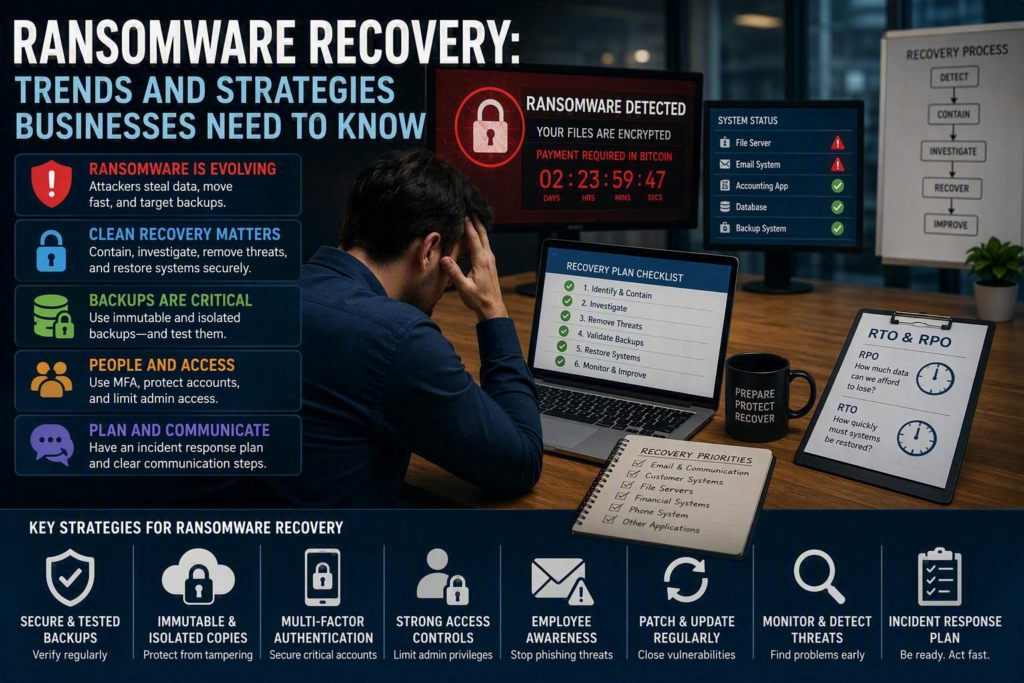
A ransomware attack rarely begins with a dramatic warning.
An employee may suddenly be unable to open a shared file. A business application may start showing errors. A user account may stop working. By the time a ransom note appears, attackers may already have access to servers, cloud accounts, workstations, and even backup systems.
This is why ransomware recovery has become more than simply restoring files from a backup.
For small and midsize businesses, effective ransomware recovery means restoring trustworthy systems, protecting sensitive information, communicating with employees and customers, and getting critical operations running again as safely as possible.
The latest ransomware recovery trends point to one important lesson: businesses need to prepare for recovery before an attack happens.
Why Ransomware Recovery Is Becoming More Difficult
Ransomware attacks have changed significantly. Attackers are not always focused only on encrypting files and demanding payment.
In many attacks, criminals first steal sensitive information and then encrypt systems. They may threaten to publish customer records, employee information, financial documents, or confidential business files if the organization refuses to pay.
This approach is commonly known as double extortion.
It changes the way businesses need to think about ransomware recovery. Even if your IT team can restore files from a clean backup, the organization may still have to deal with privacy concerns, legal requirements, contractual obligations, insurance, and reputational damage.
Businesses should know:
Where sensitive information is stored
Who can access it
Which systems contain critical data
Which information would cause the most damage if exposed
How access can be removed during an incident
Organizations handling healthcare information, financial records, customer data, legal documents, or employee information should pay particular attention to these risks.
Ransomware Attacks Can Move Quickly
Another important ransomware trend is the increasing speed and automation of attacks.
Cybercriminals can use automated tools to identify weak passwords, outdated software, exposed remote access services, poorly protected administrator accounts, and vulnerable cloud systems.
Once attackers gain access, they may spend time exploring the environment before encrypting files. They may attempt to obtain administrator privileges, disable security tools, and target backups.
That means having a backup is not enough.
If the original security weakness remains open, restoring systems without addressing it could give attackers another opportunity to regain access.
A strong ransomware recovery plan therefore needs to include containment, investigation, secure restoration, and prevention of reinfection.
Clean Recovery Is More Important Than Fast Recovery
When a ransomware attack occurs, speed matters. A business cannot afford to keep critical systems offline indefinitely.
However, restoring everything as quickly as possible can make the situation worse if the environment has not been properly contained.
A secure recovery process should begin by identifying and isolating affected systems.
Depending on the situation, this may involve:
Disconnecting infected devices from the network
Disabling compromised accounts
Resetting affected credentials
Reviewing administrator access
Identifying how the attacker entered the environment
Determining which systems and data were affected
Confirming which backups can be trusted
Restoring clean systems in a controlled order
The objective is not simply to get computers working again. It is to make sure the systems being restored are safe to put back into production.
Use Immutable and Isolated Backups
One of the most important ransomware recovery trends is the growing use of immutable backups.
An immutable backup is designed so that backup data cannot be changed or deleted during a defined retention period. This can help protect backup copies if an attacker gains access to the organization’s network or backup credentials.
However, immutability does not automatically guarantee a successful recovery.
A backup can be protected from deletion and still be:
Incomplete
Outdated
Corrupted
Missing important application data
Difficult to restore
Too slow for the organization’s recovery requirements
Businesses should maintain multiple copies of critical information and keep at least one backup isolated from the primary production environment.
For some organizations, this may mean combining local backups for faster restoration with secure offsite or cloud backups for additional protection.
The right approach depends on the organization’s data volume, internet connection, applications, regulatory requirements, and acceptable downtime.
Define Which Systems Need to Be Restored First
Not every system is equally important during a ransomware incident.
Email may be essential for communicating with employees and customers. A scheduling platform may be critical for a service business. An accounting system may be essential for financial operations. A phone system may be necessary for customer support.
Your recovery plan should identify which systems need to come back first.
It should also establish two important recovery targets:
Recovery Point Objective (RPO): How much recent data can the business afford to lose?
Recovery Time Objective (RTO): How long can a particular system remain unavailable?
These are business decisions, not just IT decisions.
For example, a business may decide that its customer management system must be restored within four hours, while historical documents can wait until later.
Defining these priorities before an attack makes recovery decisions much easier when people are under pressure.
Identity Security Is Critical to Ransomware Recovery
Cloud services have made remote work easier, but they have also made employee and administrator accounts valuable targets.
If an attacker gains control of a Microsoft 365 administrator account, they may be able to access mailboxes, change passwords, create forwarding rules, access files, or interfere with recovery efforts.
This makes identity security an important part of ransomware prevention and recovery.
Multi-factor authentication should be required for important business accounts, particularly:
Microsoft 365
Email
Remote access
Financial systems
Cloud applications
Administrator accounts
MFA should also be combined with appropriate access controls, strong administrator account management, and regular account reviews.
Businesses should assume that passwords can eventually be stolen. The goal is to make a stolen password alone insufficient for accessing important systems.
Phishing Remains a Major Entry Point
Many ransomware incidents begin with a compromised employee account or a successful phishing attack.
Attackers may send messages that appear to come from:
A manager
A customer
A supplier
Microsoft
A financial institution
A payroll provider
Modern phishing attacks can look highly convincing, especially as attackers use AI to create more realistic messages.
Employee awareness remains important, but businesses should not expect training alone to stop every attack.
Technical controls should provide additional protection when someone makes a mistake.
Learn more about how AI is making phishing scams more dangerous.
The goal is to create multiple security layers so that one mistaken click does not automatically become a business-wide incident.
Have an Incident Response Plan
Ransomware creates confusion as well as technical problems.
Employees may not know whether they should turn off their computers. Managers may not know who should contact customers. Leadership may need to make decisions about insurance, legal support, vendors, and business continuity.
A written incident response plan gives everyone a starting point.
It should include:
Who is responsible for making decisions
How IT support should be contacted if normal systems are unavailable
Emergency contact information
Steps for isolating affected devices
Communication procedures
Key vendors and service providers
Cyber insurance information
Legal and privacy contacts where appropriate
Recovery priorities
The plan does not need to be a massive technical document.
A short, current plan that people can actually use during an emergency can be far more valuable than a long document that nobody has reviewed in years.
Understand Your Cyber Insurance Requirements
Cyber insurance can provide valuable support following a ransomware incident, but businesses should not assume every policy provides the same coverage.
Some policies may require specific cybersecurity controls, timely reporting, or the use of approved incident response providers.
Businesses should understand these requirements before an incident occurs.
Your IT security practices, insurance coverage, legal obligations, and incident response plan should work together rather than being treated as separate areas.
Test Your Backups Before You Need Them
One of the biggest problems with ransomware recovery is assuming that a successful backup automatically means a successful recovery.
It does not.
A backup system may report that a job completed successfully, but that does not necessarily prove that an entire server, database, application, or cloud workload can be restored correctly.
Regular recovery testing can reveal problems before an actual emergency.
Start with simple tests, such as restoring individual files. Then test more important systems and, periodically, perform a larger recovery exercise.
Testing can uncover issues involving:
Application dependencies
Software licenses
Encryption keys
Administrator credentials
Network configurations
Vendor access
Specialized hardware
Backup retention
Testing also gives business leaders a more realistic understanding of how long recovery would actually take.
If a critical application takes two days to restore instead of two hours, it is better to discover that during a planned test than during a ransomware attack.
Protect Administrator Accounts
Administrator accounts deserve special attention because they can provide access to large portions of your technology environment.
Businesses should limit the number of users with administrative privileges and avoid using administrator accounts for everyday activities when possible.
Regular access reviews should confirm:
Who has administrator privileges
Why they need them
Whether former employees still have access
Whether inactive accounts can be removed
Whether administrator passwords are properly protected
For more information about the risks of weak business credentials, see our guide on business passwords and security.
Reducing unnecessary administrative access can limit what an attacker can do if one employee account is compromised.
Build a Practical Ransomware Recovery Strategy
The best time to review your ransomware recovery plan is before you need it.
Start by identifying your most important business operations and asking:
What systems do we need to operate tomorrow?
What information would be most damaging to lose?
What information would be most damaging to expose?
Are our backups protected from ransomware?
Have we actually tested our backups?
Is MFA enabled on important accounts?
Who has administrator access?
Who makes decisions during an incident?
How do we contact IT support if our normal systems are unavailable?
These questions can reveal gaps that may otherwise remain hidden.
For organizations across the Fraser Valley, Myriad Technologies can help review your technology environment, identify areas of risk, and build practical cybersecurity and recovery strategies based on your business needs.
Ransomware Recovery Starts Before the Attack
Ransomware recovery is no longer simply a matter of restoring last night’s backup.
Modern businesses need to prepare for stolen information, compromised accounts, damaged systems, unavailable backups, and the possibility that an attacker may still have access to the environment.
The strongest approach combines:
Secure and tested backups
Immutable or isolated backup copies
Multi-factor authentication
Strong administrator controls
Employee security awareness
Regular software updates
Monitoring and threat detection
A documented incident response plan
Clearly defined recovery priorities
Regular recovery testing
You cannot predict exactly how a ransomware attack will happen. You can, however, decide how prepared your business will be when it does.
A well-tested recovery plan can turn a major technology incident into a difficult problem to manage rather than a crisis that brings the entire business to a stop.