How to Secure Remote Staff Devices for Work
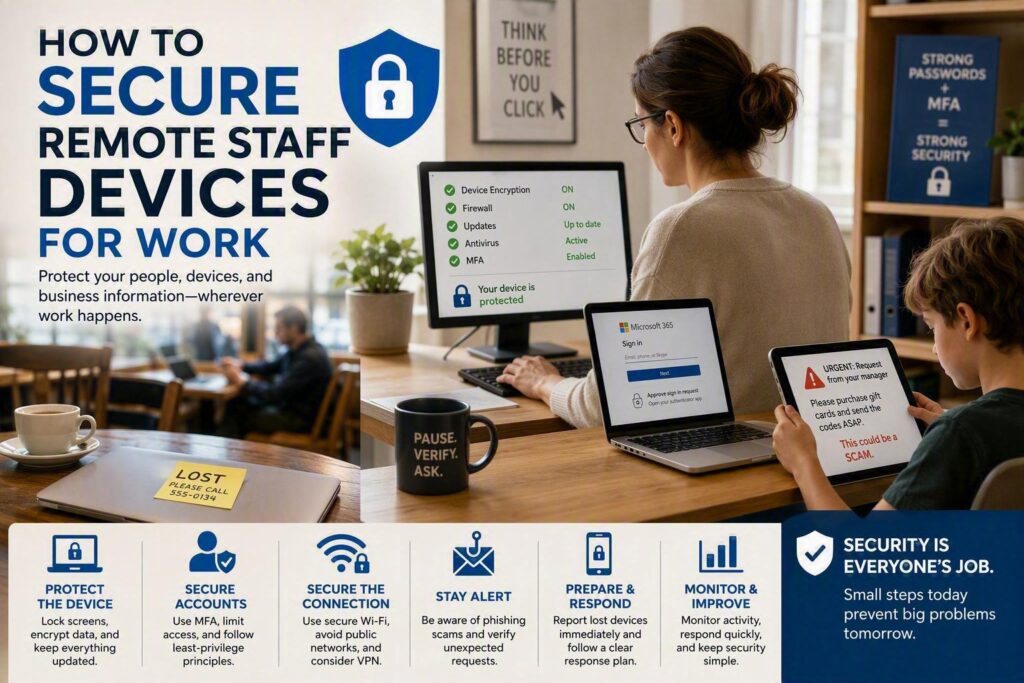
A lost laptop in a coffee shop, a family member using a work tablet, or an employee entering their password on a fake Microsoft 365 login page can quickly turn into a serious business problem.
As more employees work from home, from client locations, or between different offices, secure remote staff devices have become an important part of business cybersecurity. Protecting remote devices helps businesses safeguard client information, prevent unauthorized access, reduce downtime, and maintain customer trust.
For small and midsize businesses, the challenge is not usually understanding that security matters. The bigger challenge is knowing which protections to prioritize and making sure employees can follow them without creating unnecessary barriers to everyday work.
The best approach combines device security, strong account protection, employee awareness, regular monitoring, and a clear response plan.
Start With Visibility
Before you can properly secure remote staff devices, you need to know which devices employees are using for work.
Remote employees may use company laptops, smartphones, tablets, home computers, or a combination of devices. Any device that can access business email, cloud files, customer information, or company applications should be accounted for.
Businesses should maintain an up-to-date device inventory that includes information such as:
Device owner
Device type
Serial number
Operating system
Security software
Business applications being used
Access to company systems
The goal is not to create unnecessary paperwork. It is to make sure your business can quickly answer important questions:
Who has access to company information? Which device are they using? What happens if that device is lost or the employee leaves the company?
Company-owned devices are generally easier to secure because the business can control security settings, install required software, manage updates, and remotely remove business information when necessary.
Personal devices require more careful planning. If employees use their own computers or phones to access sensitive company information, a clear bring-your-own-device (BYOD) policy should explain what the business can protect, monitor, and remove.
Use Multiple Layers of Device Security
There is no single security tool that can protect a remote employee from every cyber threat.
A strong password will not help much if an unlocked laptop is stolen. Antivirus software cannot prevent an employee from accidentally sending confidential information to the wrong person.
That is why effective remote work security uses several layers of protection.
Protect the Device
Every device used for work should have a strong password or passcode and automatic screen locking.
This is particularly important for employees working in shared homes, public spaces, vehicles, client offices, or other locations where someone else could physically access the device.
Biometric authentication, such as fingerprint or facial recognition, can also make secure sign-in easier for employees.
Use Full-Disk Encryption
Full-disk encryption protects the information stored on a device if the laptop or mobile device is lost or stolen.
Without appropriate encryption, someone who gains physical access to a device may attempt to access information stored on its drive. Encryption adds an important layer of protection for businesses handling:
Financial information
Customer records
Legal documents
Health-related information
Employee records
Confidential business communications
Encryption is especially important for laptops because they regularly leave the traditional office environment.
Keep Devices Updated
Operating systems, web browsers, applications, and security software should be kept up to date.
Cybercriminals frequently take advantage of known vulnerabilities in outdated software. Once a security update becomes available, delaying the update can leave a known weakness open.
Whenever possible, businesses should use automatic updates and centralized patch management rather than relying on employees to remember to install updates themselves.
Protect Remote Employee Accounts
Remote work depends heavily on cloud applications, email, file-sharing platforms, and business systems. That makes employee accounts an important target for cybercriminals.
Require Multi-Factor Authentication
Multi-factor authentication (MFA) adds another verification step when someone signs into an account.
For example, even if an attacker obtains an employee’s password, they may still be unable to access the account without the additional authentication method.
MFA should be enabled for important business systems, including Microsoft 365, email, remote access services, financial applications, and other systems containing sensitive information.
Businesses should also train employees to be careful with unexpected MFA requests. Attackers can sometimes attempt to trick users into approving a login they did not initiate.
Learn more about why businesses should use multi-factor authentication.
Limit User Access
Employees should only have access to the information and systems they actually need for their jobs.
For example, an employee who only needs access to a scheduling folder should not automatically have access to payroll records, executive documents, or every customer file.
This principle is often called least-privilege access.
Limiting access reduces the potential damage if an employee’s account or device is compromised.
Secure the Internet Connection
Home Wi-Fi is generally preferable to an open public network, but it still needs to be properly secured.
Remote employees should:
Use a strong Wi-Fi password
Avoid open public Wi-Fi when possible
Keep their router firmware updated
Use a separate network for business devices when appropriate
Avoid accessing sensitive systems from unsecured networks
A virtual private network (VPN) can provide another layer of protection in certain situations, particularly when employees need to connect to company resources from untrusted networks.
However, a VPN should not be treated as a complete cybersecurity solution. It does not replace MFA, endpoint protection, encryption, patching, or employee security training.
Train Employees to Recognize Cyber Threats
Technology alone cannot secure remote staff devices.
Employees are often the first people to see phishing emails, fake Microsoft 365 login pages, suspicious invoices, password-reset requests, and fraudulent payment instructions.
Security training should be practical and easy to understand.
Employees should know:
How to identify suspicious emails
How to verify unexpected payment requests
Why they should not reuse passwords
How to report a suspicious message
What to do if they click a suspicious link
Who to contact if a device is lost or stolen
Training should also cover newer threats. AI is making some phishing messages more convincing, making it harder to identify scams simply by looking for spelling mistakes or unusual wording.
For example, employees may receive a message that appears to come from a manager asking them to purchase gift cards, change banking information, or urgently send sensitive documents.
Learn more about how AI is making phishing scams more dangerous.
The goal of security awareness training is not to make employees afraid of technology. It is to help them pause, verify, and ask for help before acting.
Create a Clear Lost Device Procedure
Employees should know exactly what to do if a work laptop, phone, or tablet is lost or stolen.
The first step should always be to report the incident as soon as possible.
A good response plan may include:
Reporting the missing device immediately
Locking or remotely securing the device
Revoking active sessions
Resetting important passwords
Checking account activity
Determining what business information may have been accessible
Reporting the incident internally when required
Remote management tools can allow businesses to lock or erase company devices in certain situations.
The important point is to prepare before an incident happens. A lost laptop on Friday afternoon should not be the first time your business considers how to respond.
Have a Strong Employee Offboarding Process
Employee departures are a normal part of running a business, but they can create cybersecurity risks if access is not removed quickly.
When an employee leaves or changes roles, businesses should have a process for:
Disabling user accounts
Removing access to cloud applications
Recovering company equipment
Transferring important files
Removing access to shared folders
Revoking remote access
Recovering company-owned devices
Removing business data from approved personal devices
This is particularly important for remote employees because company equipment and business information may be outside the physical office.
A written device and access policy also makes expectations clear for employees before they begin working remotely.
Monitor Remote Devices and Security Alerts
Having security tools installed is only part of the solution. Someone also needs to monitor what those tools are reporting.
A managed security approach can help businesses identify issues such as:
Repeated failed login attempts
Malware detections
Missing security updates
Suspicious account activity
Unusual login locations
Devices that are no longer meeting security requirements
A managed security approach can give small and midsize businesses access to ongoing monitoring without requiring an internal cybersecurity team.
Fast response is especially important when a device is lost, an account is compromised, or malware is detected.
The sooner a business can identify and contain a problem, the less opportunity an attacker has to cause further damage.
Make Remote Security Easy for Employees
The strongest security policy is not useful if employees cannot realistically follow it.
Remote work security should be simple, practical, and clearly explained.
Employees should understand that:
Work devices should only be used by authorized people
Sensitive business files should not be stored in personal accounts
Suspicious messages should be reported
Lost devices should be reported immediately
Company accounts should not be shared
Security updates should not be ignored
Short and regular security reminders can be more effective than one long training session each year.
Businesses should focus on real situations employees are likely to encounter rather than overwhelming them with technical terminology.
Secure Remote Staff Devices Before There Is a Problem
Remote work gives businesses greater flexibility, but it also means company information is no longer protected by the physical boundaries of an office.
Securing remote staff devices does not require making work complicated. It means putting practical protections in place across devices, accounts, networks, and employees.
Start with one simple question:
If a remote employee’s laptop disappeared today, would your business know what information was on it, who could access that information, and what steps to take next?
If the answer is unclear, that is a good place to start.
Myriad Technologies helps small and midsize businesses build practical IT and cybersecurity strategies that protect employees, devices, and business information without making technology harder to use.
The right solution depends on your employees, devices, applications, data, and business requirements. But taking a few practical steps today can help prevent a lost device or compromised account from becoming a costly business disruption tomorrow.