A video call freezes while your team is presenting a proposal. A cloud backup slows down during the workday. Your payment terminal becomes sluggish just as customers start lining up.
In situations like these, fiber internet vs cable for business is more than a technical question. Your internet connection affects how reliably your employees communicate, serve customers, access files, use cloud applications, and respond when something goes wrong.
For a small or midsize business, the best internet connection is not always the one with the highest advertised speed. The right choice is the service that matches your business needs, is available at your location, provides reliable performance, and includes a suitable backup plan.
Fiber Internet vs Cable: What Is the Difference?
Fiber internet sends data through thin strands of glass using light. Cable internet uses coaxial cable networks that were originally designed to deliver television services.
Both technologies can provide fast business internet. However, their network designs can create differences in upload speeds, reliability, latency, and scalability.
Fiber is often described as a dedicated connection, but this depends on the provider and the specific plan. A business-grade fiber circuit may be dedicated from your location to the provider’s network, while some fiber-to-the-premises services still share capacity farther upstream.
That is why businesses should ask how the service is delivered, whether the advertised speeds are guaranteed, and what service-level commitments are included.
Cable internet also uses shared network infrastructure. Nearby customers may use the same local network segment and available capacity. This does not mean cable is unsuitable for business. A well-provisioned business cable connection can work very well for many offices.
However, performance can be more variable during busy periods, particularly in areas where many homes and businesses share the same infrastructure.
Business Internet Speed Is More Than Download Speed
Internet providers usually promote plans based on download speed. Downloading is important when employees open websites, retrieve files, stream training videos, install software updates, or access cloud applications.
However, upload speed is equally important for many businesses.
Uploading includes:
- Sending large design or project files
- Synchronizing cloud storage
- Running offsite backups
- Participating in video meetings
- Sharing screens
- Uploading security-camera footage
- Sending information to cloud applications
- Using remote desktop services
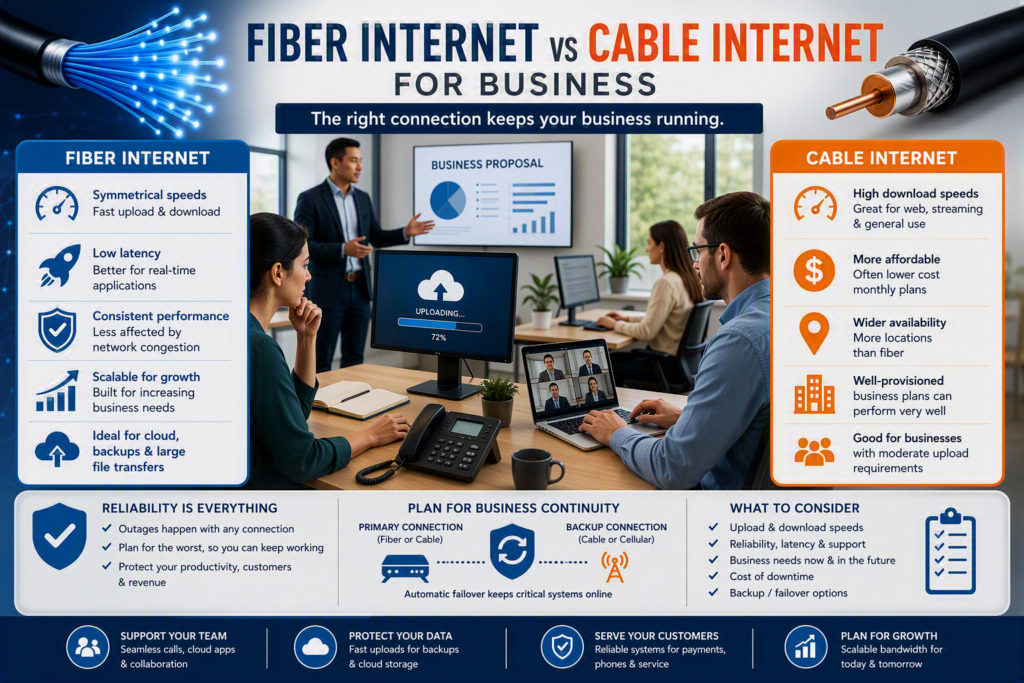
Fiber internet commonly offers symmetrical speeds, meaning the upload speed can be as fast as the download speed. Cable internet plans often provide much faster download speeds than upload speeds, although newer cable technologies are helping reduce this difference.
For example, a professional office with ten employees may find a high-speed cable plan more than adequate for email, web-based accounting, Microsoft 365, and regular video calls.
A company that regularly transfers large client files, relies on cloud phone systems, uses remote desktops, or performs frequent offsite backups may notice the difference in upload capacity much more.
Do not assume that a 1 Gbps internet plan tells you everything you need to know. A 1 Gbps cable package and a 1 Gbps symmetrical fiber connection can perform very differently when several employees are uploading information at the same time.
When comparing business internet plans, ask providers for both download and upload speeds, rather than focusing only on the headline download number.
Reliability, Latency, and Business Continuity
Speed measures how much data a connection can handle. Reliability measures how consistently that connection performs when your business needs it.
Latency measures how quickly data travels between your office and an online service. Lower latency generally makes real-time applications feel more responsive.
Fiber internet often has an advantage when it comes to latency and consistency. This can be especially useful for:
- Voice over IP phone systems
- Virtual desktops
- video conferencing
- Cloud applications
- Remote employees
- Connections between multiple office locations
Fiber is also less susceptible to electrical interference than copper-based cable.
For businesses where a dropped call, slow remote session, or interrupted transaction can create customer frustration or lost revenue, these differences can matter.
However, fiber internet is not immune to outages.
Construction damage, equipment failures, power outages, configuration problems, and issues within a provider’s network can affect any type of internet connection. Cable internet can also be highly reliable, especially when it uses a mature local network and includes a business support agreement.
The more important question is not:
“Will our internet connection ever fail?”
Instead, ask:
“What happens to our business if the connection fails?”
Businesses that depend heavily on internet access should consider a secondary connection. For example, cable can provide backup for fiber, while cellular internet can provide backup for cable.
A properly configured internet failover system can help keep essential systems, business phones, payment services, and other critical applications online when the primary connection goes down.
Understand Your Business Internet Service Agreement
Consumer and business internet plans may use similar physical infrastructure, but the service and support can be very different.
Business internet plans may include:
- Static IP addresses
- Priority technical support
- Faster repair targets
- Monitoring options
- Business-focused service agreements
- Better support for commercial networking equipment
Before signing a contract, ask about:
- Expected repair times
- Technical support hours
- Equipment ownership
- Installation timelines
- Data limits
- Modem or gateway requirements
- Compatibility with your firewall
- Service-level commitments
If your organization uses a cloud phone system, also confirm that your internet connection and network equipment can properly prioritize voice traffic.
Fiber vs Cable Cost: Look Beyond the Monthly Price
Cable internet is often less expensive and more widely available. This can make it an attractive choice for smaller businesses, newer organizations, and locations where fiber is unavailable or expensive to install.
If most of your applications are web-based and your business has modest upload requirements, a quality business cable plan can provide excellent value.
Fiber internet can cost more, particularly when you are purchasing a dedicated business fiber circuit. Installation can also take longer if a building requires new conduit, internal cabling, or additional provider construction.
In return, businesses may receive:
- Higher upload speeds
- More symmetrical bandwidth
- Strong performance for cloud applications
- Better capacity for large file transfers
- Additional service and support options
The monthly internet bill should also be compared with the potential cost of downtime.
If an internet outage prevents ten employees from working for half a day, the real cost is much higher than the monthly connectivity fee.
Consider:
- Lost employee productivity
- Delayed customer responses
- Missed appointments
- Disrupted transactions
- Lost sales opportunities
- Delayed projects
- Time spent catching up after the outage
The best approach is to match your internet connection to the potential cost of an interruption.
A small office that can temporarily work from mobile hotspots has different requirements from a healthcare provider, legal practice, call-heavy service desk, or business processing time-sensitive payments.
Business Internet Availability Can Decide the Choice
For businesses in the Fraser Valley, the best theoretical internet option may not be available at every business address.
One side of a street may have fiber while another building does not. Multi-tenant buildings can create additional challenges because landlords, building pathways, existing wiring, and provider infrastructure can all affect installation.
Do not rely only on an internet provider’s online availability checker.
Request a formal serviceability review for your exact business suite or unit.
Ask whether the quoted service is:
- Fiber directly to the premises
- Fiber to a nearby node with another connection type used for the final connection
- A shared fiber service
- A dedicated business fiber circuit
These differences can affect both the price and the expected performance.
If fiber is not available, cable may still be the right primary internet connection for your business.
In that situation, focus on choosing an appropriate business plan, using commercial-grade networking equipment, monitoring the connection, and maintaining a reliable backup connection.
Good network design can prevent a great deal of frustration regardless of the internet technology being used.
How to Choose the Right Internet Connection for Your Business
Start with your business workflows, rather than simply comparing internet speeds.
Consider how many people use the connection at the same time. Include employees working from home, hybrid employees, visitors, and guest devices.
Identify applications that are sensitive to delays or interruptions, such as:
- Cloud phone systems
- Remote desktop sessions
- Point-of-sale systems
- Electronic records
- Security cameras
- Cloud backups
- Large file transfers
- Microsoft 365 and other cloud applications
Next, consider your future growth.
Are you planning to:
- Add more employees?
- Move more systems to Microsoft 365 or other cloud platforms?
- Increase cloud backup usage?
- Add security cameras?
- Open another office?
- Increase remote work?
- Transfer larger files?
If so, fiber internet may provide useful room for growth.
If your organization has stable internet requirements, limited upload activity, and a strong backup plan, cable may provide everything you need without paying for capacity that will remain unused.
Check Your Office Network Before Blaming the Internet
Your internet provider is not always the reason your office internet feels slow.
Wi-Fi coverage, outdated switches, overloaded firewalls, poorly positioned wireless access points, and unmanaged guest devices can all affect network performance.
This means upgrading from cable to fiber will not automatically solve every connectivity problem.
Testing the connection directly at the firewall and reviewing network traffic can provide a much clearer picture of where the problem is occurring.
A professional network assessment can help determine whether the issue is your internet connection, internal network, Wi-Fi, firewall, or another part of your technology environment.
Fiber Internet vs Cable for Business: Which Should You Choose?
There is no single answer for every business.
Fiber internet may be the better choice when your organization needs high upload speeds, consistent performance, low latency, strong cloud connectivity, or additional capacity for future growth.
Cable internet may be the better choice when cost, availability, and moderate business internet requirements are the main priorities.
The most important thing is to choose based on your actual business needs rather than simply choosing the fastest number advertised.
Myriad Technologies helps organizations assess these practical details before they commit to an internet provider or business internet plan. The goal is not to recommend fiber in every situation. It is to help businesses build a dependable setup that fits their technology needs, building, budget, and potential cost of downtime.
The right internet connection should quietly support your business rather than become a recurring problem around the office.
Ask the right questions, understand your upload and download requirements, plan for an outage before one happens, and choose the business internet service that gives your team room to work efficiently and grow.