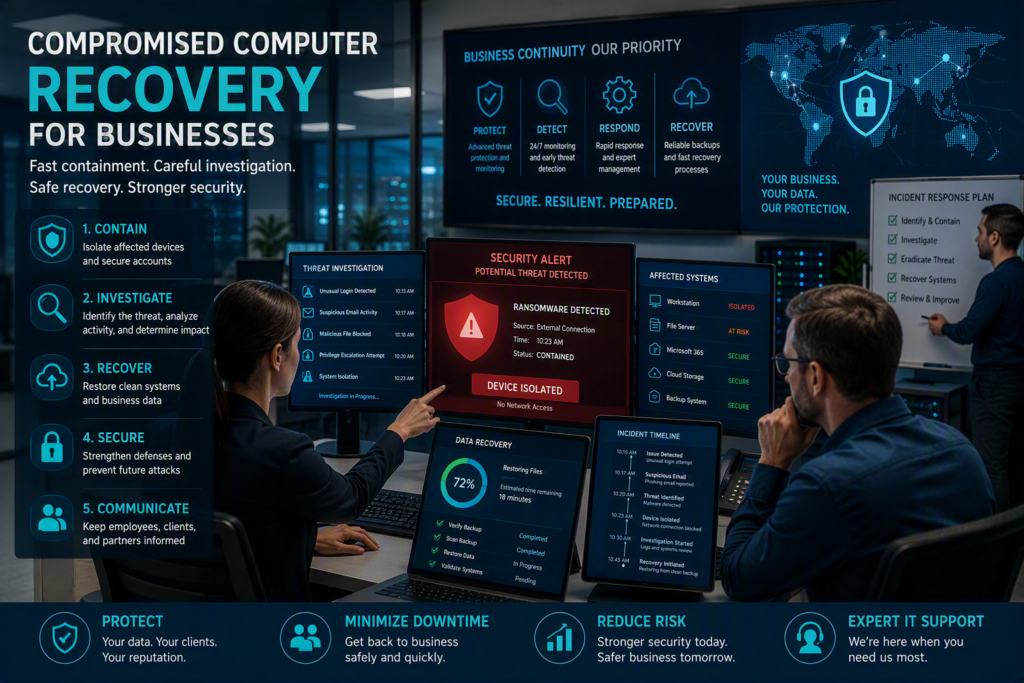
A compromised computer can turn a normal workday into a serious business interruption within minutes. A suspicious login, ransomware message, fake invoice attachment, or stolen password can put client information, staff accounts, billing systems, and daily operations at risk.
Compromised computer recovery for businesses is more than running an antivirus scan. A proper recovery process involves containing the threat, finding out what happened, securing affected accounts and systems, restoring safe operations, and preventing the same problem from happening again.
For small and midsize businesses, responding quickly is important, but so is responding correctly. Moving too quickly can destroy useful evidence or spread the threat. Waiting too long can give an attacker more time to access files, email accounts, cloud services, and connected systems.
Start With Containment
When a computer shows signs of compromise, disconnect it from the network as soon as possible. Remove the network cable or turn off Wi-Fi. Do not immediately reconnect the computer, restart it repeatedly, or ask another employee to use it to see if the problem has gone away.
If ransomware is suspected, isolating the affected computer can help prevent the threat from spreading to shared drives, servers, and other devices.
Common signs of a compromised computer include:
Unexpected password prompts
Unusual security alerts
Files with unfamiliar names or extensions
Suspicious email activity
New software or applications that you did not install
Unusually slow computer performance
Unexpected pop-ups
Messages demanding payment
Unfamiliar login notifications
One warning sign does not always mean a computer has been hacked. However, unusual activity should be taken seriously and investigated before normal use continues.
Containment should also include the affected employee’s accounts. If an employee entered their password into a suspicious website, change the password from a known clean device. Sign the account out of active sessions where possible and confirm that multi-factor authentication is enabled.
Email accounts deserve particular attention. A compromised email account may provide access to password reset messages, confidential conversations, cloud applications, financial information, and other business systems.
Do Not Immediately Erase the Computer
It can be tempting to wipe or reset a compromised computer immediately. While a clean rebuild may eventually be the safest recovery option, it is important to understand the incident first.
A qualified IT professional can investigate the computer and determine how the attacker gained access, what may have been affected, and whether other accounts or systems are at risk.
The affected computer may contain useful information that helps identify the source and scope of the security incident.
Create a Clear Compromised Computer Recovery Plan
After containing the threat, the next priority is getting the business safely back to work.
Most businesses cannot simply stop operating while a security investigation takes place. A law office may need access to client files. A healthcare organization may need scheduling and communication systems. A nonprofit may need access to donor information. Recovery priorities should reflect the systems and services that are most important to daily operations.
Start by identifying all systems connected to the affected computer. These may include:
Employee computers and laptops
Microsoft 365 accounts
Shared network folders
Cloud storage
Accounting and financial software
Customer management systems
Remote-access applications
Printers and other network devices
Servers and network equipment
A compromised laptop can become a much larger security issue if it was connected to multiple business applications or had saved passwords.
Establish a Safe Way to Continue Working
Depending on the situation, your IT team may provide a clean replacement computer, restore access through a verified account, or temporarily move employees to approved cloud services.
The right approach depends on the type of attack and the security controls already in place.
For example, restoring a workstation from a standard system image can be a fast recovery option. However, the organization should first confirm that the user account, software, and other systems connected to the computer are safe.
Keep an Incident Timeline
Document what happens throughout the recovery process.
Record:
When the problem was first noticed
Who was using the computer
What messages or alerts appeared
Which devices were disconnected
Which accounts were secured
What systems were affected
What recovery actions were completed
A simple timeline helps IT professionals understand the incident more quickly. It can also be useful for cybersecurity insurance claims, regulatory requirements, legal matters, and client communication.
Investigate Before Trusting the Computer Again
A computer is not necessarily safe simply because it appears to be working normally.
Attackers may try to maintain access through email forwarding rules, remote-access software, changed security settings, additional user accounts, stolen passwords, or other methods.
A proper business cybersecurity incident investigation should review both the affected device and the systems it could access.
Your IT team should review login activity, email forwarding rules, administrator accounts, endpoint security alerts, remote-access logs, and recent changes to cloud services.
The investigation should also determine whether the affected computer had access to:
Client information
Financial systems
Employee records
Business documents
Customer databases
Protected or sensitive information
The required response depends on what the investigation finds.
Not Every Security Incident Is the Same
A blocked malicious attachment on one computer may only require targeted cleanup, password protection, and employee education.
A successful ransomware attack or unauthorized Microsoft 365 login may require a much broader response. This could include account resets, device rebuilding, cloud security reviews, backup recovery, additional monitoring, and potentially notifications.
Treating every cybersecurity incident the same can either waste valuable time or leave important risks unresolved.
Restore Business Data Carefully
Backups are one of the most important parts of business disaster recovery, but a backup is only useful if it can be trusted.
Before restoring files or systems, confirm that the backup was created before the compromise and was not affected by the attack.
This is particularly important during ransomware recovery. Ransomware can sometimes reach connected backup systems, while attackers with access to cloud accounts may attempt to delete or modify online backups.
A careful data recovery process should:
Verify the backup
Confirm the recovery point is safe
Scan restored data when appropriate
Restore the most important business systems first
Apply current security updates
Confirm endpoint protection is active
Secure affected user accounts
Verify that multi-factor authentication is enabled
Monitor the restored systems for unusual activity
If a computer has been seriously compromised, completely rebuilding it may be safer than trying to remove every trace of malicious software.
Managed IT Support Can Improve Recovery
Businesses with documented systems, monitored backups, standardized devices, and current security controls generally have fewer unknowns during a cybersecurity incident.
Managed IT support can help businesses prepare before an incident happens and respond more effectively when something goes wrong.
Regular monitoring, patch management, backup checks, endpoint protection, account security, and documented recovery procedures can reduce the impact of a compromised computer.
Preventative IT maintenance may not be visible during a normal workday, but it can make a major difference when a security incident occurs.
Communicate With Employees Clearly
During a security incident, employees need simple instructions they can follow.
Tell staff:
What is known about the incident
Which devices or accounts are affected
What they should not do
Where to report suspicious messages
Who to contact with questions
Ask employees not to delete suspicious emails, click additional links, or continue using an affected account until they receive instructions from the IT team.
If client, employee, or patient information may have been exposed, communication should be handled carefully. Notification requirements can depend on the type of information involved, contractual obligations, insurance requirements, and applicable privacy laws.
Technical recovery and business communication should happen together, with clear responsibility for each decision.
Avoid Blaming Employees
Many cyberattacks are designed to look convincing. Even careful employees can make mistakes when dealing with a realistic phishing email, fake invoice, or urgent request.
Blaming employees can make future incidents harder to manage because people may be afraid to report mistakes.
Instead, use the incident as an opportunity to improve security awareness and business processes. Fast reporting gives your organization more options during a cybersecurity incident.
Prevent Another Compromised Computer
Once the business is operating normally again, identify and fix the weakness that allowed the compromise to happen.
Depending on the situation, this may include:
Requiring multi-factor authentication
Updating outdated software
Limiting administrator access
Reviewing remote-access tools
Improving email filtering
Strengthening endpoint protection
Reviewing cloud account security
Providing cybersecurity awareness training
Improving backup protection
Increasing security monitoring
The goal is not simply to clean one computer. The goal is to reduce the chance that the same weakness can affect the business again.
Create a Simple Incident Response Plan
Every business should have a basic IT incident response plan.
It does not need to be complicated. Employees should know:
Who to contact when something looks suspicious
How to disconnect an affected computer
What information to record
Which systems are most important
Who can approve downtime decisions
Who communicates with clients or vendors
Who contacts the insurance provider when necessary
Having these steps documented before an incident happens can save valuable time during a stressful situation.
Get Help With Compromised Computer Recovery
A compromised computer can create serious risks for a business, but the right response can limit the damage and help your team return to normal operations.
Myriad Technologies helps Fraser Valley businesses with compromised computer recovery, managed IT support, cybersecurity, backup protection, and incident response. Our team provides clear guidance for nontechnical employees and practical support when a security problem needs immediate attention.
The goal is not to create fear around technology. It is to help your business stay prepared, protect important information, and continue serving customers when unexpected technology problems occur.
A cybersecurity incident can be stressful, but it does not have to define your business. With fast containment, careful investigation, verified data recovery, and stronger security controls, your organization can be better prepared for the next suspicious email, stolen password, ransomware attempt, or compromised computer.