A slow application at 9:00 a.m. can seem like a minor inconvenience until the phones, shared files, cloud applications, and payment systems all begin slowing down at the same time. At that point, the problem is rarely just a slow internet connection.
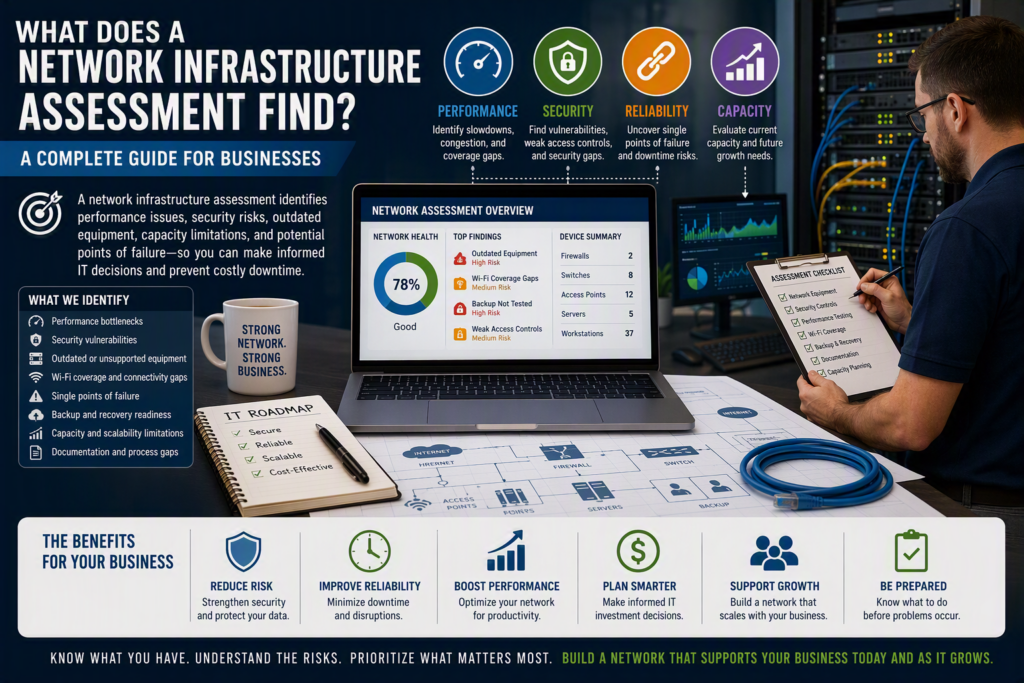
A network infrastructure assessment looks at the technology behind your business network to identify performance issues, security weaknesses, outdated equipment, capacity limitations, and potential points of failure. It helps your organization understand what is working, what needs attention, and where improvements can prevent costly downtime.
For small and midsize businesses, the purpose of a network assessment is not to create a complicated technical report that sits unread in a folder. It is to provide a clear picture of your IT infrastructure, network performance, cybersecurity risks, and technology needs so you can make informed decisions.
A network infrastructure assessment can be especially valuable when your organization is:
Experiencing recurring network or Wi-Fi problems
Planning an office expansion or relocation
Adding employees or new business applications
Moving more services to the cloud
Increasing remote work
Dealing with cybersecurity concerns
Replacing aging IT equipment
Experiencing unexplained downtime
Planning an IT budget
What Is a Network Infrastructure Assessment?
A network infrastructure assessment is a structured review of the technology, equipment, configurations, connections, security controls, and processes that support your organization’s IT environment.
Your business network is much more than a Wi-Fi connection and an internet service.
It can include:
Routers
Firewalls
Network switches
Wireless access points
Servers
Desktop computers and laptops
Printers
Internet connections
Cloud applications
Microsoft 365
Remote-access systems
Backup systems
Network cabling
Security tools
User accounts and access controls
An effective assessment documents these components and examines how they work together.
For example, upgrading to a faster internet plan will not necessarily solve network performance problems caused by an aging firewall, poorly positioned wireless access points, an overloaded network switch, outdated equipment, or an application server running out of storage.
Similarly, purchasing new computers will not solve an unreliable network connection or a backup system that has never been properly tested.
What Does a Network Infrastructure Assessment Cover?
A comprehensive network assessment typically examines four major areas: performance, reliability, security, and capacity.
Network Performance
Performance problems can have many causes. An assessment can help determine whether slow applications or unreliable connections are caused by:
Network congestion
Poor Wi-Fi coverage
Outdated equipment
Insufficient bandwidth
Network configuration issues
Hardware limitations
Server performance
Application-related problems
Understanding the actual cause is important before investing in new equipment or increasing your internet plan.
Network Security
Security should be part of every infrastructure assessment rather than treated as a separate concern.
A review may examine how users authenticate, who has administrative access, whether devices receive security updates, how remote workers connect, how guest Wi-Fi is separated, and whether sensitive business information is adequately protected.
The specific requirements will vary by industry.
A healthcare organization, professional services company, nonprofit, construction business, and retail operation may have different security and compliance requirements. However, every organization needs practical safeguards against unauthorized access, data loss, and operational disruption.
Your assessment may also review existing security controls and identify areas where additional protection may be appropriate.
Network Reliability
A network that works most of the time is not necessarily a reliable network.
An assessment should identify potential single points of failure, such as:
One internet connection
One critical server
One network switch
One firewall
One backup system
One employee who knows how everything is configured
Undocumented vendor or administrator credentials
Identifying these dependencies allows business leaders to decide where redundancy or better documentation may be worthwhile.
Network Capacity and Scalability
Technology that worked well for 10 or 15 employees may not perform the same way when the business grows.
As organizations add employees, cloud applications, video meetings, mobile devices, security cameras, VoIP phones, and guest Wi-Fi, network demand increases.
A network infrastructure assessment can determine whether your current environment can support today’s workload and whether it has enough capacity for expected growth.
The goal is not to purchase the most expensive equipment available. It is to build an environment that matches how your organization actually works.
Why Do Businesses Wait Too Long for a Network Assessment?
Most businesses do not schedule a network infrastructure assessment because everything is working perfectly.
Often, an assessment happens after a warning sign, such as:
A failed backup
A ransomware alert
A server running out of storage
A major Wi-Fi outage
Recurring internet problems
An unsupported firewall
A former employee retaining access
Unexpected system downtime
Reacting after a problem occurs can be more expensive and stressful.
During an emergency, the priority is usually restoring service as quickly as possible. There is little time to compare replacement options, review long-term costs, or address underlying infrastructure problems.
A proactive IT infrastructure assessment gives your organization more choices.
For example, if a firewall is approaching the end of its supported life, you can budget for replacement before it fails. If wireless coverage is weak in a growing office, you can improve it before employees begin relying on workarounds.
If your organization has no backup internet connection, an assessment can help you determine whether the potential downtime justifies investing in redundancy.
Not every finding requires immediate spending.
Some problems can be resolved through configuration changes or better processes. Others may require new equipment or a larger technology project.
The value of an assessment is understanding the difference.
What Questions Should a Network Assessment Answer?
Technical information is useful, but business leaders also need practical answers.
A good network infrastructure assessment should help answer questions such as:
What happens if a critical network device fails?
Can employees work productively from the office and remotely?
Can important data be recovered after an incident?
Are critical systems properly backed up?
Are there outdated or unsupported devices?
Where are the largest cybersecurity risks?
Who has administrative access?
Are current network resources sufficient for the number of employees?
Can the network support planned business growth?
Which problems require immediate attention?
Which improvements can be planned over the next 6 to 12 months?
It should also identify where your organization depends on undocumented knowledge, individual employees, or single pieces of equipment.
These dependencies can become significant operational risks during an outage.
How Does a Network Infrastructure Assessment Work?
A professional network assessment should be thorough without unnecessarily disrupting normal business operations.
1. Business and Technology Discovery
The process typically begins with a conversation about your organization.
This includes understanding:
Which systems are most important
When downtime creates the greatest impact
What technology problems employees are experiencing
How employees work remotely
What applications the business relies on
Upcoming technology projects
Planned office expansions or relocations
Expected business growth
These details help determine where the assessment should focus.
For example, an organization preparing to open a second location may have very different network requirements from a company that is simply trying to resolve recurring Wi-Fi problems.
2. Technical Network Discovery
The next stage involves reviewing the technology environment.
Depending on the organization, this may include:
Network equipment
Firewall configuration
Switches
Wireless access points
Network diagrams
Server infrastructure
Cloud services
Internet performance
Software versions
Security settings
User permissions
Backup systems
Remote-access tools
Monitoring systems
An onsite assessment can also be important when physical infrastructure is involved.
Technicians may need to review network cabling, equipment locations, Wi-Fi coverage, physical security, and the office layout.
Other components can often be reviewed remotely.
3. Performance and Security Testing
Testing should provide useful evidence without unnecessarily disrupting business operations.
The goal is to understand the environment rather than make risky changes without approval.
For example, a backup system may report that a backup completed successfully. However, that does not necessarily prove that the organization can successfully restore its files.
Backup recovery testing can provide much greater confidence that critical data will be available when it is needed.
4. Findings and Recommendations
The final stage is where the assessment becomes useful to decision-makers.
A report should not simply provide a long list of technical problems.
Instead, findings should be organized according to:
Risk
Business impact
Urgency
Cost considerations
Recommended action
Short-term priorities
Long-term improvements
The report should also explain what could happen if an issue is left unresolved.
This allows business leaders to make informed decisions about technology investments.
Common Problems Found During Network Infrastructure Assessments
Certain issues appear frequently across organizations of different sizes.
Outdated or Unsupported Equipment
Hardware and software can continue working long after manufacturers stop providing security updates or technical support.
That does not automatically mean every older device needs immediate replacement.
However, businesses should understand the risks associated with unsupported technology and have a plan for managing or replacing it.
Weak User Access Controls
Access management is another common concern.
Examples include:
Shared accounts
Former employee accounts
Excessive administrative privileges
Weak passwords
Missing multi-factor authentication
Unnecessary access to sensitive systems
Many of these issues can be addressed without major hardware investments.
Poor Wi-Fi Coverage
Wireless problems are often blamed on internet speed when the actual issue is local network coverage.
An assessment may identify:
Poor access point placement
Outdated wireless equipment
Signal interference
Network congestion
Inadequate coverage
Improperly configured wireless networks
Insufficient separation between staff and guest devices
Reliable Wi-Fi is increasingly important for businesses using cloud applications, VoIP phones, video meetings, mobile devices, and other internet-connected systems.
Inadequate Network Documentation
Documentation is easy to overlook when everything is working.
But when an outage occurs, missing documentation can significantly increase recovery time.
Your organization should know:
What devices are connected
How critical systems are configured
Who manages important vendor accounts
Where recovery information is stored
Which systems depend on one another
Who should be contacted during an outage
Good documentation can make troubleshooting, employee changes, upgrades, and future IT projects much easier.
How to Prioritize Network Infrastructure Improvements
A network assessment does not mean your organization needs to replace everything.
Effective IT planning considers risk, budget, business priorities, and timing.
For example, a small office with stable technology may only need targeted security improvements, better documentation, and regular backup testing.
An organization preparing to open a second location may need a more comprehensive network redesign, improved remote access, additional security controls, and increased network capacity.
Immediate Priorities
Immediate recommendations may include:
Removing unused accounts
Applying critical security updates
Securing backup systems
Fixing serious configuration problems
Replacing failing equipment
Addressing major security vulnerabilities
Near-Term Improvements
These may include:
Replacing unsupported firewalls
Improving Wi-Fi coverage
Upgrading network switches
Improving documentation
Strengthening access controls
Adding network monitoring
Long-Term Technology Projects
Larger initiatives may include:
Server modernization
Cloud migration
Office network redesign
Internet redundancy
Major wireless upgrades
Multi-location network integration
These projects can be planned around business operations and budget cycles rather than being forced by an unexpected outage.
Why a Network Assessment Is an Important Business Investment
A network infrastructure assessment gives business owners and decision-makers visibility into the technology supporting their organization.
Instead of waiting for equipment to fail or security problems to become emergencies, you can identify weaknesses, understand their potential impact, and prioritize improvements based on business needs.
For organizations across the Fraser Valley, a trusted technology partner can help turn network assessment findings into a practical technology roadmap.
The goal should not be to recommend technology simply for the sake of upgrading technology.
It should be to create a secure, reliable, scalable, and manageable IT environment that supports your employees and business goals.
Technology problems rarely happen at a convenient time. A network infrastructure assessment gives your organization the opportunity to understand its environment and address potential weaknesses before they become costly interruptions.
Know what you have. Understand where the risks are. Prioritize what matters most. Then build a network infrastructure that can support your business today and as it grows.