
A single convincing email can put an entire office at risk. It might look like a supplier requesting updated banking details, a Microsoft 365 security alert, or an urgent message from an executive.
For small and medium-sized businesses, having a practical cybersecurity checklist for offices can help prevent these situations from becoming costly security incidents.
Cybersecurity is not just about purchasing software. It is about protecting business information, securing devices, and making sure employees know how to respond to potential threats.
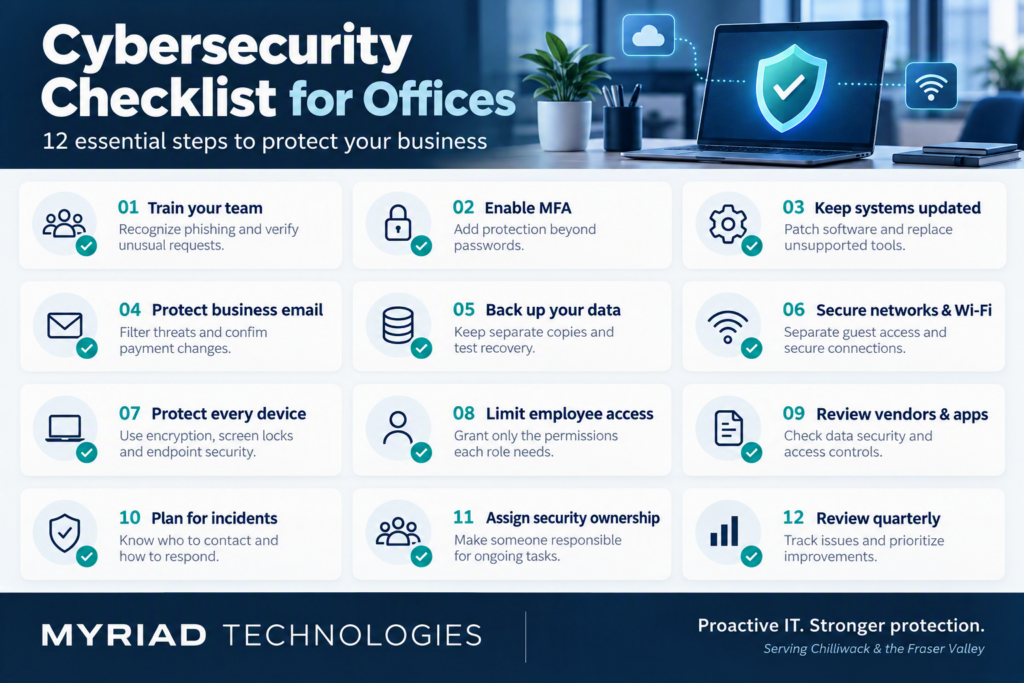
Here are 12 essential cybersecurity practices every office should follow.
1. Train Employees to Recognize Phishing Emails
Employees are often the first line of defence against cyberattacks. Teach your team to recognize suspicious emails, unexpected attachments, fake invoices, and urgent requests for passwords or payments.
Encourage staff to verify unusual requests before taking action. A simple habit of checking before clicking suspicious links can prevent serious problems.
2. Enable Multi-Factor Authentication (MFA)
Passwords alone are not enough to protect business accounts. Multi-factor authentication adds another layer of security by requiring users to verify their identity through an authentication app, security key, or verification code.
Prioritize MFA for:
Microsoft 365 and email accounts.
Financial and accounting platforms.
Cloud storage.
Remote access systems.
Administrator accounts.
Learn why enabling MFA matters.
3. Keep Software and Systems Updated
Outdated software can expose your business to security vulnerabilities. Regular updates help fix known weaknesses and improve system protection.
Make sure computers, servers, browsers, firewalls, and business applications receive security updates regularly. Replace unsupported equipment and software rather than relying on outdated systems.
4. Protect Business Email
Email is one of the most common ways cybercriminals target businesses. Use spam filtering, email security tools, and phishing protection to reduce suspicious messages reaching employee inboxes.
Also, establish a verification process for financial requests. For example, always confirm changes to supplier banking details using a trusted phone number rather than replying directly to an email.
Explore these essential security tools for businesses.
5. Back Up Important Business Data
Reliable backups are essential for recovering from ransomware, accidental deletion, hardware failures, and other unexpected incidents.
Your office should:
Back up important files and business applications regularly.
Keep protected copies separate from the main network.
Limit access to backup systems.
Test backups to confirm that data can actually be restored.
A completed backup does not guarantee a successful recovery. Regular restoration testing is just as important.
6. Secure Office Networks and Wi-Fi
Your business network should be protected against unauthorized access.
Use strong Wi-Fi passwords, separate guest networks from internal business systems, and secure remote connections with appropriate authentication.
Firewalls, network monitoring, and properly configured remote access tools can help identify suspicious activity and protect connected devices.
7. Protect Computers and Mobile Devices
Every company laptop, desktop, smartphone, and tablet should have basic security protections.
These include:
Automatic screen locks.
Supported operating systems.
Endpoint security software.
Device encryption.
Regular security updates.
If an employee loses a device, your organization should have a process to remotely lock or wipe it when supported.
8. Limit Employee Access to Business Information
Not every employee needs access to every business file or application.
Follow the principle of least privilege by giving employees access only to the systems and information required for their roles.
Review permissions regularly and immediately disable accounts when employees leave. Remember to remove access to email, cloud storage, accounting software, and other business applications.
9. Review Third-Party Software and Vendors
Many offices rely on external applications to manage customer information, payments, and internal documents.
Before adopting new software, consider:
How business information is stored.
Who can access your data.
Whether MFA is available.
How information is backed up.
What happens when you stop using the service.
Reviewing third-party applications helps reduce unnecessary security and privacy risks.
10. Create an Incident Response Plan
Even with strong security measures, incidents can happen. Employees should know exactly what to do if they encounter ransomware, suspicious account activity, or a lost company device.
Your incident response plan should identify:
Who employees should contact.
How affected devices should be isolated.
Who is responsible for managing the incident.
How important information will be recovered.
Who communicates with customers and other stakeholders.
Keep emergency contact information accessible even if your email or network becomes unavailable.
11. Assign Responsibility for Cybersecurity
Cybersecurity should be an ongoing responsibility, not something addressed only when problems occur.
Assign someone to oversee security tasks, coordinate with your IT provider, review employee access, and make sure reported issues receive attention.
You do not necessarily need an internal IT department. A managed IT provider can help oversee security, maintenance, monitoring, and ongoing improvements.
12. Review Your Cybersecurity Checklist Regularly
Technology and security threats constantly change. New employees join, applications are introduced, and business systems evolve.
Review your cybersecurity practices at least quarterly. Track outstanding issues, assign responsibility, and set deadlines for improvements.
Regular reviews help ensure that security measures remain effective as your organization grows.
Protect Your Business with a Proactive IT Strategy
A secure office is not one where nothing ever goes wrong. It is one where employees understand the risks, systems are properly maintained, and problems receive a prompt response.
Following this cybersecurity checklist is a practical starting point for protecting your business information and reducing avoidable security risks.
Need help improving your office cybersecurity?
Myriad Technologies helps businesses across Chilliwack and the Fraser Valley with managed IT services, cybersecurity, endpoint protection, and proactive monitoring.
Visit Myriad Technologies to learn how we can help protect your business and keep your technology running smoothly.