A fraudulent email can look like it came from your bookkeeper, a trusted supplier, or Microsoft 365. One rushed click can expose client records, compromise employee accounts, lock up shared files, or redirect a payment.
That is why the best cybersecurity tools for small businesses are not necessarily the most expensive or complicated products. The right tools are the ones that reduce everyday security risks, fit the way your employees work, and are actively maintained and monitored.
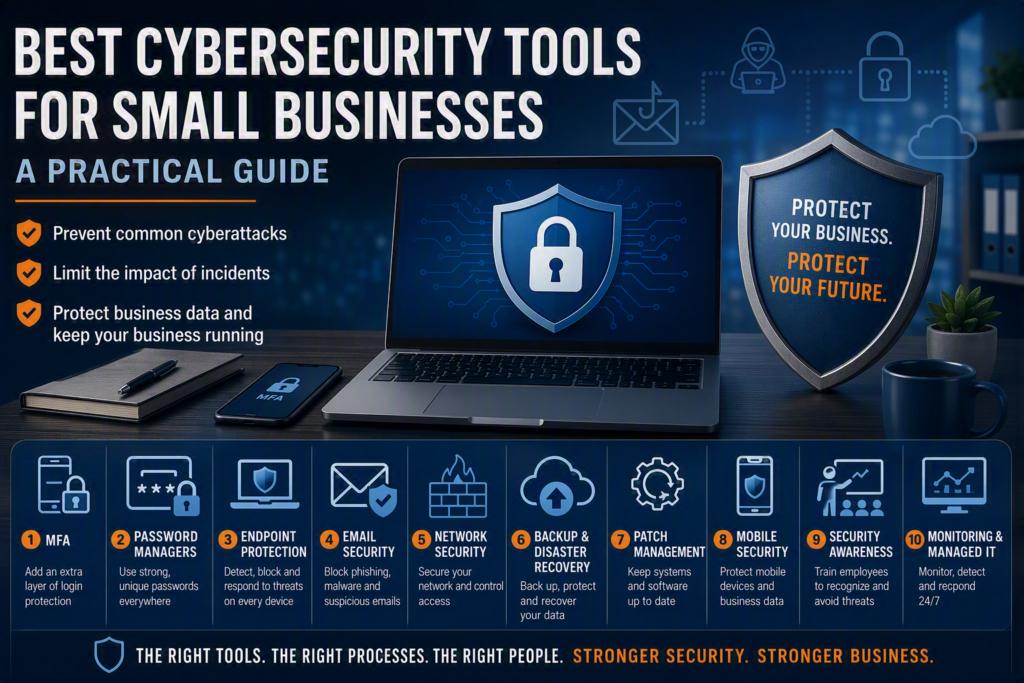
For a busy small business, cybersecurity should not become another full-time responsibility for the owner or office administrator. The goal is practical protection: prevent common cyberattacks, limit the impact of incidents, protect business data, and keep the organization operating when something goes wrong.
This guide explains the essential cybersecurity tools and technologies that small and midsize businesses should consider as part of a practical security strategy.
Why Small Businesses Need Cybersecurity Tools
Cybercriminals often target small businesses because they may have fewer security controls and limited internal IT resources.
A professional office may store confidential client documents. A healthcare organization may handle sensitive personal information. A construction company may rely on cloud applications and project files. A nonprofit may depend heavily on email and shared cloud storage.
Every business has information worth protecting.
Common cybersecurity threats facing small businesses include:
Phishing and fraudulent emails
Stolen or reused passwords
Business email compromise
Malware
Ransomware
Unpatched software
Lost or stolen devices
Unauthorized cloud account access
Fake invoices and payment requests
Data loss
Unsafe remote access
Ransomware can be particularly disruptive because a single incident can prevent employees from accessing files and business systems.
A strong cybersecurity strategy should therefore focus on the systems employees rely on every day: business email, Microsoft 365, cloud applications, computers, mobile devices, networks, and backups.
Buying a long list of security products without understanding how they work together can create unnecessary costs, duplicate functionality, and security gaps.
What Are the Best Cybersecurity Tools for Small Businesses?
The right cybersecurity tools depend on your industry, company size, number of employees, regulatory requirements, insurance requirements, and the type of information your organization handles.
However, most small and midsize businesses can benefit from several core cybersecurity technologies.
1. Multi-Factor Authentication
Multi-factor authentication, commonly known as MFA, is one of the most valuable security controls available to small businesses.
MFA requires users to verify their identity using something beyond a password. Depending on the system, this could include:
An authenticator app
A security key
A temporary verification code
A biometric authentication method
An approval through a trusted device
If an employee’s password is stolen through phishing or reused from another website, MFA can prevent that password from being enough to access business email, cloud files, or other applications.
Where Should Small Businesses Use MFA?
MFA should be considered a priority for:
Microsoft 365 accounts
Business email
Administrator accounts
Remote access
Financial and banking accounts
Cloud applications
File-sharing platforms
Applications containing sensitive information
MFA adds a small step to the login process, but that inconvenience is generally much easier to manage than recovering a compromised account.
Choose an authentication method that employees can use consistently, and establish a recovery process for situations such as lost, stolen, or replaced phones.
2. Business Password Managers
People are not particularly good at creating and remembering different complex passwords for dozens of accounts.
A business password manager helps organizations securely generate, store, and manage credentials without relying on spreadsheets, notebooks, shared documents, or insecure browser notes.
A business-grade password manager should ideally allow your organization to:
Generate strong, unique passwords
Securely store credentials
Share selected passwords with authorized employees
Control access by user or role
Remove access when employees leave
Protect the password manager itself with MFA
Manage credentials across teams
This can be particularly useful for businesses that manage vendor portals, social media accounts, cloud applications, accounting platforms, and other shared services.
Password Managers and MFA Work Together
A password manager does not replace MFA.
The two controls address different risks.
Strong, unique passwords reduce the risk associated with password reuse and weak credentials.
MFA provides an additional barrier if a password is stolen.
Using both creates a stronger foundation for business account security.
3. Endpoint Protection and EDR
Every laptop, desktop, and server connected to your business environment represents a potential entry point for an attacker.
Traditional antivirus software remains useful, but modern cybersecurity threats often require more than basic malware scanning.
Endpoint detection and response (EDR) tools can monitor devices for suspicious behavior and help security teams investigate and respond to potential threats.
Depending on the product, endpoint security tools may help:
Detect suspicious activity
Identify malware
Block malicious processes
Isolate compromised devices
Investigate security incidents
Monitor endpoint activity
Provide centralized security visibility
Managed Endpoint Security for Small Businesses
For a small organization without dedicated cybersecurity staff, an important question is not simply “Which endpoint security software should we buy?”
The bigger question is:
Who is going to monitor the alerts and respond when something happens?
A security platform can generate useful warnings, but those warnings do not help much if nobody has time to investigate them.
For many small businesses, a managed IT or cybersecurity provider can help monitor endpoint security, investigate suspicious activity, and respond when an incident requires attention.
Choose endpoint protection that is centrally managed, regularly updated, and deployed consistently across supported business devices.
Personal laptops that employees use to access company information should also be considered as part of your security strategy.
4. Email Security and Anti-Phishing Protection
Email remains one of the most common ways cybercriminals target businesses.
Attackers may send messages pretending to be:
A company executive
A supplier
A customer
A financial institution
Microsoft
A shipping company
A payroll provider
The goal may be to steal login credentials, deliver malware, obtain sensitive information, or convince an employee to make a fraudulent payment.
A business-grade email security solution can add another layer of protection by helping identify suspicious messages, malicious links, spoofed senders, and potentially harmful attachments.
However, technology alone is not enough.
Employees should also know how to identify suspicious messages and understand when they should stop and verify a request.
5. Firewall and Network Security
A business firewall helps control traffic entering and leaving your network.
Modern firewall solutions can provide more than basic internet filtering. Depending on the environment, they may include capabilities such as:
Intrusion prevention
Web filtering
Application controls
VPN support
Network monitoring
Threat detection
Secure remote access
For offices with multiple employees, servers, printers, wireless networks, and business applications, properly configured network security can help reduce unnecessary exposure.
However, a firewall should be properly maintained. An outdated device or poorly configured rule can create a false sense of security.
6. Backup and Disaster Recovery Tools
Cybersecurity is not only about preventing attacks.
Businesses also need to prepare for what happens if an attack succeeds, a device fails, or important data is accidentally deleted.
Reliable backups can help an organization recover from:
Ransomware
Hardware failures
Accidental deletion
File corruption
Theft
Natural disasters
Other disruptive events
A good business backup strategy should consider what is being backed up, how frequently backups occur, where copies are stored, and whether the backups can actually be restored.
Backups should also be protected from unauthorized access. If ransomware can reach both the production files and the backups, recovery becomes much more difficult.
Test Your Backups
A backup that has never been tested should not automatically be considered a reliable recovery plan.
Businesses should periodically verify that files can be restored and that critical systems can be recovered within an acceptable timeframe.
7. Patch Management and Software Updates
Cybercriminals frequently exploit known vulnerabilities in outdated software.
Patch management tools help businesses keep operating systems, applications, browsers, and other supported software updated.
This is especially important for:
Windows computers
Microsoft 365 applications
Web browsers
Business applications
Servers
Network equipment
Remote access software
For small businesses, automated patch management can reduce the amount of manual work required to keep devices current.
However, updates should still be managed carefully. Critical business applications may require testing before major updates are deployed across an organization.
8. Mobile Device Security
Employees increasingly use smartphones and tablets to access business email, documents, messaging platforms, and cloud applications.
That makes mobile devices part of your organization’s cybersecurity environment.
Mobile security and device management tools can help businesses:
Require device security controls
Protect business applications
Manage access to company information
Remotely remove business data when appropriate
Monitor device compliance
Separate business and personal information
Businesses should establish clear policies for employees who access company systems from personal devices.
9. Security Awareness and Phishing Training
Technology is an important part of cybersecurity, but employees are also a critical security layer.
Regular security awareness training can help employees recognize:
Phishing emails
Fake login pages
Suspicious attachments
Fraudulent payment requests
Social engineering
Unexpected MFA prompts
Impersonation attempts
Training should be practical rather than overly technical.
Employees do not need to become cybersecurity professionals. They need to know what to look for, when to stop, and who to contact when something seems suspicious.
10. Security Monitoring and Managed IT Services
Small businesses may not have the resources to hire a full-time cybersecurity team.
That is where managed IT and security services can become valuable.
A managed provider can help with areas such as:
Security monitoring
Endpoint management
Patch management
Microsoft 365 security
Backup monitoring
Account management
Security alerts
Incident response
Employee support
The value is not simply having another technology platform. It is having someone responsible for making sure security tools are configured correctly, monitored consistently, and acted upon when they generate an alert.
How to Choose Cybersecurity Tools for Your Small Business
There is no single cybersecurity product that is right for every organization.
Before purchasing a tool, consider:
1. What problem does it solve?
Do not purchase software simply because it is marketed as a cybersecurity solution.
Identify the specific risk first.
2. Does it integrate with your existing systems?
A security product should work effectively with the technology your business already uses, such as Microsoft 365, Windows, cloud applications, mobile devices, and network infrastructure.
3. Who will manage it?
Determine whether your internal team has the time and expertise to configure, monitor, update, and respond to the system.
4. Does it scale with your business?
The tool should remain practical as you add employees, devices, locations, and applications.
5. What happens when something goes wrong?
Understand what support is available during a security incident and how quickly your organization can get assistance.
Build a Cybersecurity Strategy Instead of Buying More Tools
The goal should not be to collect as many cybersecurity products as possible.
A better approach is to build several layers of protection that work together.
A practical small business cybersecurity strategy may include:
MFA → Strong passwords → Endpoint protection → Email security → Network security → Backups → Patch management → Employee training → Monitoring and response
Each layer addresses a different part of the risk.
If one control fails, another layer may help prevent the incident from becoming more serious.
Cybersecurity Tools for Small Businesses in Chilliwack and the Fraser Valley
For small and midsize businesses in Chilliwack and across the Fraser Valley, cybersecurity does not have to mean purchasing dozens of expensive products or building a large internal IT department.
Start with the fundamentals.
Protect business accounts with MFA, use strong and unique passwords, secure endpoints, protect email, maintain reliable backups, keep software updated, train employees, and make sure someone is monitoring your security environment.
The best cybersecurity tools for your small business are ultimately the ones that address your actual risks, work together, are properly configured, and are consistently maintained.
Good cybersecurity is not about buying more technology.
It is about using the right tools, the right processes, and the right people to protect your business.