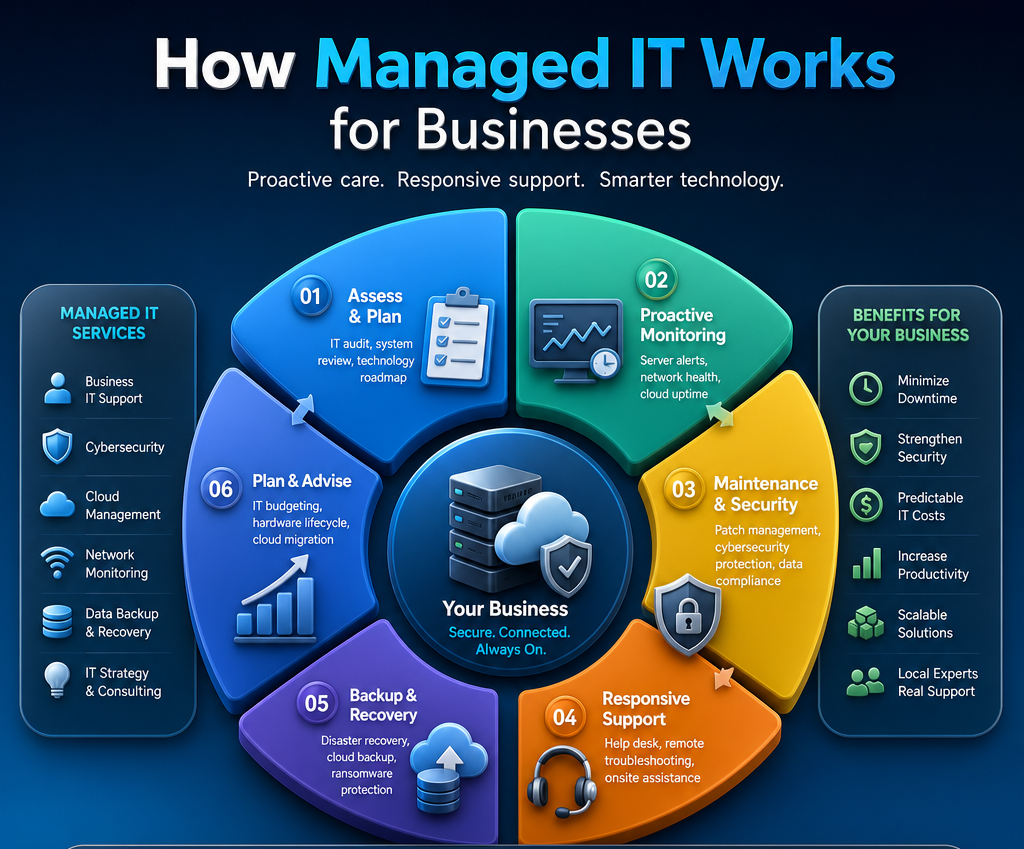
A server warning appears just before the workday begins. Staff cannot access shared files, phones are unreliable, and an important client deadline is approaching. The practical question behind moments like this is: how does managed IT work? For most small and midsize organizations, it means having an experienced technology team already familiar with your systems, ready to respond while also working to prevent the problem from happening in the first place.
Managed IT is not simply calling someone when a computer fails. It is an ongoing service relationship in which an external IT provider takes responsibility for maintaining, supporting, securing, and improving the technology your organization depends on. The goal is straightforward: fewer interruptions, clearer decisions, and technology that supports your work rather than creating more of it.
How Managed IT Works Day to Day
A managed IT provider begins by learning how your organization operates. That includes the computers, servers, internet connection, Wi-Fi, business phones, Microsoft 365 accounts, cloud applications, backups, cybersecurity tools, and any specialized systems your team uses. A healthcare office, legal practice, nonprofit, and construction company may all need dependable IT support, but their daily workflows and risks are different.
That initial review helps the provider identify immediate concerns, such as outdated devices, unsupported software, weak passwords, unreliable backups, or a network that is not keeping up with the number of users. From there, the provider develops a support plan based on what matters most to your organization. It should not be a one-size-fits-all package filled with services you will never use.
Proactive Care Happens in the Background
Once systems are brought under management, much of the work happens quietly behind the scenes. Monitoring tools watch for warning signs such as a failing hard drive, low storage space, an offline backup, suspicious login activity, or a server that is running out of resources. Routine updates, security patches, and maintenance can often be completed remotely and scheduled to minimize disruption.
This preventative work is a major difference between managed IT and the traditional break-fix model. Break-fix support starts after something has gone wrong. Managed IT is designed to catch and address smaller issues before they become a full-day outage, a data-loss event, or an expensive emergency repair.
Prevention cannot eliminate every issue. Hardware can still fail, internet providers can have outages, and staff can still receive convincing phishing emails. But a provider that monitors the environment, maintains current documentation, and has a response process can reduce both the likelihood of a serious problem and the time it takes to recover.
Support Is Available When People Need It
Even well-maintained technology needs human support. An employee may be locked out of an account, a printer may stop communicating with the network, or a new team member may need access to the right files and software. Managed IT gives your staff a clear place to go for help rather than leaving an office administrator to troubleshoot alone.
Many requests can be resolved remotely. A technician can securely connect to a computer, diagnose the issue, and explain the fix in plain language. When the problem involves equipment, cabling, a network outage, or an issue that cannot be handled remotely, onsite support may be needed. For Fraser Valley organizations, having access to a local team can make a meaningful difference when an urgent problem is affecting the whole office.
Good support is more than closing a ticket quickly. It means listening to what the person is experiencing, asking the right questions, and making sure the solution works in the context of their job. A technically correct answer is not especially helpful if the employee is still unable to complete the task that prompted the call.
Cybersecurity and Backups Are Built Into the Work
Cybersecurity is not a separate concern that can be addressed once a year and forgotten. It is part of how managed IT works every day. A managed provider helps protect devices, accounts, networks, email, and data through measures such as endpoint protection, multi-factor authentication, security updates, access controls, email filtering, and staff guidance.
The right approach depends on the organization. A professional office handling confidential client records may need tighter access controls and retention practices than a small team with limited sensitive data. Healthcare providers and organizations that handle personal information may also have specific privacy obligations. The provider’s role is to explain the risks clearly and recommend practical safeguards, not overwhelm decision-makers with technical jargon or sell unnecessary tools.
Backups are equally important. Having a backup is not enough if no one knows whether it is running, protected, and recoverable. Managed IT services often include monitoring backup jobs, investigating failures, and testing recovery procedures. If ransomware, accidental deletion, equipment failure, or a major outage occurs, a reliable recovery plan can be the difference between a difficult day and a prolonged business interruption.
Planning Keeps Technology From Becoming a Surprise Expense
Managed IT also includes guidance for the decisions that happen between emergencies. Computers eventually need replacement. Software subscriptions change. Staff numbers grow. A business may move offices, add a new location, adopt cloud tools, or need better phone and meeting-room systems.
Instead of making these decisions only when something breaks, your provider can help create a technology roadmap. This gives you a clearer view of upcoming costs, priorities, and risks. It also helps avoid buying equipment that does not fit your network, choosing a cloud service without considering security, or waiting until an aging server fails before planning a replacement.
This advisory role is especially valuable for organizations without an internal IT manager. You get access to experienced guidance without the cost of maintaining a large in-house department. At the same time, managed IT is not meant to remove your control. Your organization still decides what investments make sense. The provider should give you understandable options, explain the trade-offs, and respect your budget.
What Is Included in Managed IT Services?
The details vary by provider and service agreement, but managed IT commonly covers remote help desk support, device monitoring, patch management, cybersecurity tools, backup oversight, Microsoft 365 administration, network management, and IT planning. Some organizations also need onsite visits, server support, cloud migrations, telecommunications support, or specialized project work.
It is worth asking exactly what is included, what is billed separately, and how urgent issues are handled. For example, routine maintenance may be included in a monthly plan, while a major office move or a full network replacement may be treated as a project. Neither model is inherently better. Clear expectations are what protect your budget and prevent frustration later.
Response time matters as well. An issue affecting one employee is different from an outage that stops an entire office from working. Ask how the provider prioritizes incidents, how after-hours emergencies are handled, and who communicates with your team during a serious disruption. Dependable service means knowing you will not be left guessing when the stakes are high.
The Value Is Accountability, Not Just Technology
The best managed IT relationship feels less like outsourcing a problem and more like adding a trusted extension of your team. Your provider should know which systems are critical, which staff members need special access, where your data is stored, and what a serious disruption would mean for your organization.
That familiarity saves time when support is needed. It also creates accountability. Rather than coordinating separate vendors for computers, email, cybersecurity, cloud services, and communications, you have one partner who can see how the pieces fit together. Myriad Technologies takes this approach by combining practical IT support, cybersecurity, cloud guidance, and technology planning with local, responsive service.
A good provider will also tell you when an issue is outside the scope of IT. Sometimes a slow application is caused by a software vendor, an internet outage belongs with the carrier, or a workflow problem needs a process change rather than a new tool. The provider should still help coordinate the next step and keep the issue moving toward resolution.
Start With the Problem You Want Technology to Solve
If your team is losing time to recurring computer issues, uncertain backups, confusing software access, or slow responses when something fails, those are useful places to begin the conversation. You do not need to know the technical answer before asking for help. Explain what is getting in the way of your work, what information you need to protect, and what happens when systems are unavailable.
The right managed IT partner will listen first, explain your options clearly, and build a plan around the way your organization actually operates. That gives your people more confidence in the technology they use every day and more time to focus on the people they serve.