A policy is updated, but the old version is still saved on three desktops. A new employee needs a form and has to ask around to find it. Staff announcements disappear beneath a crowded inbox. These may seem like small inconveniences, but they can create delays, duplicate work, and uncertainty about which information employees can trust.
Well-planned intranet development services give your organization one reliable place for the information, documents, resources, and tools employees need to do their jobs. For small and midsize organizations, an employee intranet does not need to be a complicated corporate portal. It needs to be useful, secure, easy to navigate, simple to maintain, and built around how your team actually works.
What Is an Intranet?
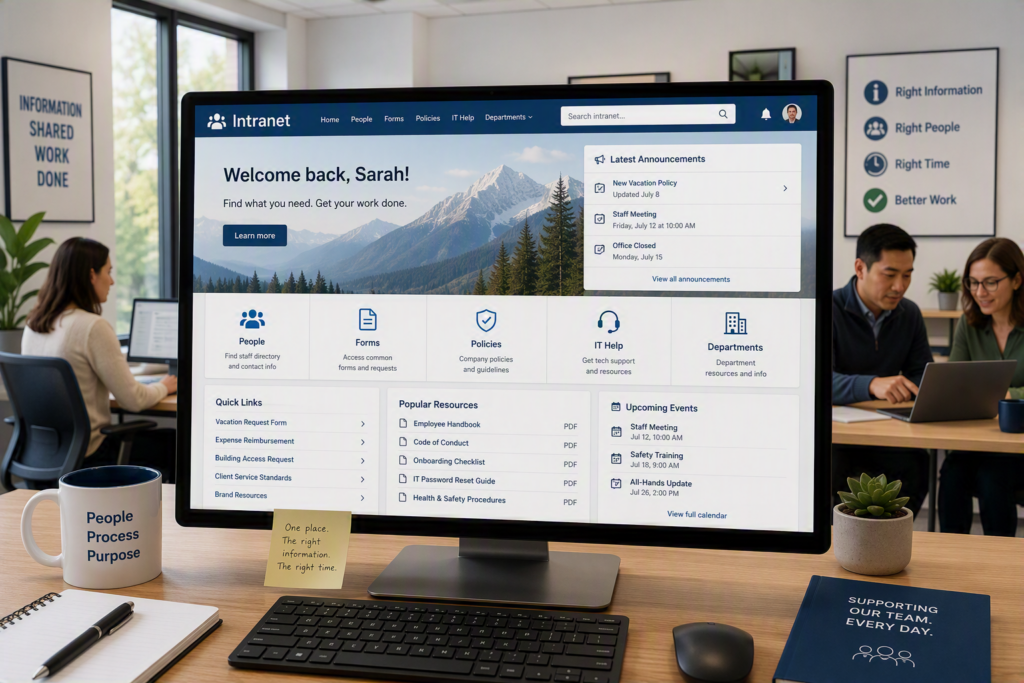
An intranet is a private internal website designed for employees, volunteers, or approved partners. A well-designed business intranet can bring together shared documents, company policies, staff news, forms, directories, procedures, training resources, and quick links to the systems your organization already uses.
The goal is not to add another platform that employees have to remember. The goal of intranet development is to reduce the daily friction caused by scattered information.
When a receptionist can quickly find the current intake form, a manager can post an important update, and a new employee can follow an organized onboarding checklist, the intranet is doing its job.
For a professional office, an intranet might provide a central library for templates, procedures, and client-service standards. For a healthcare provider or pharmacy, it may provide controlled access to internal resources, training materials, and operational notices. A nonprofit may need a central location for volunteer information, program documents, event details, and board resources.
The right structure depends on the organization. Effective intranet solutions reflect how people actually work instead of forcing employees into a generic layout.
Why Intranet Projects Often Miss the Mark
Many intranet projects fail for a simple reason: they are designed as document warehouses instead of practical workplace tools.
If employees have to click through five sections to find a frequently used form, they may simply return to emailing someone they know. If outdated pages remain online without a clear owner, employees quickly lose confidence in the information.
Another common mistake is trying to launch everything at once. A large organization may need separate areas for departments, employee self-service, knowledge management, and internal communications. A smaller organization may get better results by starting with the resources employees request most often and expanding over time.
Technology choices matter, but they should follow the plan rather than lead it. Microsoft 365 tools can be an excellent foundation when your team already uses Microsoft Teams, SharePoint, and Outlook.
In other situations, a custom intranet or carefully configured content platform may make more sense. The right approach depends on your existing systems, security requirements, content ownership, budget, and how comfortable your employees are with new technology.
Intranet Development Services Start With Listening
Successful intranet development services start before the first page is built. It is important to understand where information currently lives, how employees find it, and where everyday work gets delayed.
That conversation should include the people who answer questions every day, not just leadership. Office administrators, coordinators, department leads, and frontline staff often know exactly which documents are difficult to find and which processes generate repeat requests.
A thoughtful discovery process typically identifies:
Who will use the intranet
What employees need to accomplish
Which content should receive priority
Where information currently lives
Which systems need to be connected
How user access should be managed
Who will maintain the content
What information should not be stored on the intranet
It is equally important to identify information that does not belong on an intranet. Confidential client records, sensitive employee information, and regulated data may require different systems and stronger access controls.
At Myriad Technologies, the goal is to make technology practical for the people using it. That means explaining options in plain language and recommending an intranet scope that fits the organization instead of selling features that employees will never use.
Build Your Intranet Around Common Questions
One of the most effective ways to plan an employee intranet is to start with the questions employees repeatedly ask.
Where is the current vacation request form?
Who do I contact for building access?
What is the procedure when a client calls after hours?
Which logo, letterhead, or presentation template should we use?
Each recurring question can point to a potential intranet page, shortcut, form, or process guide.
This approach keeps the intranet development process focused on everyday employee needs. It also creates early wins that encourage staff to use the new system.
Make Intranet Information Easy to Find
Clear navigation is more important than clever navigation. Employees should be able to understand where to look without learning complicated internal terminology.
A simple navigation structure organized around practical categories such as People, Forms, Policies, IT Help, and Department Resources is often more effective than a long list of organizational labels.
Search is useful, but it should not be the only way employees can find important information. Frequently used resources should have prominent placement on the homepage or within a quick-links section.
Page titles should also use the words employees actually use. If staff call something an “expense form,” do not label it “financial reimbursement documentation.”
Small details like these can have a significant impact on employee intranet adoption.
Intranet Security and Access Need Early Attention
An intranet can improve information organization and access control, but only when security is planned properly.
Not every employee needs access to every page, folder, document, or announcement. Role-based permissions can help ensure that employees see the information relevant to their work while protecting content intended for leadership, HR, finance, or specific departments.
For organizations using Microsoft 365, identity management and multi-factor authentication should be part of the conversation.
Your intranet should support your broader cybersecurity practices, rather than becoming an overlooked entry point to business information.
There is a balance to consider. Strong access controls can protect sensitive content, but unnecessary permission barriers can make everyday work frustrating. The goal is appropriate access: secure where needed, simple where possible, and regularly reviewed as employee roles change.
Content Management Keeps Your Intranet Useful
A successful intranet launch is only the beginning. An employee intranet remains valuable when someone is responsible for keeping important pages and resources accurate.
That does not mean one person has to write every update. It means content ownership needs to be clearly defined.
For example:
HR can manage policies and onboarding resources.
Operations can manage procedures and workflows.
Department leads can manage their department-specific resources.
IT can manage technical support information and technology resources.
An intranet administrator can maintain publishing standards, archive outdated information, and help keep navigation consistent.
Set realistic review schedules from the beginning. Some content may need monthly review, while a holiday calendar may only need attention a few times a year.
Avoid giving every page the same review schedule. Focus first on content that affects daily operations, compliance, customer service, or employee safety.
A Practical Intranet Rollout Builds Adoption
Employees do not automatically change their habits simply because a new intranet exists. A short, practical introduction can make a significant difference.
Show employees where to find the resources they use most often, explain what has changed, and make it easy for staff to report missing information or confusing pages.
It can also help to launch your intranet in phases.
Start with:
A simple homepage
Core policies
Frequently used forms
Staff contacts
Essential procedures
IT support resources
Important announcements
Once employees are using these areas, you can add departmental resources, training libraries, event calendars, employee self-service features, and more advanced integrations.
Pay attention to feedback during the first few months. If employees continue emailing requests for a form that is supposedly easy to find, that is useful information. The page may need a better title, a more visible shortcut, or a simpler process.
A good business intranet should improve through real-world use rather than remain frozen after launch.
What to Look for in an Intranet Development Partner
The right intranet development company should be able to discuss more than page design.
Ask how the provider will:
Learn your organization’s workflows
Plan your intranet structure
Manage user permissions
Integrate with existing technology
Organize and migrate existing content
Support your team after launch
Train employees and administrators
Keep the intranet secure
Maintain and update the system
You should also understand who owns the content, how future updates will be handled, and what level of support is available after the intranet goes live.
For organizations across Chilliwack and the Fraser Valley, there is value in working with a technology partner that understands both the technical requirements and the day-to-day pressures of a busy local organization.
A well-designed intranet should make routine work easier and information more accessible. It should not become another system employees have to work around.
Build an Intranet Around the Way Your Organization Works
Start with the information your employees need before they have to ask for it.
When policies, forms, procedures, contacts, announcements, and resources are organized, current, secure, and easy to access, your employee intranet becomes more than an internal website. It becomes a reliable part of how your organization communicates, shares knowledge, supports employees, and gets work done.
If your current information is spread across email, desktops, shared folders, and multiple systems, intranet development services can help bring it together into a more organized and accessible workplace resource.
Myriad Technologies can help you evaluate your current systems, identify where an intranet can make the biggest difference, and develop a practical solution that fits your organization.