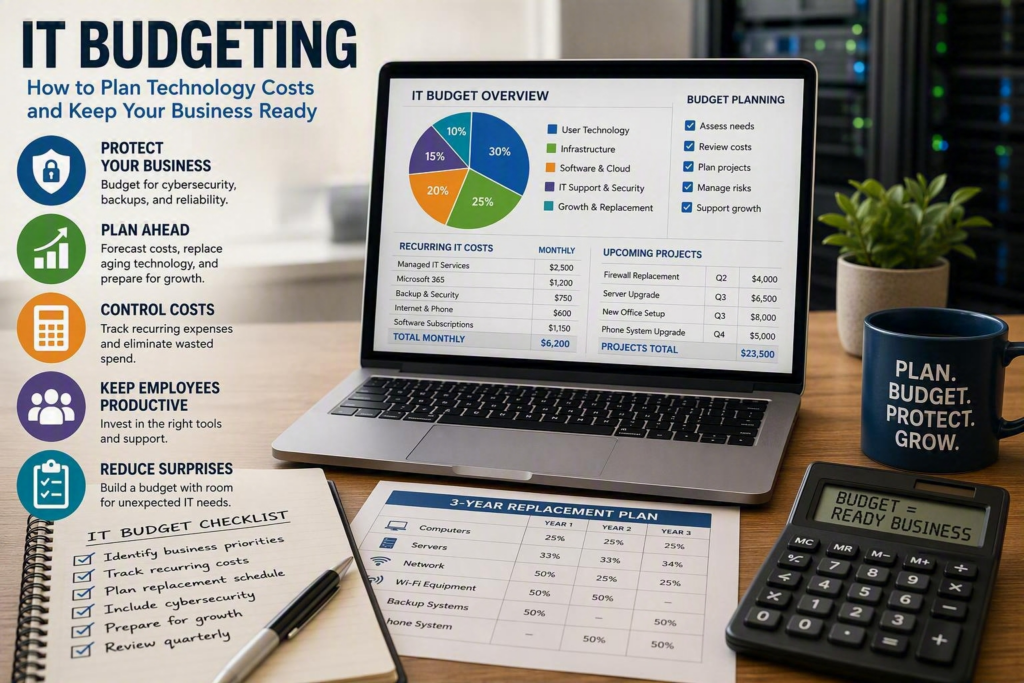
A server fails at 10:30 on a Tuesday. An employee clicks a convincing phishing email. Microsoft 365 storage reaches its limit just before an important deadline. These situations can happen to any business, and without proper IT budgeting, they can quickly become expensive and stressful.
For small and midsize businesses, an IT budget is more than a list of computers, software subscriptions, and technology expenses. It is a plan for keeping employees productive, protecting business information, and making sure critical systems continue working.
The goal is not to purchase the newest technology every year. Good IT budgeting means understanding what your business needs, planning for future expenses, and making important technology decisions before an emergency makes them for you.
Start IT Budgeting With Your Business Priorities
Technology spending should support the way your business actually operates.
A law firm may prioritize secure document storage, reliable communication, and remote access. A healthcare organization may need stronger protection for sensitive information and dependable systems for staff. A nonprofit may need to carefully manage technology costs while still giving employees secure tools for collaboration.
Before setting a budget, identify the technology your business cannot afford to lose.
Ask questions such as:
What would happen if email stopped working?
How long could the business operate without internet access?
What happens if employees cannot access important files?
Which applications are essential to daily operations?
How much would an hour or a day of downtime cost?
These questions help connect technology spending to real business priorities.
Your budget should also consider where the business is going. If you are hiring more employees, opening a new location, moving services to the cloud, or replacing an outdated phone system, those expenses should be included before they become urgent.
A budget based only on last year’s technology expenses may not reflect what your business needs next year.
Separate Recurring IT Costs From Projects
One of the biggest challenges with IT budgeting is that everyday technology costs and major technology projects are often mixed together.
They should be planned separately.
Recurring IT Expenses
Your operating IT budget may include regular costs such as:
Managed IT support
Cybersecurity services
Microsoft 365 licenses
Backup services
Internet and phone services
Antivirus and endpoint protection
Cloud applications
Software subscriptions
Routine maintenance
These expenses are generally easier to forecast because they happen monthly or annually.
IT Projects and Major Purchases
Project expenses are different. They usually have a specific start and end date.
Examples include:
Replacing a server
Upgrading a network
Replacing a firewall
Moving systems to the cloud
Setting up a new office
Replacing employee computers
Improving cybersecurity
Upgrading a phone system
Planning these expenses in advance helps prevent a large technology purchase from becoming an unexpected financial burden.
Some costs may also fall between the two categories. For example, cybersecurity monitoring may be a monthly operating expense, while replacing an aging firewall is a project. Both are important, but they require different planning.
What Should an IT Budget Include?
Every organization is different, but a practical small business IT budget should normally consider five main areas.
1. User Technology
Include the technology employees need to do their jobs, such as:
Desktop and laptop computers
Monitors
Mobile devices
Printers
Headsets and accessories
Computer setup and configuration
Do not only budget for the purchase price. Include deployment, configuration, maintenance, and support where applicable.
2. Core IT Infrastructure
Your infrastructure budget may include:
Wi-Fi equipment
Network switches
Firewalls
Servers
Network cabling
Internet connections
Business phone systems
Battery backup equipment
These systems may not be visible to employees every day, but they can have a major impact on business reliability.
3. Software and Cloud Services
Software costs can become a significant part of an IT budget as more businesses move to cloud-based services.
Consider:
Microsoft 365
Accounting software
Industry-specific applications
Cloud storage
Password management
Backup platforms
Communication tools
Security software
Review these subscriptions regularly to make sure the business is not paying for licenses that are no longer being used.
4. IT Support and Cybersecurity
Technology needs ongoing support and protection.
Your budget may include:
Help desk support
Managed IT services
Endpoint protection
Backup monitoring
Security monitoring
Security awareness training
Software patching
Incident response planning
These services can help reduce downtime and identify problems before they become larger business disruptions.
5. Replacement and Business Growth
Your IT budget should also prepare for future needs.
This includes:
Replacing aging computers
Adding equipment for new employees
Expanding network capacity
Opening new offices
Increasing software licenses
Upgrading outdated technology
Supporting business growth
Planning these expenses early makes them much easier to manage.
Create an IT Replacement Schedule
One of the most useful parts of IT budgeting is having a technology replacement plan.
A device that still turns on is not necessarily a device that should remain in service indefinitely. Older computers can become slower, harder to support, incompatible with newer applications, and more difficult to secure.
Instead of waiting until several computers fail at the same time, businesses can replace equipment gradually.
For example, instead of replacing 20 computers during one budget year, a business might replace a portion of its oldest devices each year.
The same approach can apply to:
Computers
Servers
Firewalls
Network switches
Wi-Fi equipment
Backup systems
Phone systems
Battery backup equipment
There is no single replacement schedule that works for every business. A computer used for basic email may have different requirements from a workstation running specialized design or accounting software.
The important thing is to track equipment age, warranty status, vendor support dates, and expected replacement costs.
Make Cybersecurity Part of Your IT Budget
Cybersecurity should not be treated as an optional expense that only receives attention after an incident.
A practical cybersecurity budget can include multiple layers of protection, such as:
Managed endpoint security
Secure backups
Software patching
Security awareness training
Network security
Incident response planning
No single security product can prevent every cyberattack. The goal is to reduce risk and limit the impact when something goes wrong.
Your cybersecurity spending should reflect the type of information your business handles. Organizations working with confidential customer records, financial information, health information, or sensitive employee data may require stronger security controls.
The important thing is to make cybersecurity an ongoing part of the IT budget rather than a one-time purchase.
Plan for Unexpected IT Expenses
Even a well-planned IT budget cannot predict everything.
Hardware can fail earlier than expected. Software prices can change. A new security requirement may require an unexpected investment. Your business may also grow faster than planned.
For this reason, it is helpful to keep some room in the budget for unexpected technology expenses.
A contingency amount can help cover emergency repairs, replacement equipment, security incidents, or urgent projects without forcing you to cancel other priorities.
Regular budget reviews are also important.
A quarterly review can help identify:
Unused software licenses
Unexpected support costs
Aging equipment
Upcoming renewals
New security risks
Delayed technology projects
New business requirements
Your annual IT budget should be a plan, not a document that gets created once and forgotten for the rest of the year.
Consider the Total Cost of Technology
The cheapest technology option is not always the least expensive choice in the long run.
A low-cost computer that frequently needs repairs can cost more through employee downtime and support. A basic backup system that has never been tested could create significant costs if important data cannot be restored.
An unsupported firewall may appear to save money by delaying replacement, but it could leave the business exposed to security problems.
When evaluating an IT purchase, consider more than the initial price.
Ask:
How reliable is the solution?
How long will it be supported?
What does maintenance cost?
What happens if it fails?
How quickly can it be replaced?
Can your IT provider support it?
Will it work with your existing systems?
How much employee time will it require?
This approach helps businesses focus on value rather than simply choosing the lowest price.
Compare Cloud, On-Premises, and Hybrid Costs
IT budgeting has become more complicated as businesses choose between cloud services, on-premises infrastructure, and hybrid environments.
Cloud services can reduce the need to purchase and maintain certain hardware. They can also make remote work and collaboration easier.
However, cloud services usually involve recurring subscription costs that need to be reviewed regularly.
On-premises technology can provide greater control in certain situations, but businesses are responsible for hardware maintenance, upgrades, backups, security, and replacement.
A hybrid approach may make sense for businesses that need a combination of cloud and on-site systems.
There is no single solution that is best for every organization. The right choice depends on your applications, business requirements, internet connectivity, security needs, compliance obligations, and tolerance for downtime.
Make Your IT Budget Easy to Understand
An IT budget should make sense to the people making business decisions.
Instead of simply writing:
Firewall replacement — $4,000
Explain why the expense matters:
Firewall replacement — planned for Q2 because the existing firewall is approaching the end of vendor support. Replacing it helps maintain secure internet access and reduces the risk of an unexpected outage.
For major IT expenses, include:
Expected cost
Planned timing
Business reason
Priority
Consequence of delaying the expense
This gives business owners and decision-makers the information they need to make informed choices.
Some projects can wait. Others, such as replacing unsupported security equipment or fixing unreliable backups, may need immediate attention.
Review Your IT Budget Regularly
Technology changes quickly, and your business needs can change just as quickly.
A regular IT budget review can help you stay ahead of upcoming expenses instead of reacting to them.
Review your:
Technology inventory
Software subscriptions
Hardware warranties
Vendor support dates
Cybersecurity controls
Backup systems
Employee growth
Upcoming projects
For businesses without an internal IT department, working with a trusted technology partner can make this process easier.
Myriad Technologies helps small and midsize businesses understand their technology needs, identify potential risks, plan future investments, and prioritize IT improvements without replacing technology simply for the sake of replacing it.
Better IT Budgeting Means Fewer Surprises
Good IT budgeting is not about spending the most money on technology. It is about spending money in the right places at the right time.
A strong IT budget helps your business:
Prepare for equipment replacement
Control recurring technology costs
Reduce unexpected expenses
Improve cybersecurity
Plan for business growth
Reduce technology-related downtime
Make better purchasing decisions
Start by identifying the technology your business depends on most. Then create a replacement schedule, review your recurring costs, include cybersecurity in your core budget, and set aside room for unexpected expenses.
A technology decision made months in advance is usually easier and less expensive than an emergency decision made when a critical system has already failed.