Choosing between Microsoft 365 vs Google Workspace can have a significant impact on how your team communicates, collaborates, and manages information. The right cloud productivity platform helps employees work efficiently, stay connected, and access critical business data from anywhere. The wrong choice can lead to document confusion, communication challenges, security risks, and unnecessary frustration.
For small and midsize businesses, both Microsoft 365 and Google Workspace offer modern alternatives to traditional file servers and on-premises applications. Each platform provides email, cloud storage, document creation tools, video meetings, and collaboration features. However, the differences become much more apparent when you look at how employees actually work every day.
Microsoft 365 vs Google Workspace: A Quick Comparison
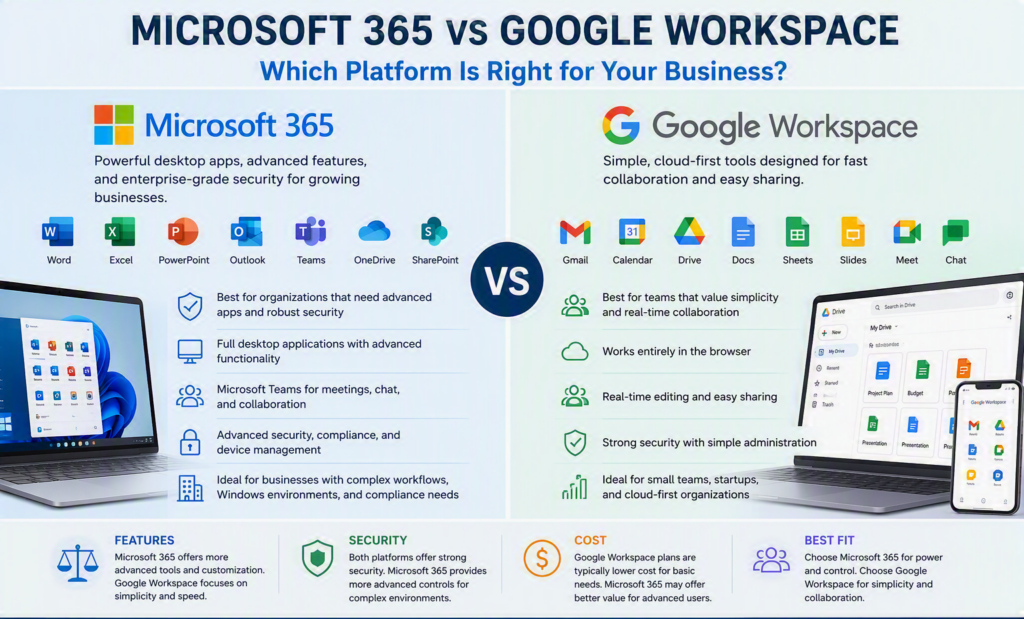
Microsoft 365 is often the preferred choice for organizations that rely on desktop applications, advanced document formatting, detailed spreadsheets, and Microsoft-based systems. The platform includes:
- Outlook
- Word
- Excel
- PowerPoint
- Teams
- OneDrive
- SharePoint
Many organizations already use Microsoft applications, making migration and adoption easier for employees.
Google Workspace focuses on browser-based productivity and includes:
- Gmail
- Google Drive
- Google Docs
- Google Sheets
- Google Slides
- Google Meet
- Google Chat
Google Workspace is designed for simplicity and real-time collaboration, making it attractive for organizations that want a straightforward cloud-first solution.
Neither platform is automatically the best choice. A law office producing complex legal documents may prefer Microsoft 365, while a nonprofit organization managing volunteers and shared resources may find Google Workspace’s simplicity more appealing.
Document Creation and Team Collaboration
When discussing collaboration, Google Workspace is often the first platform that comes to mind.
Google Docs and Google Sheets allow multiple users to work simultaneously, leave comments, and see changes in real time. Sharing documents with contractors, volunteers, clients, or external partners is quick and intuitive.
Microsoft 365 has significantly improved its collaboration capabilities and now offers live co-authoring through both web and desktop applications. When files are stored in OneDrive or SharePoint, multiple team members can edit documents together in real time.
The difference is depth.
Microsoft 365 Strengths
Microsoft 365 excels when organizations need:
- Advanced document formatting
- Complex templates
- Track Changes workflows
- Reference management
- Detailed Excel reporting
- Large datasets and formulas
- Professional presentations
For businesses that depend heavily on Word and Excel, Microsoft 365 remains difficult to beat.
Google Workspace Strengths
Google Workspace shines when teams need:
- Fast document sharing
- Browser-based access
- Simple collaboration
- Minimal training requirements
- Quick external collaboration
While Google’s tools work exceptionally well for many organizations, growing businesses may eventually require more advanced reporting, compliance controls, and document management capabilities.
Cloud File Storage and Organization
Cloud storage is about far more than simply saving files online.
Google Drive
Google Drive is known for its straightforward design and simple file-sharing capabilities. Teams can quickly organize files and provide access to employees and collaborators.
Benefits include:
- Easy file sharing
- Simple folder structures
- Shared drives
- Browser-first experience
Microsoft OneDrive and SharePoint
Microsoft uses a more structured model.
Personal files are typically stored in OneDrive, while departmental and organizational files reside in SharePoint and Microsoft Teams.
While setup often requires more planning, organizations gain benefits such as:
- Department-level permissions
- Document libraries
- Knowledge bases
- Retention policies
- Better long-term file governance
A well-implemented SharePoint environment helps ensure important business files remain accessible even when employees leave the organization.
Regardless of which platform you choose, business-critical information should always be stored in company-controlled locations rather than personal user accounts.
Email, Calendars, and Communication Tools
Email and communication remain at the center of daily business operations.
Gmail and Google Meet
Gmail is popular because of its clean interface and ease of use. Google Meet provides reliable video conferencing, while Google Calendar makes scheduling straightforward.
Google Workspace is often attractive to organizations looking for a lightweight communication solution.
Outlook and Microsoft Teams
Outlook continues to be the preferred platform for many businesses that manage:
- Shared mailboxes
- Multiple calendars
- Resource booking
- Delegated access
- Client contacts
Microsoft 365 also includes Microsoft Teams, which combines chat, video meetings, file sharing, collaboration channels, and integrations into a single workspace.
For organizations trying to reduce communication across multiple applications, Teams can become a central hub for day-to-day operations.
However, regardless of platform, technology alone does not improve communication. Businesses still need clear guidelines for where conversations happen, how information is shared, and how decisions are documented.
Security and Compliance Considerations
When comparing Microsoft 365 vs Google Workspace security, both platforms provide strong protection features, including:
- Multi-factor authentication (MFA)
- Encryption
- Spam filtering
- Phishing protection
- Audit logs
- Administrative controls
The difference often comes down to management requirements and available security controls.
Microsoft 365 Security Advantages
Microsoft 365 is often the stronger choice for organizations with:
- Windows-based environments
- Compliance requirements
- Sensitive customer information
- Device management needs
- Advanced security policies
The broader Microsoft security ecosystem allows organizations to create highly customized protections.
Google Workspace Security Advantages
Google Workspace delivers strong security with a simpler administrative experience.
Cloud-first organizations often appreciate:
- Easier administration
- Streamlined user management
- Flexible device support
- Reduced infrastructure complexity
Both platforms require proper configuration and ongoing oversight.
The question isn’t which platform claims to be more secure. The better question is which platform your organization can manage consistently and effectively.
Even the best cloud platform should be supported by:
- Employee cybersecurity training
- Clear access controls
- Multi-factor authentication
- Secure configuration practices
- Regularly tested monitored backups
Understanding the True Cost
Many businesses focus only on licensing costs when evaluating Microsoft 365 vs Google Workspace.
However, the real cost includes:
- Migration services
- Staff training
- Data organization
- Security configuration
- Device management
- Ongoing support
- Backup solutions
Google Workspace can be highly cost-effective for organizations with straightforward communication and collaboration needs.
Microsoft 365 often provides better long-term value for businesses that already depend on Office applications or want to consolidate multiple technology tools onto a single platform.
The goal should not be choosing the plan with the most features. The goal should be selecting the platform that supports current operations while allowing room for future growth.
How to Choose Between Microsoft 365 and Google Workspace
The best place to start is your existing workflow.
Consider:
- What types of documents your team creates
- How employees collaborate
- What devices they use
- How clients communicate with your business
- What data requires the strongest protection
Microsoft 365 Is Often Better For:
- Advanced Word and Excel users
- Windows-centric organizations
- Outlook-based scheduling
- Complex document management
- Internal SharePoint sites
- Businesses using Microsoft Teams
Google Workspace Is Often Better For:
- Browser-based teams
- Simple collaboration workflows
- External collaboration requirements
- Smaller organizations
- Businesses seeking minimal administration
Before making a final decision, test real-world tasks. Ask employees to create documents, share files, schedule meetings, retrieve older versions, and work remotely from multiple devices.
These practical tests often reveal far more than a feature comparison chart.
Plan Your Migration Before Moving Data
A cloud migration is the perfect opportunity to improve organization and eliminate unnecessary clutter.
Before migrating, review:
- Outdated user accounts
- Duplicate files
- Abandoned folders
- Security permissions
- Data retention requirements
Employees should also receive clear guidance regarding:
- File storage locations
- Access requests
- New workflows
- Email and calendar changes
For organizations throughout the Fraser Valley, Myriad Technologies helps transform migrations into a manageable business project rather than a disruptive IT event.
The Final Verdict: Microsoft 365 vs Google Workspace
There is no universal winner in the Microsoft 365 vs Google Workspace debate.
Microsoft 365 delivers exceptional value for organizations that rely on advanced productivity tools, structured collaboration, and comprehensive security controls. Google Workspace excels for teams seeking simplicity, flexibility, and browser-based collaboration.
The best choice is the one that supports your employees, protects your data, and continues to meet your business needs as your organization grows.
When properly implemented and managed, either platform can provide a strong foundation for communication, collaboration, security, and long-term business success.