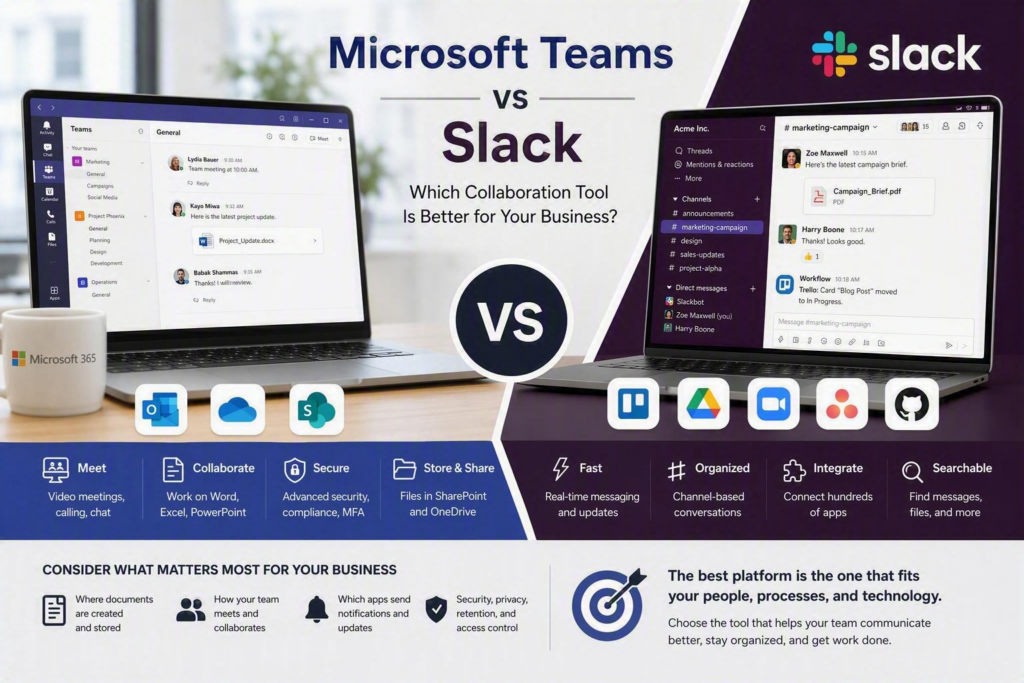
The right communication platform can make it easier for employees to find information, collaborate on projects, share files, and stay connected. The wrong platform can create another place for employees to check, increasing confusion and making information harder to manage.
When comparing Microsoft Teams vs Slack, the best choice is not simply the platform with the most features. It depends on where your employees already work, how your business manages files, which software your team relies on, and what security and compliance requirements you need to meet.
For many small and midsize businesses, the decision comes down to a simple question: Should business collaboration stay within Microsoft 365, or should your company use a dedicated messaging platform such as Slack?
Both Microsoft Teams and Slack can be excellent business communication tools. The right option depends on how your organization works.
Microsoft Teams vs Slack: What Is the Difference?
Microsoft Teams is designed to work closely with Microsoft 365. It combines chat, channels, video meetings, calling, calendars, file sharing, and collaboration on Microsoft Word, Excel, and PowerPoint.
If your business already uses Outlook, OneDrive, SharePoint, and Microsoft 365, Teams can feel like a natural extension of the tools your employees already know.
Slack, on the other hand, started primarily as a workplace messaging platform. It is particularly well known for channel-based communication, quick conversations, searchable messages, and integrations with a wide range of business applications.
Slack can be especially useful for businesses that rely on several different cloud applications and want to bring notifications and conversations into one communication workspace.
Neither platform automatically improves communication. A poorly organized Microsoft Teams environment can become just as confusing as a Slack workspace with too many channels. Good organization, permissions, naming standards, security policies, and employee training are important regardless of which platform you choose.
When Microsoft Teams Is the Better Choice
Microsoft Teams is often the most practical choice for businesses that already use Microsoft 365.
Employees can schedule meetings through Outlook, join meetings through Teams, collaborate on documents, and access files stored through SharePoint and OneDrive. Keeping these services connected can reduce the number of separate applications employees need to learn and manage.
Microsoft Teams for Meetings and Everyday Business Communication
Teams can be a strong option when video meetings and remote collaboration are an important part of your daily operations.
Professional offices, nonprofits, healthcare-related organizations, and businesses with remote or hybrid employees can use Teams for meetings, screen sharing, messaging, calendars, and document collaboration.
Teams can also support business phone systems through Microsoft Teams Phone. For companies looking to bring messaging, meetings, and business calling into a more connected environment, this can simplify communication management.
Teams is also useful for businesses that frequently rely on video meetings with employees, customers, vendors, or remote teams.
Microsoft Teams File Sharing and Collaboration
File management is another major advantage of Microsoft Teams.
Files shared in Teams are generally stored within Microsoft 365 services such as SharePoint. This allows businesses to manage documents, permissions, version history, and access from the Microsoft 365 environment.
For organizations already using Microsoft 365, this can make it easier to keep business documents connected to the people and teams working on them.
However, businesses should still establish clear file-sharing rules. Teams does not automatically prevent employees from accidentally sharing sensitive information or giving access to the wrong people.
Microsoft Teams Security and Account Management
Security is an important consideration when choosing a business collaboration platform.
For organizations handling confidential business information, financial records, customer information, patient-related information, or other sensitive data, Microsoft Teams can benefit from the security and identity-management tools available through Microsoft 365.
Depending on your Microsoft licensing and configuration, businesses can use features such as multifactor authentication, conditional access, device management, data-loss prevention, and retention policies.
Multifactor authentication is particularly important because employee accounts can provide access to email, files, applications, and company information.
However, Microsoft Teams is not automatically secure simply because it is a Microsoft product. Businesses still need to properly manage guest access, external sharing, employee accounts, devices, permissions, and security policies.
Potential Disadvantages of Microsoft Teams
Microsoft Teams has many features, but that can also make it feel complicated.
Employees who only want simple messaging may find the interface busy. Too many teams, channels, notifications, and conversations can make information difficult to find.
Teams also works best when the surrounding Microsoft 365 environment is properly organized. Poor SharePoint permissions, inconsistent file-sharing practices, or poorly structured teams can create problems instead of solving them.
When Slack May Be the Better Choice
Slack can be a good option for organizations that want workplace communication to be at the center of their daily workflow.
Its channel-based structure makes it easy to organize conversations around departments, projects, customers, or specific topics. Slack is also well known for its integrations with third-party business applications.
Slack for Fast Business Communication
Slack can work particularly well for businesses that use many different cloud applications.
Marketing teams, technology companies, project-based businesses, and organizations that depend on multiple online services may benefit from Slack’s integrations and automated notifications.
For example, businesses can connect project management platforms, calendars, customer service applications, forms, and other software to specific Slack channels.
This allows employees to receive relevant updates without constantly checking multiple applications.
Slack for External Collaboration
Slack can also be useful for organizations that frequently work with customers, vendors, contractors, or business partners.
Slack Connect can provide a dedicated communication environment for external collaboration instead of relying entirely on long email conversations.
However, external collaboration should always be managed carefully. Businesses need clear rules for permissions, access, confidential information, and what happens when a client, contractor, or partner no longer needs access.
Slack Provides a Focused Messaging Experience
One of Slack’s biggest strengths is its focus on workplace communication.
Many employees find channels and quick conversations easy to understand. This can make Slack useful for teams that need to communicate frequently throughout the day and quickly find previous discussions.
Search is also valuable when employees need to locate an old conversation, decision, file, or project update.
However, Slack does not necessarily replace Microsoft 365.
Businesses that depend heavily on Outlook, Microsoft Office, SharePoint, OneDrive, and Microsoft-based identity management may still need to use those services alongside Slack.
That can mean employees regularly switch between Slack, email, Microsoft Teams meetings, document storage, and other business applications.
Potential Disadvantages of Slack
Slack can introduce another platform for your business to purchase, administer, secure, and support.
Important features related to administration, security, message history, and retention can also vary depending on the Slack plan your business selects.
There is another potential issue: information can become fragmented.
For example, documents may be stored in Microsoft 365, formal approvals may happen through email, and daily discussions may take place in Slack.
Without clear internal policies, employees may not know where to find the official version of a document or the final decision on a project.
Microsoft Teams vs Slack: Which Is Better for Your Business?
Instead of asking employees which platform they prefer, look at how work actually happens inside your organization.
When comparing Microsoft Teams vs Slack for business, consider these four areas:
Where employees create, edit, and store important business documents
How frequently your organization uses internal, client, and remote meetings
Which business applications need to send notifications or updates to employees
What security, privacy, retention, and access-control requirements apply to your information
If most of your business already operates within Microsoft 365, Microsoft Teams may be the easier choice.
It can reduce duplicate accounts, limit the number of platforms employees need to learn, and keep communication connected to Microsoft 365 services.
If your organization relies heavily on fast channel-based communication and many non-Microsoft applications, Slack may provide a better messaging experience.
Slack can also work well alongside Microsoft 365, but businesses should understand that using both platforms creates additional administration and requires clear rules about where information should be stored.
Should Your Business Use Microsoft Teams or Slack?
There is no universal answer to the question of Microsoft Teams vs Slack.
A business that already relies on Microsoft 365 will often find Teams to be the more practical solution. A company that depends on many third-party applications and prioritizes fast, channel-based communication may prefer Slack.
The most important factor is not the number of features each platform offers. It is how well the platform fits your existing technology, employees, security requirements, and business processes.
Don’t Just Install the Software and Hope It Works
Choosing Microsoft Teams or Slack is only the first step.
Before rolling out a collaboration platform, your business should establish clear guidelines for:
Who can create teams, channels, or workspaces
How teams and channels should be named
When employees should use chat instead of email
Where important business documents should be stored
How guest and external access should be managed
How employee access is removed when someone leaves the company
How sensitive information should be shared
How long important communications and documents should be retained
A pilot program can also help before introducing the platform across the entire organization.
Start with employees from different areas of the business, such as administration, operations, leadership, and frontline teams. Their feedback can help identify problems with notifications, file permissions, meetings, training, and communication workflows before a company-wide rollout.
Get Help Choosing the Right Business Collaboration Platform
For businesses across the Fraser Valley, choosing between Microsoft Teams and Slack is not simply a software decision. It is an IT and business-process decision.
Myriad Technologies can help your organization evaluate collaboration tools based on your existing Microsoft 365 environment, cybersecurity requirements, devices, applications, and day-to-day workflow.
The best collaboration platform is the one your employees will actually use, your IT team can manage effectively, and your business can trust with important information.
Whether you choose Microsoft Teams or Slack, the goal should be the same: make communication easier, keep information organized, and give your employees the tools they need to work efficiently.