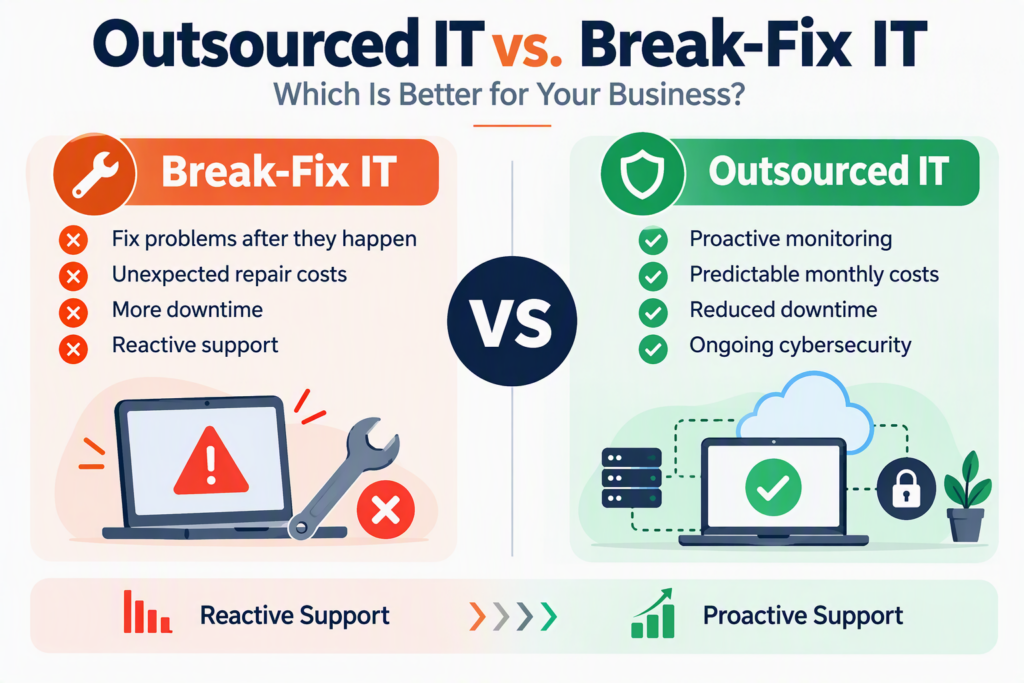
A server fails at 10:30 a.m. Your team cannot access shared files, customers are waiting, and an important deadline is approaching. This is when the difference between outsourced IT vs. break-fix IT support becomes clear. One approach focuses on preventing problems and maintaining your technology, while the other responds after something goes wrong.
For small and midsize businesses, choosing the right IT support model affects more than technical performance. It can influence employee productivity, cybersecurity, customer service, operating costs, and business continuity.
Understanding how outsourced IT services compare with break-fix support can help you choose a solution that fits your business needs, budget, and long-term goals.
What Is Break-Fix IT Support?
Break-fix IT support is a reactive service model in which a business contacts an IT technician or service provider when a technical problem occurs. The provider diagnoses the issue, completes the necessary repairs, and charges for the work performed. Pricing may be hourly, per service call, or based on the project.
For small businesses with only a few computers and basic technology requirements, break-fix support can seem like a cost-effective option. Instead of paying a monthly IT support fee, you pay only when you need assistance.
Break-fix services can also be useful for specific projects, such as installing new computers, relocating an office, recovering lost data, or setting up a phone system.
However, the main limitation of break-fix IT is that ongoing monitoring and preventive maintenance are not necessarily included. Problems such as failed backups, outdated software, aging hardware, and security vulnerabilities can go unnoticed until they disrupt business operations.
When an issue occurs, your team must wait for technical support to investigate and resolve it. Depending on the severity of the problem, that delay can result in lost productivity, unexpected expenses, and frustrated customers.
What Is Outsourced IT Support?
Outsourced IT support allows businesses to work with an external IT provider that manages and supports their technology on an ongoing basis. This model is commonly delivered through managed IT services, where businesses receive continuous technical support, maintenance, and guidance under an agreed service plan.
Rather than waiting for equipment or software to fail, an outsourced IT provider works to identify potential problems, maintain systems, and reduce the risk of unexpected downtime.
Depending on the service agreement, outsourced IT services may include:
Remote and onsite IT support
Computer, server, and network monitoring
Software updates and patch management
Cybersecurity monitoring and guidance
Data backup monitoring and recovery planning
Microsoft 365 support and administration
Vendor coordination and troubleshooting
IT strategy, budgeting, and technology planning
A reliable outsourced IT partner also helps business owners and employees understand technical issues without unnecessary complexity. You should be able to ask questions, understand your options, and make informed decisions about your technology.
For small and midsize businesses that do not need a full-time internal IT department, outsourcing provides access to a broader range of technical skills without the cost and responsibility of hiring an entire team.
Outsourced IT vs. Break-Fix: Comparing the Costs
One of the biggest differences between outsourced IT and break-fix support is how businesses pay for IT services.
Break-fix support generally involves variable costs. You may spend very little during a month when everything works properly, but a major server failure, network outage, or cybersecurity incident can result in a significant unexpected expense.
The cost of IT problems also extends beyond the repair invoice. Business downtime can lead to:
Employees being unable to complete their work
Missed customer calls and delayed service
Invoicing and payment processing delays
Lost sales and business opportunities
Emergency repair and recovery expenses
Outsourced IT services typically use a predictable monthly pricing structure, making it easier to plan and budget for technology support.
Although a monthly managed IT agreement represents an ongoing expense, it can help reduce the likelihood and impact of avoidable technical problems. Regular maintenance, monitoring, and security management can also help businesses identify risks before they become expensive emergencies.
Neither model guarantees that technology will never fail. The important difference is whether your IT support focuses primarily on repairing problems or also works to prevent them.
When comparing IT support costs, consider the total cost of ownership, including downtime, security risks, employee productivity, and the time spent managing technical issues internally.
How IT Support Affects Business Downtime
When comparing outsourced IT vs. break-fix support, downtime is one of the most important factors to consider.
A brief internet interruption may have little impact on your business. However, losing access to email, shared files, business applications, or customer records for an entire day can seriously affect operations.
Different industries face different consequences. A professional services firm may miss an important client deadline, while a healthcare practice may experience delays accessing records or scheduling appointments. Nonprofits and community organizations may also struggle to deliver essential programs when their systems are unavailable.
With break-fix support, troubleshooting begins after a problem has been reported. Recovery time depends on the provider’s availability, the complexity of the issue, and whether replacement equipment or additional resources are required.
An outsourced IT provider typically has an ongoing relationship with your business and a better understanding of your systems, users, vendors, and backup procedures. This familiarity can help streamline troubleshooting and support a faster, more organized response.
Ongoing IT management also makes it easier to plan hardware replacements, system upgrades, and technology changes before they become urgent problems.
For businesses that rely on technology throughout the workday, reducing downtime is an important part of maintaining productivity and customer satisfaction.
Cybersecurity: Why Proactive IT Management Matters
Cybersecurity is another important consideration when choosing between outsourced IT and break-fix support.
Not every security problem is immediately visible. Outdated software, weak passwords, suspicious login activity, an unprotected email account, or an untested backup can expose a business to risks without causing an obvious technical failure.
A reactive approach may leave these issues unaddressed until an incident occurs.
Proactive IT management helps businesses establish consistent security practices, including:
Regular software updates and security patches
User access controls and account management
Data backup monitoring and recovery planning
Employee cybersecurity awareness and guidance
No IT provider can eliminate every cybersecurity threat. However, consistent monitoring, maintenance, and security planning can help reduce exposure and improve your organization’s ability to respond to incidents.
For businesses that handle financial information, personal records, healthcare data, or confidential client information, cybersecurity should be part of everyday IT operations rather than something addressed only after a problem occurs.
Outsourced IT support can help make these security responsibilities more consistent by assigning ownership, establishing processes, and reviewing risks as part of an ongoing service relationship.
Which IT Support Model Is Right for Your Business?
The right choice depends on your organization’s technology requirements, budget, security needs, and tolerance for downtime.
When Break-Fix IT Makes Sense
Break-fix support may be suitable for businesses that:
Have very limited technology requirements
Can tolerate occasional interruptions
Need occasional technical assistance rather than ongoing management
Have a limited budget for recurring IT services
Require help with a specific project or one-time repair
For these organizations, paying for support only when needed may be a reasonable approach, provided they understand the risks of limited monitoring and preventive maintenance.
When Outsourced IT Is the Better Choice
Outsourced IT support is often a stronger fit for businesses that:
Depend on computers, networks, and cloud applications every day
Need reliable access to email, files, and business systems
Handle sensitive customer or employee information
Want consistent cybersecurity monitoring and maintenance
Support remote or hybrid employees
Need predictable IT budgeting and ongoing technical guidance
Do not have a dedicated internal IT team
Outsourced IT is particularly valuable when technology problems could significantly affect customer service, revenue, compliance, or business continuity.
Rather than choosing the model with the lowest initial price, consider what a day of downtime would cost your organization and whether your current IT support can adequately manage the risks.
How to Choose an Outsourced IT Provider
If you are considering outsourced IT services, look beyond the monthly price. The right provider should understand your business, explain recommendations clearly, and deliver services that address your actual operational needs.
Before signing an agreement, consider the following questions:
What services are included? Confirm whether monitoring, maintenance, cybersecurity, backups, and user support are covered.
How quickly can support respond? Ask about response targets, support hours, and emergency procedures.
How are security risks managed? Understand how the provider handles updates, access controls, threat monitoring, and backup recovery.
Is pricing transparent? Clarify what is included in the monthly fee and which services may incur additional charges.
Can the provider support future growth? Choose a partner that can help your technology evolve as your business changes.
Will you receive practical guidance? Look for clear communication and recommendations based on business priorities rather than unnecessary technical complexity.
A good IT partner should help you understand not only what needs attention today but also what your business should prepare for in the months and years ahead.
Outsourced IT Services in Chilliwack and the Fraser Valley
For small and midsize businesses in Chilliwack and across the Fraser Valley, having a dependable IT support partner can make managing technology easier.
Myriad Technologies provides IT support, cybersecurity guidance, and technology planning to help businesses maintain reliable systems and address technical challenges. With an emphasis on proactive support and clear communication, Myriad helps business owners and teams make informed technology decisions without having to manage every technical issue themselves.
Whether you need ongoing IT management, help improving your cybersecurity, or guidance on planning future technology investments, the right support can help your organization work more efficiently and prepare for unexpected challenges.
Contact Myriad Technologies to discuss your business’s IT requirements and explore an IT support approach that fits your needs.
Make IT Support Work for Your Business
The choice between outsourced IT and break-fix support comes down to how your business manages technology risks.
Break-fix support can be useful for occasional repairs and one-time projects. Outsourced IT provides a more proactive approach through ongoing maintenance, monitoring, cybersecurity support, and technology planning.
For businesses that depend on reliable systems and cannot afford extended interruptions, proactive IT management can provide greater visibility, more predictable support costs, and a stronger foundation for growth.
Your technology should help your team serve customers, complete work, and achieve business goals. Choosing the right IT support model helps keep those priorities at the centre of your technology strategy.