Phishing attacks remain one of the most common cybersecurity threats facing businesses today. While many people assume phishing emails are easy to spot, modern attacks have become increasingly sophisticated. Cybercriminals often create messages that look like they come from trusted companies, coworkers, banks, or technology providers.
Understanding a real-world phishing attack example can help employees recognize warning signs before a compromised account leads to a data breach, financial loss, or business disruption.
What Is a Phishing Attack?
A phishing attack is a fraudulent attempt to steal sensitive information such as usernames, passwords, financial details, or company data by pretending to be a trusted source.
Attackers commonly impersonate:
- Microsoft 365
- Banks and financial institutions
- Vendors and suppliers
- Company executives
- IT departments
- Popular cloud platforms
The goal is simple: convince someone to click a malicious link, download an infected file, or provide confidential information.
A Common Phishing Attack Example
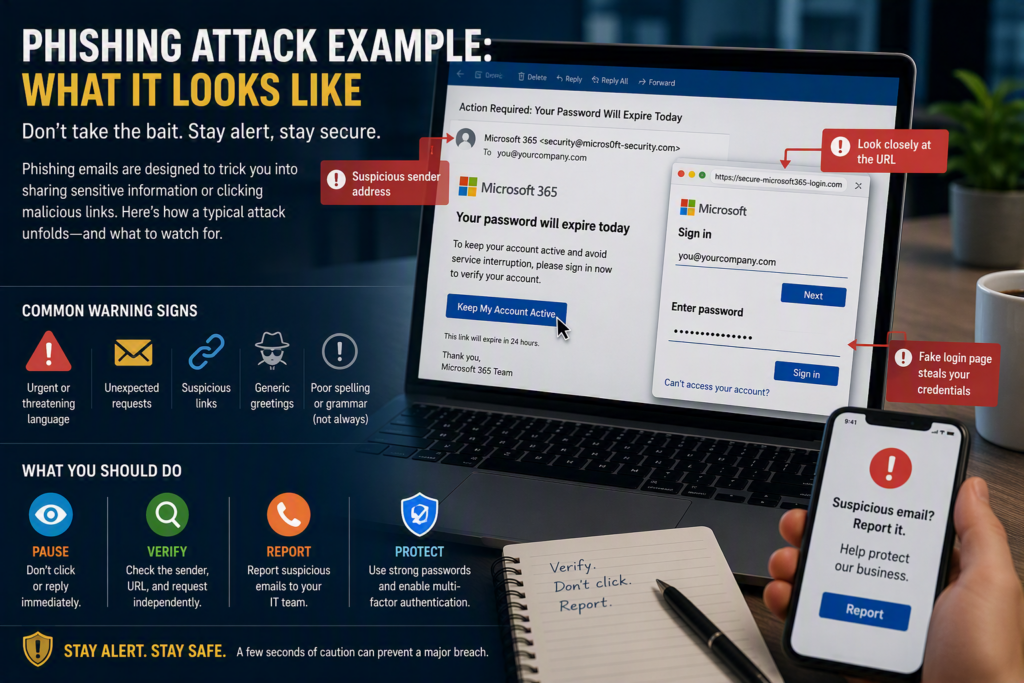
Imagine an employee receives an email that appears to come from Microsoft 365. The subject line reads:
“Action Required: Your Password Will Expire Today”
The email warns that unless immediate action is taken, access to email and company files will be suspended. A button labeled “Keep My Account Active” directs the employee to what appears to be a Microsoft login page.
At first glance, everything looks legitimate. The branding appears familiar, the wording is professional, and the request seems urgent.
However, several warning signs may be present:
- The sender’s email address contains a misspelled domain name.
- The login page URL is not an official Microsoft website.
- The message creates unnecessary urgency.
- The email contains unexpected login requests.
If the employee enters their credentials, the attacker gains access to the account and may immediately attempt to sign in.
What Happens After Credentials Are Stolen?
Once attackers obtain a username and password, they often work quietly.
Rather than announcing their presence, they may:
- Search through emails for financial information
- Monitor conversations involving invoices or payments
- Create hidden email forwarding rules
- Access shared files and company documents
- Send fraudulent messages from the compromised account
Because the communication comes from a legitimate email address, coworkers, vendors, and customers may trust the messages without question.
If multifactor authentication (MFA) is not enabled, attackers can often gain access immediately.
Why Phishing Attacks Are So Effective
Many people assume phishing works because employees are careless. In reality, phishing attacks succeed because busy employees are often required to make quick decisions.
Attackers carefully create messages that:
- Appear familiar
- Create urgency
- Mimic normal business processes
- Arrive at busy times
An employee processing invoices, reviewing payroll information, or preparing for a meeting may be more likely to act quickly without fully reviewing an email.
This is why cybersecurity awareness should focus on education and verification rather than blame.
Warning Signs of a Phishing Email
No single clue guarantees an email is malicious, but employees should be cautious when multiple warning signs appear together.
Check the Sender’s Email Address
Cybercriminals often create addresses that closely resemble legitimate organizations.
Examples include:
- support@micros0ft.com
- billing@paypa1.com
- admin@company-security.net
Always verify the full sender address rather than relying on the display name.
Be Suspicious of Urgent Requests
Messages demanding immediate action should raise concerns.
Examples include:
- Password expiry warnings
- Urgent payment requests
- Account suspension notices
- Requests to bypass standard approval processes
Examine Links Carefully
Before clicking any link, hover over it to view the destination URL.
If a message claims to come from Microsoft, the link should direct users to an official Microsoft website.
When possible, access services by using saved bookmarks or typing the website address directly into the browser.
Verify Unusual Requests
If a payment change, banking update, or confidential request seems unusual, verify it through a second communication method before taking action.
A quick phone call can prevent a costly mistake.
What Employees Should Do If They Click a Phishing Link
Accidentally clicking a suspicious link does not automatically mean the organization has been compromised.
The most important step is reporting it immediately.
If credentials were entered:
- Change the password immediately
- Notify IT or your Managed IT provider
- Review recent account activity
- Check for unauthorized forwarding rules
- Enable or verify multifactor authentication
If a file was downloaded or remote access was granted:
- Disconnect the device from the network if possible
- Stop using the computer until it has been reviewed
- Contact IT support immediately
Early detection often prevents a small incident from becoming a major security issue.
How Businesses Can Prevent Phishing Attacks
Technology plays an important role in reducing phishing risk, but employee awareness is equally important.
Effective protection includes:
- Multifactor authentication (MFA)
- Email security and spam filtering
- Endpoint protection
- Regular software updates
- Security awareness training
- Strong password policies
- Backup and disaster recovery planning
Many organizations also benefit from working with a Managed IT provider that can monitor systems, identify suspicious activity, and respond quickly when threats are detected.
Final Thoughts
Phishing attacks continue to evolve, making them harder to identify than ever before. Modern phishing emails often look professional, use trusted branding, and create a sense of urgency designed to encourage quick action.
The best defense is a combination of strong security controls, employee awareness, and clear reporting procedures.
When employees feel comfortable slowing down, verifying requests, and asking questions, businesses are far less likely to become victims of phishing attacks. A brief pause can often prevent account compromises, financial losses, and significant business disruptions.