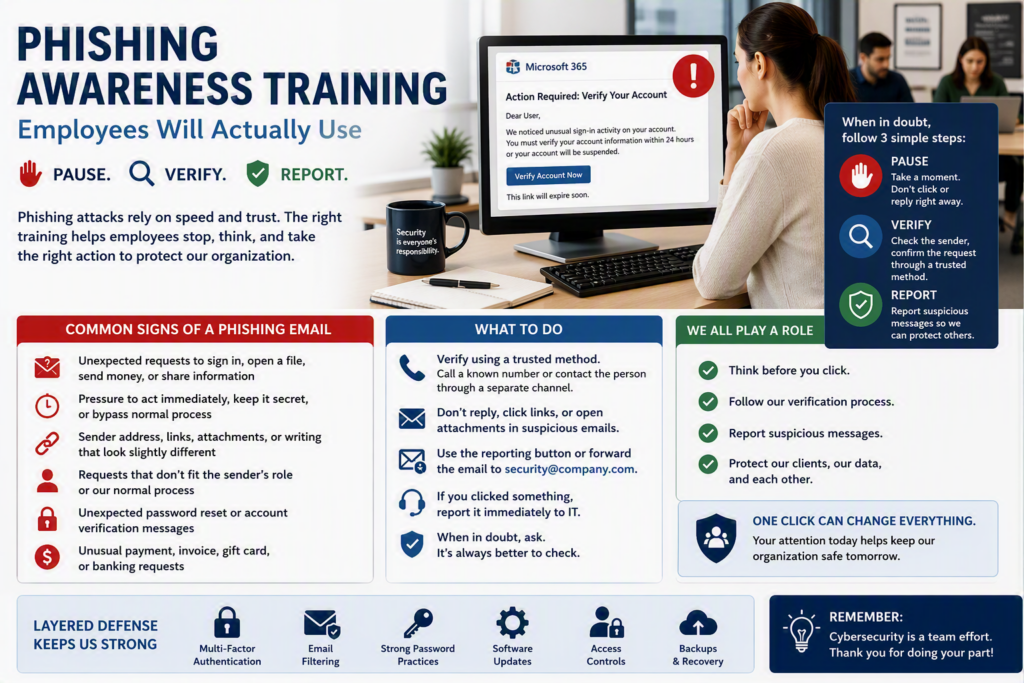
A convincing phishing email rarely announces itself as a scam. It may look like a Microsoft 365 password notice, an invoice from a familiar supplier, a shared document, or a message from an executive asking for help.
Effective phishing awareness training for employees gives your team practical skills they can remember and use. Instead of simply telling employees not to click suspicious links, effective training teaches them how to pause, verify, and report unusual requests before one click becomes a serious business problem.
For small and midsize organizations, this matters because one compromised account can affect payroll, client information, email access, cloud files, and everyday operations. Technology controls are essential, but they cannot stop every deceptive message. Your employees need practical cybersecurity awareness training that works when they are busy, interrupted, or trying to help a customer.
Why Phishing Is a Business Continuity Issue
Phishing is more than an IT concern. It is an operational and business continuity risk.
A successful phishing attack can lock employees out of their email, send fraudulent messages to clients, redirect a payment, steal login credentials, or give criminals access to confidential business files.
Professional offices, healthcare providers, nonprofits, and community organizations can all be targeted because they hold valuable information and depend heavily on email and cloud systems. Attackers also know that smaller organizations may not have a large internal IT department monitoring every security alert.
Phishing attacks often take advantage of three things: routine, urgency, and trust.
The goal of effective phishing training is not to turn every employee into a cybersecurity expert. It is to help employees recognize when something does not look right and give them a clear, low-stress process for getting help.
What Employees Need From Phishing Awareness Training
A yearly slideshow about suspicious links is better than nothing, but employees can easily forget the information within days or weeks.
Effective phishing awareness training employees will remember should be:
Short and practical
Relevant to employees’ actual roles
Repeated throughout the year
Based on realistic phishing examples
Easy to understand
Focused on what employees should do, not just what they should avoid
Supported by a simple reporting process
Start with the types of messages most likely to reach your organization.
An accounts payable employee may receive a fake vendor banking update. A manager may receive an impersonated request to purchase gift cards. Front-desk staff may receive a document-sharing notification that appears to come from a colleague. Someone in HR may receive a fake résumé attachment or benefits inquiry.
Employees should understand several common warning signs.
Common Signs of a Phishing Email
Employees should pause when they encounter:
An unexpected request to sign in, open a file, send money, or share information
Pressure to act immediately, keep a request secret, or bypass normal approval procedures
A sender address, link, attachment, or writing style that is slightly different from what they normally expect
A request that does not fit the sender’s usual role or your organization’s normal process
Unexpected password-reset or account-verification messages
Unusual payment, invoice, gift card, or banking requests
None of these signs automatically proves that a message is malicious. Legitimate communications can be urgent, and familiar vendors can change email systems.
That is why good phishing prevention training should teach employees how to verify unusual requests using a trusted method.
For example, employees can call a known phone number, contact the person through a separate communication channel, or start a new email using a saved contact. Replying directly to a suspicious message does not reliably verify the request.
Make Phishing Reporting Easy, Not Embarrassing
Employees sometimes hesitate to report suspicious emails because they are worried about being blamed for clicking something or reporting a legitimate message.
That hesitation can give an attacker more time to access an account, steal information, or target additional employees.
Create a simple rule:
If a message seems suspicious, report it. If you clicked something, report it immediately.
Early reporting gives your IT team more opportunities to investigate the message, reset credentials, remove malicious emails, review affected devices, and protect other employees.
A clear reporting process is much more useful than simply telling staff to “contact IT.”
Tell employees exactly what to do. Depending on your environment, that could mean:
Using an email security reporting button
Forwarding the message to a designated security address
Calling IT support
Contacting a manager or security contact
Following a documented incident reporting procedure
Include the reporting process in employee onboarding and reinforce it regularly so employees do not have to search for instructions during a stressful situation.
Use Phishing Simulations Carefully and With Purpose
Phishing simulations can help organizations understand whether training is being applied in real-world situations. However, simulations work best as a coaching tool rather than a “gotcha” exercise.
A realistic test email followed by a short explanation can reinforce practical decision-making and help employees recognize similar attacks in the future.
There is also a trust factor to consider. If simulations are excessively frequent, unnecessarily deceptive, or used to publicly embarrass employees, staff may become frustrated and less willing to report mistakes.
The objective is not to catch employees. The objective is to build a workplace where people feel comfortable slowing down before acting on an unusual request.
Vary phishing simulation scenarios over time. A fake password-expiration email tests a different response than a fraudulent invoice, shared-document notification, or executive impersonation request.
After each simulation, explain the warning signs. Employees who understand why a message was suspicious are better positioned to recognize similar phishing attempts later.
Combine Phishing Training With Security Controls
Employee awareness is an important layer of cybersecurity, but it should never be the organization’s only defense.
Even a well-trained employee can make a mistake, particularly when attackers use compromised vendor accounts, convincing websites, or carefully designed login pages.
Organizations should support employees with appropriate technical safeguards, including multi-factor authentication, email filtering, secure password practices, regular software updates, appropriate access controls, and reliable backups.
Business processes matter too.
A request to change vendor banking information, transfer money, purchase gift cards, or make a large payment should have an independent verification process, even when the request appears to come from a senior employee.
These safeguards help reduce the potential impact of an employee mistake. They also make cybersecurity awareness training more effective because employees can see that security is supported by both people and technology.
Build Phishing Awareness Into Everyday Work
The most effective employee phishing training is not a one-time event. It becomes part of how your organization communicates and makes everyday decisions.
Short reminders can be particularly effective when they relate to real situations.
If a new invoice scam is circulating, send employees a brief explanation of what the scam looks like and how to report it.
If an employee receives an unusual request and handles it correctly, use the situation as an anonymous learning example.
Monthly two-minute security tips can also be easier for employees to absorb than a long annual cybersecurity presentation.
Leadership should follow the same security practices expected from employees. When managers confirm payment changes through a second channel, avoid unexpected credential requests, and thank employees for reporting suspicious messages, they reinforce the organization’s security culture.
For organizations with remote employees or multiple locations, consistency becomes even more important.
Everyone should know:
Who to contact for security questions
How to report a suspicious email
What to do after clicking a suspicious link
What to do after entering a password
How quickly an incident should be reported
A clear process reduces confusion when a phishing incident happens outside normal office hours.
Measure Phishing Awareness Without Reducing Employees to a Score
Phishing simulation click rates can provide useful information, but they should not be the only measure of security awareness.
Organizations can also look at:
Whether employees are reporting more suspicious messages
How quickly suspicious emails are reported
Whether employees understand the verification process
Whether employees know what to do after clicking
Which phishing scenarios cause the most confusion
Whether recurring training topics are improving employee responses
An increase in reported suspicious emails is not necessarily a negative result. It may indicate that employees are paying closer attention and feel more comfortable reporting potential threats.
Over time, the goal is to reduce risky interactions while encouraging fast reporting and open communication.
Review your phishing awareness program after real incidents and near misses. Identify where the process was unclear, what made the message convincing, and whether an additional technical control or approval process could reduce the risk.
This turns security incidents into opportunities to improve your overall defenses.
Give Employees Permission to Pause
Most phishing attacks rely on speed.
The attacker wants an employee to click before thinking, make a payment before verifying, or provide information before checking who actually made the request.
Effective phishing awareness training gives employees a different default response:
Pause. Verify. Report.
That simple habit can help protect more than email accounts. It can protect client trust, employee time, financial information, confidential data, and the day-to-day operation of your organization.
If your team is unsure about a message, asking a trusted IT professional for help is much easier than recovering from a compromised account.
For organizations looking for practical phishing awareness training for employees, the focus should be simple: give people the knowledge, tools, and confidence to recognize suspicious requests and take the right action before a phishing attempt becomes a business problem.