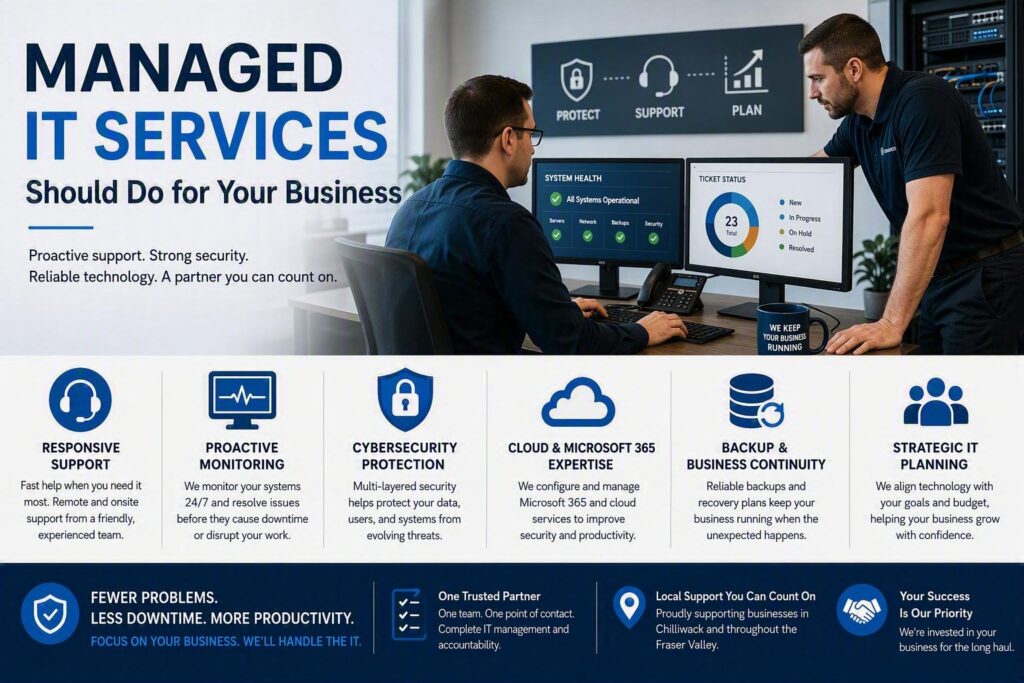
When technology stops working, business slows down. A staff member loses access to a critical document, email starts behaving unexpectedly, or the internet connection drops during an important client meeting. These situations are rarely just IT problems. They affect productivity, customer service, revenue, and day-to-day operations.
That is where managed IT services provide value. Rather than simply fixing issues after they occur, managed IT services help businesses keep systems running smoothly, protect important data, and ensure expert support is available when problems arise. For small and medium-sized organizations, the goal is not to have the most advanced technology. The goal is to have reliable, secure systems that support business growth instead of creating obstacles.
What Managed IT Services Are Designed to Do
Managed IT services provide ongoing technology support, system monitoring, maintenance, cybersecurity, and strategic planning. Instead of waiting for a server failure, network outage, or security incident, a managed IT provider works proactively to identify and resolve issues before they impact operations.
Services typically include a combination of remote support and onsite assistance, covering:
- Workstations and laptops
- Business networks
- User accounts and permissions
- Backup systems
- Cloud platforms
- Cybersecurity solutions
- Business applications
- VoIP and communications systems
The exact scope should reflect the organization’s needs. A healthcare clinic, construction company, nonprofit organization, and legal office all use technology differently and face unique challenges.
One of the biggest advantages is accountability. Rather than coordinating with multiple vendors for internet service, cybersecurity, email, and hardware support, businesses have a single trusted partner who understands how everything works together. When issues span multiple systems, there is one team responsible for identifying the root cause and driving resolution.
Why Reactive IT Support Often Costs More
Traditional break-fix IT support may seem affordable because you only pay when something goes wrong. However, the true cost of technology failures often extends far beyond the repair bill.
Unexpected downtime can result in:
- Lost employee productivity
- Delayed projects and billing
- Missed appointments
- Customer service interruptions
- Increased operational stress
- Lost revenue opportunities
If an incident involves security threats such as ransomware attacks, compromised accounts, or failed backups, the consequences can affect the entire organization.
Reactive support also makes technology planning difficult. Important upgrades are frequently postponed until equipment fails completely, forcing rushed purchasing decisions and emergency replacements.
Managed IT services help reduce these surprises through ongoing maintenance, lifecycle planning, and proactive monitoring. While no provider can prevent every outage or hardware failure, a proactive approach significantly reduces avoidable disruptions and improves response times when unexpected issues occur.
The Most Important Components of Managed IT Services
Technology support should be easy to understand. Business leaders do not need a list of technical product names. They need confidence that their systems are protected, supported, and aligned with business goals.
Responsive IT Support for Your Team
Fast and reliable support remains one of the most valuable aspects of managed services.
A quality provider understands that different issues carry different levels of urgency. A receptionist unable to access scheduling software, a law office locked out of critical documents, or a retail location experiencing payment system failures cannot wait days for assistance.
Effective support includes:
- Rapid response times
- Clear communication
- Experienced technicians
- Remote troubleshooting capabilities
- Onsite service when necessary
Remote support resolves many issues quickly, but onsite expertise remains important for networking problems, hardware replacement, office relocations, and infrastructure projects.
Proactive Maintenance and Monitoring
Many major IT issues begin with small warning signs that go unnoticed.
Examples include:
- Hard drives nearing capacity
- Failed software updates
- Aging firewall hardware
- Wireless access point failures
- Backup jobs that stop running
Ongoing monitoring helps identify these risks early.
Preventive maintenance should include:
- Software updates and patching
- Network performance reviews
- Backup verification
- User account management
- Security reviews
- Asset documentation
While much of this work happens behind the scenes, it is often what prevents minor issues from becoming costly emergencies.
Cybersecurity That Matches Business Needs
Cybersecurity is no longer optional for organizations that rely on digital systems.
Effective protection goes beyond installing antivirus software. Modern cybersecurity combines technology, employee awareness, and incident response planning.
Common cybersecurity measures include:
- Multi-factor authentication (MFA)
- Endpoint protection
- Managed threat detection
- Strong access controls
- Security patching
- Employee cybersecurity awareness training
- Advanced email filtering solutions
Employees should also understand how to identify suspicious emails and know exactly how to report potential threats.
The appropriate security strategy depends on the organization’s risk profile. Businesses handling confidential client records, healthcare data, financial information, or donor details often require stronger protections than organizations with limited sensitive information.
A trusted IT partner explains recommendations clearly and focuses on practical risk reduction, not fear-based sales tactics.
Microsoft 365, Cloud Services, and Business Continuity
Cloud platforms have transformed the way businesses operate. Solutions such as Microsoft 365 make collaboration easier, support remote work, and improve accessibility.
However, simply moving to the cloud does not automatically solve issues related to security, permissions, or backup management.
Managed IT providers help organizations properly configure Microsoft 365 and other cloud platforms by:
- Managing user access
- Securing accounts
- Supporting remote workers
- Implementing secure file-sharing practices
- Protecting business data
- Creating recovery plans
Business continuity planning is equally important. Organizations should know how they will continue operating during internet outages, hardware failures, cyber incidents, or data loss scenarios.
When Managed IT Services Make Sense
Managed IT services are ideal for organizations that depend heavily on technology but do not require a large internal IT department.
Benefits typically include:
- Access to a broader range of expertise
- Consistent system management
- Improved cybersecurity
- Predictable technology budgeting
- Reduced downtime
- Strategic IT planning
Managed services can also complement existing internal staff. Many organizations use external providers for day-to-day support, cybersecurity oversight, and specialized projects while internal personnel focus on operational priorities.
The appropriate level of support depends on factors such as:
- Number of employees
- Technology complexity
- Data sensitivity
- Compliance requirements
- Number of locations
- Cost of downtime
Every organization has different requirements, which is why service plans should be tailored rather than standardized.
How to Choose the Right Managed IT Partner
Selecting a managed IT provider should involve more than comparing service packages.
Ask questions such as:
- How are support tickets handled?
- What happens during a critical outage?
- What response times can be expected?
- What services are included each month?
- How are projects quoted?
- Who will support our organization?
Communication matters as much as technical expertise. Business leaders should leave conversations understanding the issue, the available options, and the expected impact on operations.
Strong providers also discuss long-term planning. Technology should have a clear roadmap that addresses:
- Equipment replacement schedules
- Security improvements
- Business growth
- Infrastructure upgrades
- Risk management
For organizations throughout Chilliwack and the Fraser Valley, having access to local onsite support can provide significant value when network equipment, servers, or office systems require hands-on attention.
Turning Technology Into a Business Advantage
Technology should help employees serve customers, complete work efficiently, and support organizational growth. It should not create constant interruptions or uncertainty.
Managed IT services provide more than technical support. They offer proactive maintenance, cybersecurity protection, strategic planning, and dependable expertise that helps organizations avoid unnecessary downtime and costly surprises.
At Myriad Technologies, managed IT support is built around long-term relationships and practical solutions. The focus is on understanding how each organization operates, responding when challenges arise, and providing recommendations that align with real business goals.
The best time to evaluate your IT environment is before the next outage, security incident, or equipment failure occurs. Understanding your current systems, risks, and support gaps today can help transform technology from an ongoing concern into a reliable asset that supports your business every day.