A phishing email reaches a staff member. A laptop is still running an old operating system. A former employee’s account remains active. Any one of these issues can become a costly interruption, but they are easy to miss when everyone is focused on serving clients and keeping the business moving. A network security assessment for business gives owners and managers a clear view of where their technology is exposed, what deserves attention first, and what can wait.
For small and midsize organizations, this is not about creating a thick technical report that sits unread in a folder. It is about protecting the systems your team relies on every day: email, files, cloud applications, phones, Wi-Fi, workstations, servers, backups, and the devices used outside the office.
What a Network Security Assessment Actually Does
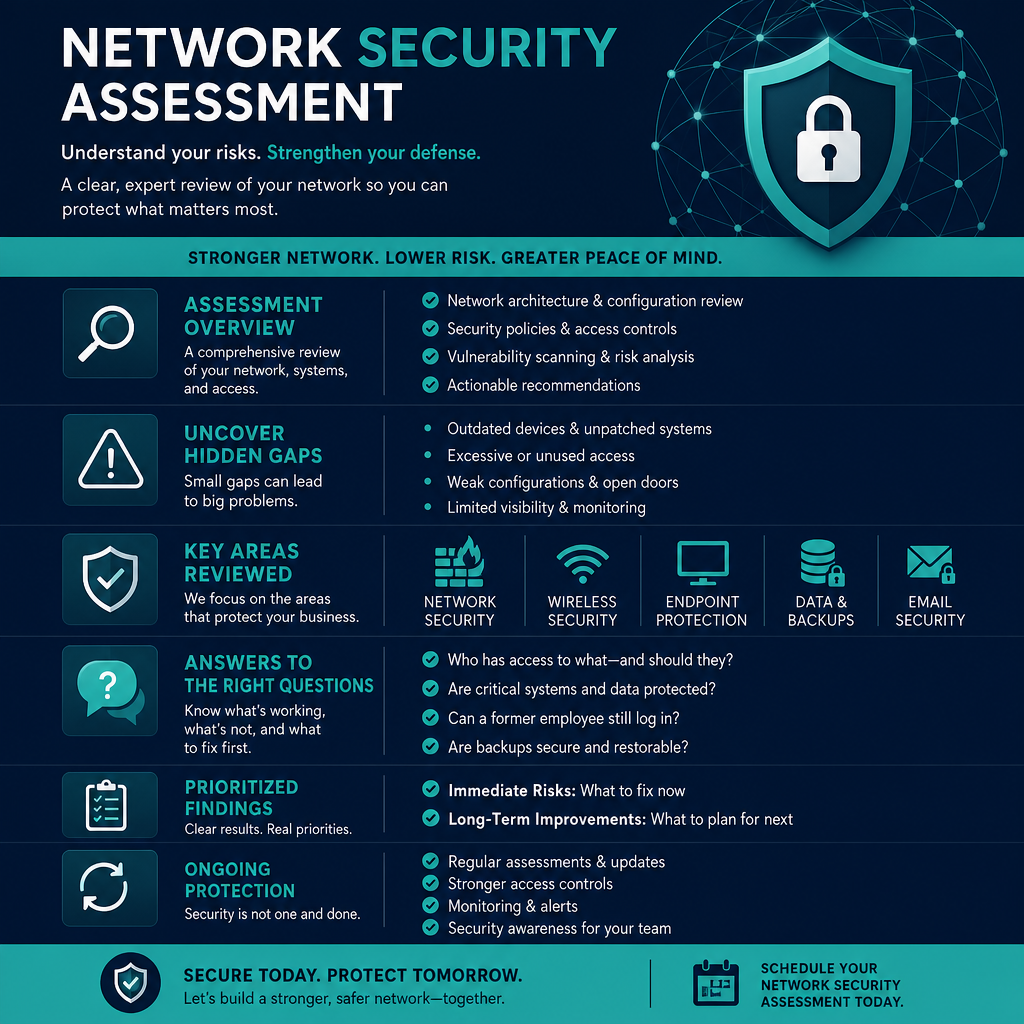
A security assessment is a structured review of your network, devices, accounts, configurations, and everyday technology practices. Its purpose is to identify weaknesses before they become an opening for ransomware, fraud, data loss, or downtime.
The process should look at both technology and people. A properly configured firewall matters, but so does whether staff can recognize a suspicious message. Multifactor authentication can prevent many account takeovers, but only if it is consistently enabled and employees understand how to use it. Security works best when safeguards fit the way people actually work.
An assessment is different from an emergency response. Emergency support begins after something has gone wrong. An assessment is preventative. It helps your organization make informed improvements while there is still time to plan them carefully, budget appropriately, and avoid unnecessary disruption.
Why Businesses Often Have Hidden Gaps
Most security gaps do not appear because someone ignored security altogether. They develop over time. A business adds cloud software, hires new staff, opens a second location, allows remote work, or replaces a server. Each change can leave behind an old setting, unused account, unsupported device, or unclear responsibility.
This is especially common in organizations without a large internal IT department. An office manager may be responsible for keeping technology running alongside many other duties. A professional practice may have software vendors, internet providers, and outside IT support, yet no one has a complete picture of how those pieces connect. A nonprofit may need to balance limited budgets against the responsibility of protecting donor, employee, or client information.
The result is not necessarily poor technology. It is often technology that has grown faster than its documentation and oversight.
What Should Be Reviewed During an Assessment?
The scope depends on your organization’s size, industry, and systems. A healthcare provider handling sensitive records has different obligations than a small professional office, while both still need secure access, reliable backups, and a plan for suspicious activity.
A useful network security assessment for business typically examines several connected areas:
- Network perimeter and Wi-Fi: Firewalls, internet connections, remote-access tools, guest networks, wireless encryption, and whether unauthorized devices can connect.
- Devices and software: Workstations, laptops, servers, mobile devices, operating-system updates, endpoint protection, and unsupported applications.
- User accounts and access: Password policies, multifactor authentication, administrator privileges, shared accounts, former employee access, and access to cloud services.
- Data protection and backups: Where critical files are stored, who can access them, whether backups are protected from ransomware, and whether recovery has been tested.
- Email and phishing defenses: Spam filtering, domain protections, suspicious-message reporting, and staff awareness practices.
- Monitoring and response readiness: Security alerts, log retention, vendor contacts, incident-response responsibilities, and the steps to take if an account or device is compromised.
The goal is not to treat every finding as equally urgent. A missing software update on a low-risk device is different from an exposed remote-access system or an administrator account without multifactor authentication. Good assessment work separates immediate risks from improvements that can be scheduled as part of a longer-term technology plan.
The Questions Leaders Should Ask
Business leaders do not need to become network specialists to ask useful questions. Start with practical questions tied to operations.
Can we identify every person and device with access to our systems? Could a former employee still reach company email or files? If a laptop were stolen, would its data be protected? If ransomware encrypted our shared files, how quickly could we restore them? If the internet or a server failed, who would call whom and what would staff do next?
The answers reveal more than technical weaknesses. They show whether the organization has clear ownership. When a security incident occurs, confusion can add hours or days to recovery. Knowing who has authority to disable accounts, contact a vendor, communicate with staff, and approve emergency work can be as valuable as the technology itself.
Assessment Findings Need Context, Not Fear
Security reports can be intimidating when they are filled with severity scores, acronyms, and dozens of recommendations. That approach rarely helps a busy owner or operations manager decide what to do next.
The best assessment translates findings into business terms. It explains what the issue is, what could happen if it is not addressed, how likely that risk is, what the recommended fix involves, and whether the work could affect normal operations. It should also acknowledge trade-offs.
For example, tighter access controls may require staff to use multifactor authentication more often. Network segmentation may involve planning and hardware costs. Replacing outdated equipment can be an investment, but continuing to use unsupported systems can create larger costs through downtime, insurance concerns, or a preventable breach.
Not every recommendation must happen immediately. What matters is having a prioritized plan that addresses the highest risks first and gives leadership a realistic timeline for the rest.
Common Improvements After an Assessment
Many organizations discover that meaningful security gains come from practical housekeeping rather than dramatic changes. Removing inactive accounts, applying overdue updates, limiting administrator access, separating guest Wi-Fi from business systems, and reviewing backup recovery procedures can significantly reduce exposure.
Multifactor authentication is another frequent priority, particularly for email, financial systems, remote access, and cloud applications. A password alone can be stolen through phishing, reuse across websites, or a compromised device. Multifactor authentication adds a second check that makes an attacker’s job much harder.
Backup strategy also deserves close attention. Having backups is not enough if they are connected to the same network and can be encrypted during an attack. Organizations should know where backups are stored, how long they are retained, who can delete them, and how restoration would work under pressure. Testing a recovery is the only way to know whether a backup plan is truly useful.
How Often Should You Assess Your Network?
For many small and midsize organizations, a formal review once a year is a sensible starting point. More frequent reviews may be appropriate for organizations handling regulated information, processing payments, supporting remote employees, or making major technology changes.
An assessment should also follow a significant event. That may include moving offices, adding a new location, adopting a new cloud platform, merging with another organization, experiencing a phishing incident, or replacing core network equipment. Security is not a one-time project because your systems and risks do not stay still.
Between formal assessments, regular maintenance matters. Updates, account reviews, backup checks, endpoint monitoring, and staff guidance keep small issues from becoming larger ones. This is where a proactive managed IT relationship can be especially valuable: security is treated as an ongoing operational responsibility, not a crisis purchase.
Choosing the Right Help
A capable IT partner should begin by listening. They should understand what information you handle, which systems are essential, how staff work, and what downtime would mean for your organization. Technical tools are useful, but they cannot replace context.
Ask whether the provider will explain findings in plain language, provide clear priorities, and help implement the recommended changes. Also ask how they handle urgent concerns discovered during the review. A serious vulnerability should not be buried in a final report weeks later.
For Fraser Valley organizations, Myriad Technologies approaches security as part of dependable day-to-day IT support: understanding the business first, then building practical protection around the people and systems that keep it running.
A security assessment should leave you with more than a list of problems. It should give you confidence that the next steps are clear, manageable, and connected to the way your business serves its customers.