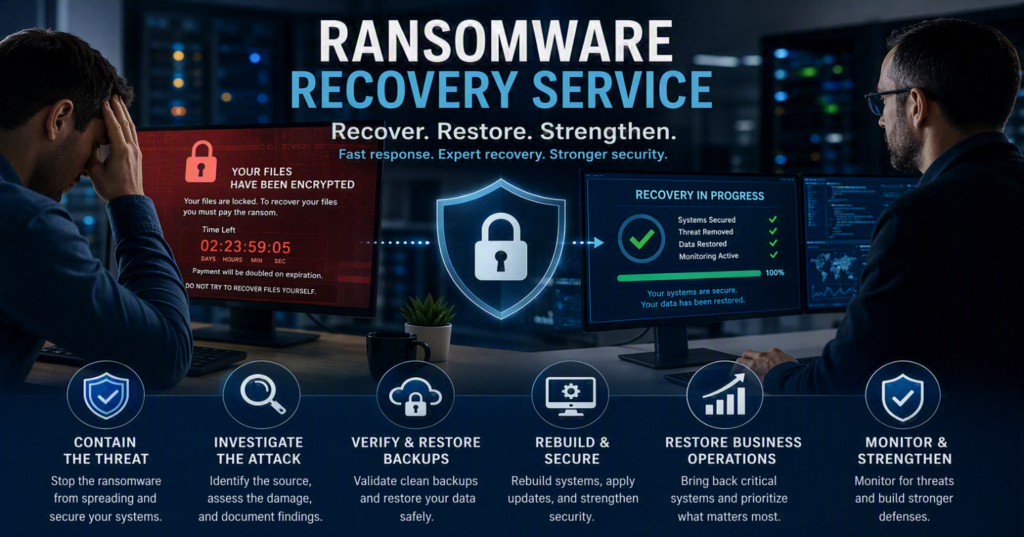
At 8:15 on a Monday morning, employees can’t access files, the accounting system displays a ransom note, and customer calls are already coming in. This is when a professional ransomware recovery service becomes more than an IT expense. It becomes your organization’s roadmap to containing the attack, restoring critical systems, and minimizing costly downtime.
For small and medium-sized businesses, ransomware attacks can feel deeply personal. Whether you’re serving patients, managing client projects, processing payroll, or supporting community members, a ransomware incident can bring operations to a halt. Recovering safely requires more than simply turning computers back on. It requires investigation, secure restoration, and a strategy to prevent future attacks.
What Does a Ransomware Recovery Service Do?
A ransomware recovery service helps organizations:
- Contain the attack before it spreads further
- Investigate how the breach occurred
- Assess affected systems and data
- Restore files and business operations safely
- Strengthen cybersecurity defenses
- Reduce the risk of future ransomware incidents
Every ransomware attack is different. A compromised Microsoft 365 account requires a different response than file encryption spreading through servers and shared drives. The right recovery plan depends on the scope of the incident and the systems affected.
Containment Comes First
The first priority is stopping the ransomware from reaching additional devices, servers, backups, and cloud environments. Infected systems may need to be disconnected from the network immediately to reduce further damage.
While this can be disruptive in the short term, allowing a compromised network to remain online can turn a manageable incident into a major business crisis.
Investigating the Source of the Attack
Once the threat is contained, IT specialists investigate:
- The likely entry point
- Compromised user accounts
- Affected systems and applications
- Potential data theft
- Suspicious email activity
- Unauthorized remote access
Many modern ransomware groups use double extortion tactics, encrypting files while also threatening to release stolen data. Understanding whether information was accessed or exfiltrated is critical for compliance obligations, customer communication, insurance claims, and legal requirements.
Secure Recovery and Restoration
Recovery involves more than restoring files. It includes:
- Restoring clean backups
- Rebuilding compromised systems
- Resetting passwords
- Applying security updates
- Reviewing administrator privileges
- Strengthening email and remote access security
The goal is not only to recover operations but also to ensure the environment is trustworthy and secure.
The First Hours After a Ransomware Attack Matter Most
A rushed response can make recovery more difficult.
Employees often try to keep work moving by reopening files, reconnecting devices, or using personal email accounts. While understandable, these actions can spread the infection, overwrite important forensic evidence, or expose additional information.
If you suspect ransomware:
- Disconnect affected devices from wired and wireless networks.
- Avoid deleting ransom notes or suspicious files.
- Do not begin restoring backups immediately.
- Preserve evidence, including screenshots and timelines.
- Contact your IT provider or incident response partner right away.
If your organization has cyber insurance, notify your insurer as soon as possible. Many policies require prompt reporting and may recommend approved forensic teams, legal counsel, or recovery specialists. Delays can affect coverage and response options.
It’s also helpful to designate a single internal point of contact for updates and decision-making. Clear communication reduces confusion and helps employees follow appropriate response procedures.
How a Ransomware Recovery Service Restores Operations
1. Contain and Document the Incident
Recovery teams isolate affected systems, investigate compromised accounts, analyze suspicious activity, and document findings.
Detailed documentation supports:
- Cyber insurance claims
- Legal requirements
- Regulatory reporting
- Stakeholder communications
2. Verify Backup Integrity
A backup is only valuable if it is:
- Accessible
- Complete
- Unaffected by the attack
- Successfully tested
Before restoration begins, specialists verify backup integrity and confirm that malware is not present.
Organizations should maintain multiple backup copies, including isolated or immutable backups protected from routine network access. Cloud storage alone does not automatically provide ransomware protection.
Learn more about protecting backups with Immutable Backups and Ransomware Protection.
3. Rebuild Before Reconnecting
Restoring data into an unchanged environment can leave the original security weaknesses intact.
A complete recovery may require:
- Rebuilding servers
- Reimaging workstations
- Applying security patches
- Removing unauthorized software
- Resetting credentials
- Reviewing administrative permissions
Multifactor authentication should also be verified for:
- Microsoft 365
- Email platforms
- Remote access systems
- Administrative accounts
- Financial applications
Although this process may take additional time, it significantly reduces the risk of reinfection.
4. Restore Critical Services First
Not every system has the same business value.
For example:
- Healthcare organizations may prioritize patient scheduling and communications.
- Professional services firms often need email and document management systems restored first.
- Nonprofits may prioritize donor databases, intake services, and payroll systems.
A structured recovery plan helps organizations identify priorities and restore essential operations quickly while maintaining security.
5. Monitor and Strengthen Security
Recovery doesn’t end when systems are back online.
Organizations should continue with:
- Enhanced threat monitoring
- Security reviews
- Backup improvements
- Access control assessments
- Staff awareness training
The goal is to emerge stronger and more resilient after the incident.
Should You Pay the Ransom?
There is no universal answer.
Paying a ransom does not guarantee:
- Successful file recovery
- Functional decryption tools
- Deletion of stolen data
- Protection against future extortion
The decision should never be made in panic. Businesses should consult legal counsel, cyber insurance providers, and qualified incident response professionals before considering payment.
For organizations reviewing coverage after an incident, our guide to Cybersecurity Insurance Requirements can help explain important considerations.
The best position is to avoid having payment become the only recovery option. Tested backups and a documented recovery strategy provide flexibility when every minute counts.
Choosing the Right Ransomware Recovery Partner
When evaluating a ransomware recovery provider, ask:
- Can they respond quickly?
- Will they coordinate with your insurance provider?
- How do they validate backup restorations?
- What communication can you expect during recovery?
- What security improvements will be implemented afterward?
A reputable provider should explain the situation clearly, provide realistic expectations, and outline a structured recovery process.
For organizations in Chilliwack and throughout the Fraser Valley, local support can be especially valuable when onsite assistance is required for servers, networking equipment, or staff coordination.
At Myriad Technologies, we help businesses recover from ransomware attacks through rapid response, clear communication, and long-term cybersecurity improvements.
Preparing Before a Ransomware Attack Occurs
The most effective ransomware recovery strategy begins before an incident ever happens.
A cybersecurity readiness review should include:
1. Verified Backups
Maintain secure backups, including offsite or isolated copies, and regularly test restore procedures.
2. Multifactor Authentication (MFA)
Require MFA for Microsoft 365, email systems, cloud services, remote access, and privileged accounts.
3. Regular Security Updates
Keep operating systems, applications, firewalls, servers, and network equipment up to date.
4. Limited User Permissions
Apply least-privilege access so compromised accounts cannot access all company resources.
5. Incident Response Planning
Maintain a documented response plan with current contact information for IT providers, insurance partners, legal counsel, and leadership teams.
6. Employee Security Awareness
Employee training remains one of the most effective cybersecurity defenses. Most users don’t click malicious links because they’re careless. They do so because the message appears legitimate, urgent, or relevant to their work.
Regular security awareness training and an easy reporting process can significantly reduce risk.
Learn more in our guide to E-Mail Security Best Practices.
Protect Your Business with Expert Ransomware Recovery Services
No organization can eliminate every cyber risk. However, businesses that maintain secure backups, implement strong cybersecurity controls, and work with experienced IT professionals can recover more quickly and minimize disruption.
When a ransomware attack occurs, having a trusted ransomware recovery service on your side can help contain the threat, restore critical systems, and strengthen your organization’s long-term security posture.
If you’re looking for ransomware recovery services in Chilliwack or the Fraser Valley, Myriad Technologies provides fast, reliable support to help businesses recover with confidence.