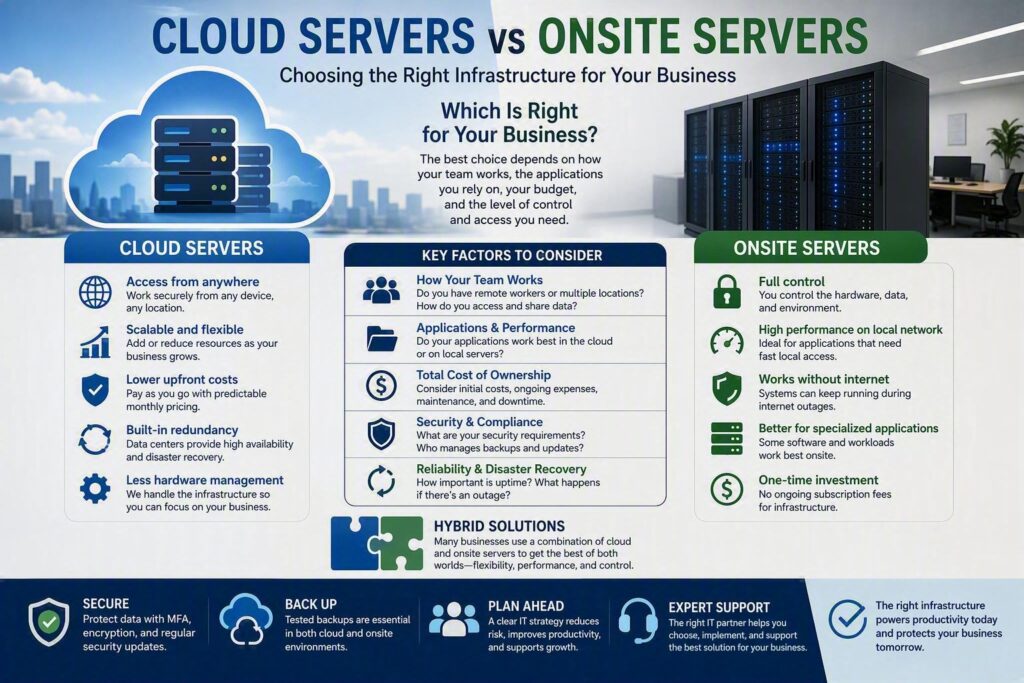
Most businesses do not start thinking about servers until something goes wrong. An aging server requires another costly repair, employees struggle to access files while working remotely, or a power outage brings operations to a standstill. When comparing cloud servers vs onsite servers, the best choice is not necessarily the newest technology. It is the solution that supports your team, protects your data, and aligns with how your business actually operates.
For small and mid-sized organizations, both cloud and onsite infrastructure can be the right fit. Some businesses benefit from the control of local servers, while others gain flexibility from cloud-based environments. Many organizations find the ideal solution somewhere in between. The key is understanding the advantages, limitations, and business implications of each approach.
Understanding the Difference Between Cloud and Onsite Servers
An onsite server is physical hardware located in your office or facility. It may host shared files, business applications, databases, or user authentication services. Your organization owns or leases the hardware and is responsible for maintenance, security, backups, updates, and eventual replacement.
A cloud server operates in a professionally managed data center and is accessed through an internet connection. Cloud solutions may include virtual servers, cloud storage, hosted applications, or Microsoft 365 environments. While the cloud provider maintains the underlying infrastructure, your business remains responsible for proper security, user management, data protection, and access controls.
The biggest difference is where the infrastructure resides and who manages the hardware. Cloud services reduce the burden of owning and maintaining physical equipment, while onsite servers provide direct control over systems and data.
Start With How Your Team Works
Before comparing features and costs, consider how employees access information and perform their daily tasks.
Organizations with:
- Remote employees
- Multiple office locations
- Mobile workforces
- Frequent collaboration with clients and external partners
often benefit from cloud-based systems because staff can securely access applications and files from virtually anywhere.
Cloud platforms can simplify collaboration by allowing employees to work from approved devices without relying heavily on VPN connections or office-based infrastructure.
However, onsite servers can still be the best choice for businesses that depend on specialized software, large local datasets, or applications designed specifically for local network performance.
For example, certain manufacturing, engineering, medical, and industry-specific applications may run more efficiently on dedicated local infrastructure than in a cloud-hosted environment.
Because business requirements vary, many organizations choose a hybrid solution that combines local servers with cloud services.
Examples include:
- Keeping specialized software on local servers
- Moving email to Microsoft 365
- Storing backups in the cloud
- Using cloud collaboration tools alongside onsite applications
A hybrid environment often provides the flexibility of the cloud while retaining the performance advantages of local systems.
Comparing Cloud and Onsite Server Costs
Cloud infrastructure typically requires a lower upfront investment.
Instead of purchasing server hardware, organizations usually pay monthly subscription fees based on:
- Users
- Storage requirements
- Processing power
- Backup retention
- Licensing
This model can improve cash flow and make scaling easier as business needs change.
However, cloud costs should be reviewed regularly. Storage growth, additional licenses, backup services, and increased computing resources can gradually increase monthly expenses.
Onsite servers usually require a larger initial investment that may include:
- Server hardware
- Installation and configuration
- Networking equipment
- Battery backup systems
- Cybersecurity tools
- Backup hardware
- Warranty coverage
Businesses must also plan for eventual hardware upgrades and server replacement.
When evaluating costs, it is important to include potential downtime. The lowest-priced solution is not always the most cost-effective if employees cannot access critical systems when they need them.
Security Is Not Automatic in Either Environment
Some organizations assume cloud platforms are automatically secure because they are hosted in enterprise-grade data centers. Others believe onsite servers are safer because they remain physically inside their office.
In reality, security depends on implementation, management, and ongoing maintenance.
Cloud providers invest heavily in physical infrastructure, redundancy, and monitoring. However, organizations still need strong security controls to protect cloud environments.
Common risks include:
- Weak passwords
- Poor access controls
- Phishing attacks
- Compromised devices
- Misconfigured permissions
Implementing multi-factor authentication (MFA) is one of the most effective ways to strengthen cloud security and reduce the risk of unauthorized account access.
Onsite servers present different challenges. Organizations must protect equipment from:
- Theft
- Fire
- Water damage
- Power failures
- Hardware failures
- Unauthorized physical access
They must also ensure servers, applications, firewalls, and operating systems remain properly updated.
Regardless of where infrastructure is located, a strong security strategy should include:
- Multi-factor authentication
- Endpoint protection
- Security monitoring
- Regular patching
- Employee cybersecurity training
- Access control reviews
- Tested backup systems
Reliability Depends on Planning
Cloud infrastructure offers excellent redundancy because services operate across multiple professionally managed data centers.
If one hardware component fails, resources can often be shifted automatically to alternate systems.
This level of redundancy is difficult and expensive for most small businesses to build internally.
However, cloud services depend on reliable internet connectivity. If your office loses internet access, employees may lose access to cloud applications and data unless a backup internet solution is available.
Organizations that rely heavily on cloud services should consider:
- Secondary internet connections
- Cellular failover solutions
- Network redundancy planning
Onsite servers can continue functioning within the office during internet outages, depending on the application being used.
However, local infrastructure introduces other risks. A hardware failure, power problem, flood, fire, or building issue can affect access to critical systems unless proper redundancy and backups are in place.
The most reliable environments are designed around recovery planning rather than assuming failures will never occur.
Moving to the Cloud Requires Careful Planning
Many organizations are interested in modernizing infrastructure through cloud migration strategies.
While cloud migration can improve flexibility and accessibility, it should never be treated as a simple file copy project.
Applications often have:
- Licensing requirements
- Database dependencies
- Security considerations
- Integration requirements
- User workflow impacts
A rushed migration can create:
- Duplicate files
- Broken permissions
- User confusion
- Application disruptions
- Productivity losses
Successful migrations begin by identifying:
- Who uses each system
- What data is involved
- How applications interact
- Recovery requirements
- Security requirements
Businesses should also complete proper data migration validation and planning before moving critical systems.
Similarly, replacing an onsite server provides an opportunity to improve security, clean up permissions, remove obsolete accounts, and modernize documentation.
Which Option Is Best for Your Business?
Cloud servers are often an excellent choice when organizations need:
- Flexible remote access
- Scalability
- Reduced hardware management
- Modern collaboration tools
- Simplified disaster recovery
Onsite servers may remain the better choice when businesses require:
- Specialized applications
- Large local datasets
- Local performance advantages
- Minimal internet dependency
- Greater infrastructure control
For many organizations, the answer is not cloud or onsite. It is a thoughtfully designed hybrid environment that combines the strengths of both.
Making the Right Infrastructure Decision
Choosing between cloud servers and onsite servers is ultimately a business decision, not just a technology decision.
The right solution should support productivity, protect critical data, reduce risk, and provide employees with reliable access to the tools they need every day.
For organizations throughout Chilliwack and the Fraser Valley, evaluating your current environment can reveal where aging infrastructure, security gaps, or access limitations may be affecting operations. Myriad Technologies helps businesses assess their existing systems, understand risks, and create practical infrastructure strategies that align with long-term goals.
Whether the best solution is cloud, onsite, or a hybrid combination, the goal remains the same: technology that supports your business without getting in the way of it.