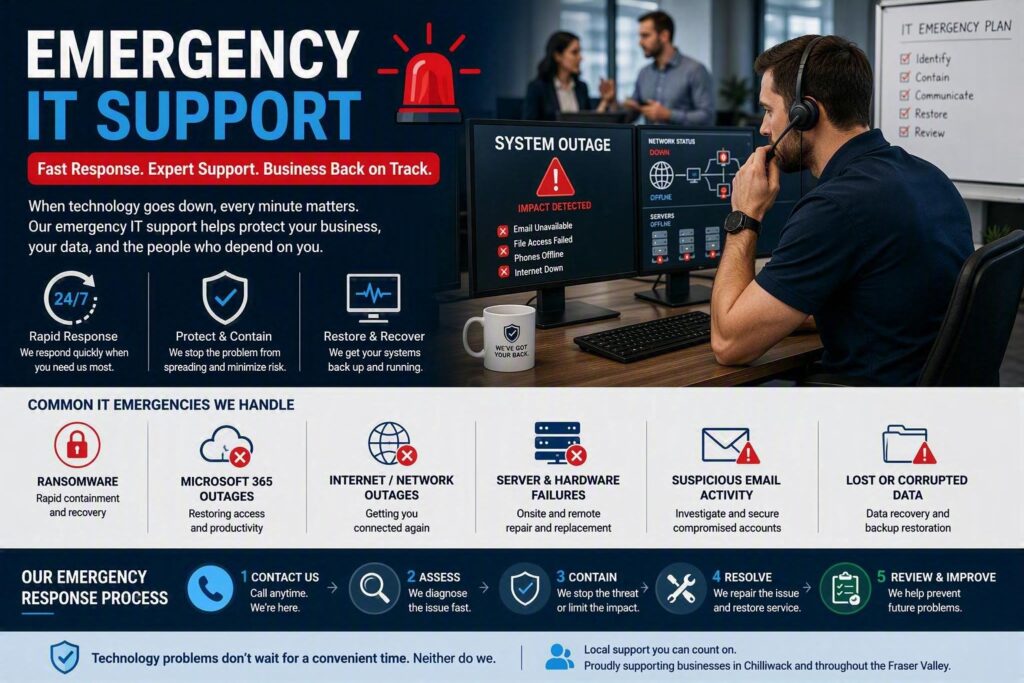
A Monday morning technology outage can affect far more than email. Employees may lose access to client records, scheduling systems, payment platforms, phones, and essential business applications. When that happens, emergency IT support becomes about much more than repairing a computer. It becomes about protecting productivity, customer service, revenue, and business continuity.
For small and mid-sized organizations, technology disruptions often feel even more urgent because there is no internal IT department ready to respond immediately. The most effective response combines fast action, clear communication, and experienced technical support that restores operations while minimizing risk.
What Qualifies as an IT Emergency?
Not every technology issue requires an emergency response. A single password reset or a printer malfunction can usually wait for normal support channels.
A true IT emergency is a problem that creates a significant operational, financial, security, or compliance risk.
Common examples include:
- Organization-wide internet outages
- Server failures
- Microsoft 365 outages affecting multiple users
- Business phone system failures
- Network infrastructure failures
- Suspected data breaches
- Cybersecurity incidents
- Critical application outages
- Corrupted or inaccessible business data
- Suspicious email activity from business accounts
The urgency depends on how the issue impacts daily operations. A brief connectivity problem might be a minor inconvenience for one organization but a major disruption for a healthcare clinic, legal office, or financial services provider.
The key question is always: How many people are affected, what business functions are unavailable, and could sensitive information be at risk?
The Critical First Hour of an IT Incident
The first hour often determines whether an isolated issue becomes a larger business disruption.
Many organizations make the mistake of immediately rebooting systems, attempting multiple fixes, or allowing employees to troubleshoot independently. While well-intentioned, these actions can sometimes worsen the situation, overwrite valuable diagnostic information, or allow cybersecurity threats to spread.
Instead, begin by gathering clear information:
- Who is affected?
- When did the issue begin?
- What changed recently?
- Is there an error message?
- Are files, email, phones, or internet services impacted?
- Is the problem isolated or widespread?
Accurate details allow support technicians to diagnose the issue more efficiently.
If you suspect a cybersecurity incident involving malware, ransomware, or unauthorized network access, disconnect the affected device from the network immediately. Remove its Wi-Fi connection or unplug the network cable, but avoid shutting down the device unless directed by your IT provider.
For larger outages, designate:
- One person to communicate with staff
- One person to communicate with IT support
This approach prevents confusion, duplicate reporting, and unauthorized troubleshooting efforts that can complicate recovery.
What Effective Emergency IT Support Looks Like
During a business outage, technical expertise matters. Equally important is how that support is delivered.
Employees should not need advanced technical knowledge before receiving help. A quality IT provider will listen carefully, ask relevant questions, explain findings clearly, and focus on restoring business operations as quickly as possible.
Strong emergency support begins with triage.
Technicians quickly identify whether the issue involves:
- Network infrastructure
- Internet providers
- Hardware failure
- Account credentials
- Microsoft 365 services
- Cloud applications
- Security threats
- Server issues
The goal is to restore essential functions safely rather than applying temporary fixes that create additional risks.
Remote and Onsite Support Matter
Many emergencies can be diagnosed and resolved remotely. However, some situations require onsite assistance.
Examples include:
- Failed switches or firewalls
- Damaged network equipment
- Cabling issues
- Hardware replacements
- Power-related failures
- Server infrastructure problems
Organizations should understand in advance how emergency requests are handled and whether their provider offers both remote and onsite support when required.
Cybersecurity Incidents Require Specialized Response
Cybersecurity emergencies must be approached differently than standard technical failures.
Warning signs can include:
- Ransom notes appearing on devices
- Files becoming inaccessible
- Unexpected login prompts
- Suspicious account activity
- Email accounts sending unauthorized messages
- Unusual file encryption
If any of these occur, assume the situation may be serious until properly investigated.
Do not:
- Contact attackers
- Pay ransom demands
- Attempt extensive self-remediation
- Install random security tools hoping to remove the threat
Instead, work with experienced professionals who can:
- Isolate affected systems
- Protect backups
- Investigate account activity
- Determine the scope of the incident
- Preserve evidence
- Assess data exposure risks
Organizations may also need to review passwords and verify multi-factor authentication (MFA) settings. However, credential changes should be performed carefully and from trusted systems during the recovery process.
Recovery is only complete when organizations can confirm:
- Systems are fully restored
- Threat actors no longer have access
- Vulnerabilities have been addressed
- Backups remain secure
- Security controls have been strengthened
Why Preparation Makes Recovery Faster
Emergency IT support is most effective when the provider already understands the organization’s environment.
When IT professionals have documentation covering:
- Network infrastructure
- Internet connections
- Cloud services
- Server configurations
- Backup systems
- Critical business applications
they can spend less time gathering information and more time solving the problem.
This is one reason many organizations choose managed IT services.
Ongoing proactive monitoring and maintenance can help identify potential failures before they lead to outages. While no provider can prevent every incident, regular monitoring significantly reduces the likelihood of unexpected downtime and improves recovery speed when issues occur.
Questions to Ask Before an Emergency Happens
The best time to evaluate emergency IT support is before you need it.
Important questions include:
- How are after-hours emergencies handled?
- What response times are available?
- Is onsite support offered?
- Who manages communication during a cyber incident?
- How frequently are backups tested?
- What systems are monitored proactively?
- How are critical outages prioritized?
It is also important to understand the difference between response time and resolution time.
A provider may respond immediately, but certain situations such as hardware replacement, ISP outages, or large-scale data recovery may require additional time to fully resolve.
Clear expectations help organizations make informed business decisions during disruptions.
Turning an IT Emergency Into an Opportunity for Improvement
Once systems are restored, organizations should conduct a brief post-incident review.
Consider questions such as:
- What caused the problem?
- How quickly was it identified?
- Were staff properly informed?
- Did existing procedures work effectively?
- What improvements could reduce future risk?
The goal is not to assign blame. The goal is to strengthen processes, improve resilience, and reduce future downtime.
At Myriad Technologies, emergency IT support focuses on both short-term recovery and long-term stability. That means resolving immediate issues, explaining what happened in plain language, and recommending practical improvements that help prevent similar disruptions in the future.
Whether the solution involves enhanced backups, stronger cybersecurity controls, updated hardware, or improved monitoring, every incident provides an opportunity to build a more resilient technology environment.
When technology fails, businesses need more than a quick fix. They need a trusted partner capable of restoring operations, protecting critical data, and guiding them through the unexpected with confidence.