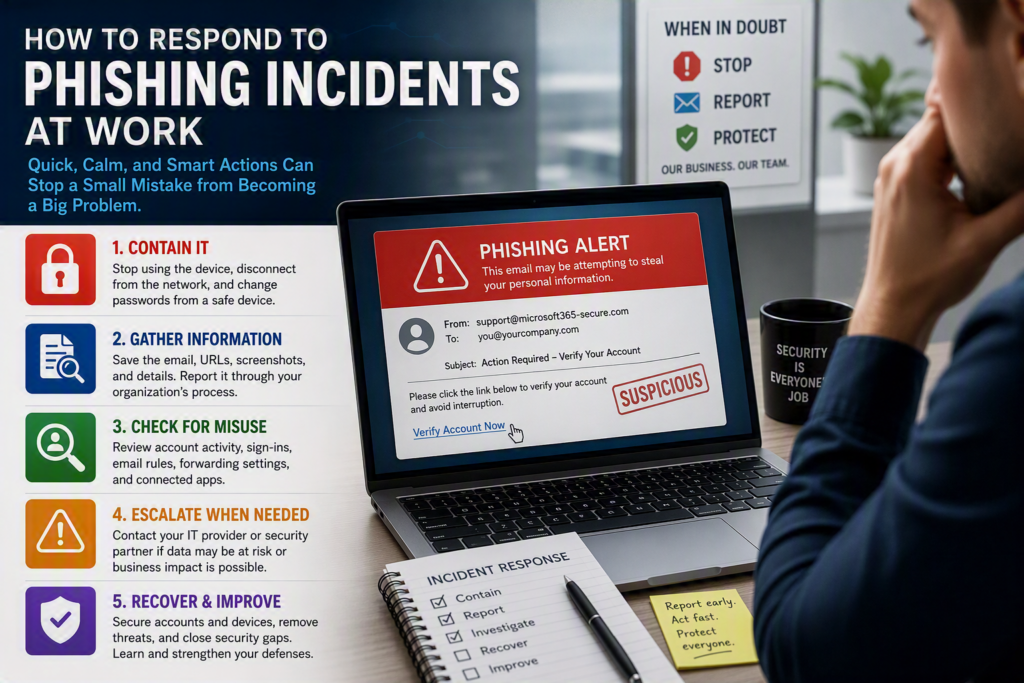
An employee forwards an email that appears to come from Microsoft 365, a trusted supplier, or even their bank. They click the link, enter their password, and only afterward realize something doesn’t seem right.
This is the moment to respond with calm, decisive action, not blame or guesswork.
For small and midsize organizations, a single compromised account can disrupt payroll, expose client information, generate fraudulent invoices, or provide attackers with access to shared files and email systems. The good news is that a fast, coordinated response can dramatically reduce the damage.
Contain the Incident First
The first priority is limiting the attacker’s ability to move further into your environment.
If an employee clicked a suspicious link, opened an attachment, downloaded a file, or entered credentials, ask them to stop using the device immediately. If there are signs of malware, such as unusual pop-ups, unexpected activity, encryption notices, or locked files, disconnect the device from the network by turning off Wi-Fi or unplugging the network cable.
If the employee only received the email and did not interact with it, do not delete it. Instead, report it through your organization’s established process or forward it to your IT provider for investigation. The original email may help identify whether other employees received the same phishing campaign.
If credentials were entered on a suspicious website, changing the password becomes urgent. Whenever possible, do this from a known-safe device. Reset the password, sign out of all active sessions, and verify that multi-factor authentication (MFA) is enabled. If the same password was reused across other business systems, those accounts should also be reviewed and secured.
However, a password reset alone is often not enough. Attackers who gain access to email frequently create inbox forwarding rules, register unauthorized devices, add alternate sign-in methods, or use the account to send convincing messages to coworkers and customers. These changes can remain active even after the password has been changed unless they are specifically identified and removed.
Preserve Important Information Without Spreading the Threat
Effective incident response depends on having accurate information.
Talk with the employee to understand exactly what happened, including when the incident occurred and what information may have been entered, downloaded, or shared. Keep the discussion supportive and focused on security. Employees are far more likely to report mistakes quickly when they know the goal is to protect the organization rather than assign blame.
Your IT team should collect and preserve:
- The original phishing email
- Sender information
- The suspicious website address
- Attachment names
- Screenshots
- Security alerts
- Device information
- The timeline of events
This information helps determine whether the incident was isolated or requires a wider response.
Avoid forwarding suspicious emails around the organization as attachments unless requested by your IT team. A safer approach is to use your email platform’s reporting tools or provide the relevant details directly to those investigating the incident.
Check for Account Misuse and Business Impact
Once the account has been secured, the next step is determining whether it was used by an attacker.
Review recent account activity for:
- Sign-ins from unfamiliar locations or devices
- Unusual login times
- Multiple failed login attempts
- Unauthorized inbox rules
- Suspicious forwarding settings
- Unexpected sent messages
- Changes to MFA settings
- Altered mailbox permissions
For Microsoft 365 environments, the investigation should also include cloud storage activity, connected applications, administrator changes, and other account activity that may indicate compromise.
A phishing incident involving a standard employee account may be relatively contained. However, incidents involving finance staff, executives, administrators, or shared mailboxes require immediate attention and often a broader investigation.
Organizations should also consider the type of information accessible through the affected account. A law firm may need to assess the exposure of confidential client communications. Healthcare providers may need to investigate whether protected patient information was accessed. Nonprofits might need to review donor records or financial information.
If fraudulent emails were sent from the compromised account, notify recipients as quickly as possible. Keep the message simple and direct:
- Explain that suspicious emails may have been sent from your account.
- Advise recipients not to click links or open attachments.
- Provide a trusted method for verifying future requests.
Prompt communication can help prevent additional victims and reduce reputational damage.
Know When to Escalate
Not every suspicious email turns into a major security incident. However, certain situations require immediate assistance from your managed IT provider or cybersecurity specialist.
Escalate immediately if:
- An employee entered their password on a suspicious website.
- An unexpected MFA prompt was approved.
- A malicious attachment was opened.
- Files become encrypted or inaccessible.
- Unusual activity is detected in email, cloud storage, or business systems.
- Sensitive customer, employee, financial, health, or confidential business information may have been exposed.
- An executive, finance, or administrator account is involved.
Business Email Compromise (BEC) attacks deserve special attention because they often involve no malware at all. Instead, attackers monitor email conversations, impersonate trusted contacts, and manipulate payment requests or sensitive communications.
If a payment was sent based on suspicious instructions, contact your financial institution immediately. When it comes to recovering funds, time is critical, and waiting until the next business day can significantly reduce your chances of success.
For organizations throughout the Fraser Valley, working with a trusted technology partner that can respond remotely or onsite can make a significant difference in the first few hours following an incident. Myriad Technologies helps organizations investigate what happened, secure affected systems, and communicate clear next steps in plain language.
Recover Carefully and Close Security Gaps
Recovery is not complete simply because the employee can sign in again.
Any affected device should be thoroughly scanned and reviewed before being returned to normal use, especially if software was installed or suspicious attachments were opened. Depending on the findings, rebuilding the device, restoring from a clean backup, or increased monitoring may be the safest course of action.
At the account level, IT teams should:
- Remove unauthorized inbox and forwarding rules.
- Revoke unknown sessions.
- Disconnect suspicious applications.
- Verify account recovery information.
- Reset passwords where password reuse is suspected.
- Review privileged accounts separately.
Administrators should use dedicated administrative accounts protected with strong MFA rather than their everyday email accounts.
Learn Why the Attack Succeeded
Every phishing incident provides an opportunity to improve security.
Ask questions such as:
- Was the sender’s domain deceptively similar to a trusted vendor or partner?
- Did the email bypass existing security filters?
- Was MFA unavailable or improperly configured?
- Did an internal process allow sensitive changes without verification?
- Were employees adequately trained to recognize warning signs?
The answer often involves a combination of technology, processes, and employee awareness.
A Strong Security Improvement Plan Should Include:
- Strengthening email filtering and anti-phishing protections.
- Requiring multi-factor authentication throughout the organization.
- Implementing phishing-resistant authentication methods where practical.
- Providing realistic security awareness training.
- Creating a simple and well-known reporting process.
- Verifying payment and banking changes through a trusted phone number rather than information provided in an email.
- Maintaining tested backups and an incident response plan with up-to-date contact information.
While stronger security measures can occasionally introduce minor inconveniences, those inconveniences are far less costly than a compromised account, fraudulent payment, data breach, or prolonged business outage.
Build a Reporting Culture Before the Next Phishing Email Arrives
Phishing resilience is not about expecting employees to identify every sophisticated scam.
Cybercriminals are highly skilled at creating urgency and impersonating familiar brands, service providers, executives, and colleagues. The real goal is to make reporting suspicious activity easy and ensure that everyone knows what to do when something feels wrong.
A simple instruction employees can remember is:
Stop. Report. Don’t Investigate on Your Own.
Most importantly, employees should know that reporting a click or mistake quickly is helpful, not embarrassing.
Organizations that create a positive reporting culture give their IT teams the best possible chance to contain threats before they become business disruptions.
The next phishing email may look completely legitimate. What ultimately protects your organization is not perfect human judgment. It is a practiced response, clear support processes, strong security controls, and a workplace culture where people feel comfortable speaking up as soon as something doesn’t seem right.