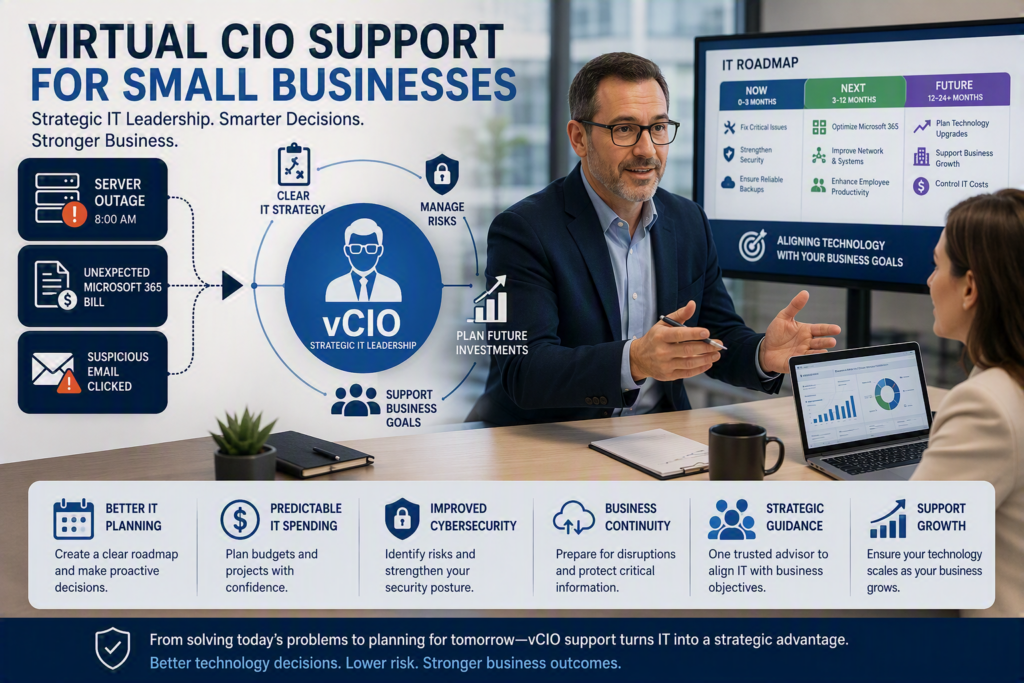
A server outage at 8 a.m., an unexpected Microsoft 365 bill, or an employee clicking a suspicious email may seem like separate IT problems. Often, they are signs that technology decisions are being made reactively instead of strategically.
So, what is virtual CIO support? A virtual CIO (vCIO) provides businesses with experienced technology leadership without the cost of hiring a full-time Chief Information Officer. The goal is to create a clear IT strategy, manage technology risks, plan future investments, and make sure technology supports the business.
For small and midsize businesses, virtual CIO services can provide the strategic IT guidance they need without adding another full-time executive to the payroll.
What Is a Virtual CIO?
A virtual CIO, or vCIO, is an outsourced technology leader who helps an organization make informed, long-term IT decisions.
CIO stands for Chief Information Officer. In a larger organization, a full-time CIO typically oversees technology strategy, IT budgets, cybersecurity, systems planning, and major technology projects. A virtual CIO provides similar strategic guidance on a flexible, part-time basis.
A vCIO is not simply another name for an IT help desk.
IT support focuses on keeping employees productive when something goes wrong. For example, a technician may troubleshoot a computer, reset a password, or fix a network issue. A vCIO looks at the bigger business question:
Why did the problem happen?
Could it happen again?
What should be changed?
What will the solution cost?
What risks remain if nothing is done?
How does the technology support the company’s long-term goals?
For a small business, this strategic perspective can be extremely valuable. Many organizations do not need a full-time CIO, but they still need someone who can connect technology decisions with business goals, explain options clearly, and create a practical IT roadmap.
How Is a vCIO Different From IT Support?
Day-to-day IT support keeps your business running today. A virtual CIO helps prepare your business for tomorrow.
Both functions are important, but they serve different purposes.
For example, an IT technician may replace a failing firewall. A vCIO looks at whether the firewall is properly sized for the business, whether remote employees are adequately protected, and whether the organization needs additional managed IT services to keep its technology environment secure and reliable.
The technician solves the immediate problem. The vCIO helps prevent recurring problems and supports better technology investment decisions.
A good vCIO should also explain technical recommendations in simple business terms. Instead of simply saying that a network needs an upgrade, they should explain how the upgrade could affect:
Business downtime
Data security
Employee productivity
Customer service
Compliance
Long-term IT costs
This makes it easier for business owners, directors, and office managers to make informed decisions.
What Does a Virtual CIO Do?
The exact responsibilities of a vCIO depend on the organization’s size, industry, technology environment, and business goals. A 15-person professional office will have different requirements than a healthcare organization, nonprofit, or company with multiple locations.
However, virtual CIO support typically includes several key areas of IT strategy and planning.
Technology planning: Creating an IT roadmap for computers, servers, cloud services, phones, networks, and business applications. This helps businesses replace and upgrade technology before it fails.
IT budgeting: Forecasting technology expenses, planning for major purchases, and separating regular IT costs from larger projects.
Cybersecurity strategy: Reviewing security controls such as multifactor authentication, backups, endpoint protection, employee security awareness, access permissions, and incident response plans.
Cloud and Microsoft 365 planning: Helping businesses select, manage, and make better use of cloud platforms such as Microsoft 365. Businesses considering a transition can learn more about the benefits of Microsoft 365 for businesses.
Vendor management: Coordinating with software providers, telecommunications companies, cloud providers, and other technology vendors. When an issue involves multiple vendors, the vCIO can help ensure someone is responsible for moving the issue forward.
Business continuity planning: Identifying critical systems, planning how data will be restored, and determining how employees can continue working during an outage or other disruption. Reliable business backup solutions can be an important part of this strategy.
IT reporting and leadership meetings: Regularly reviewing technology priorities, risks, completed projects, upcoming expenses, and recommended improvements with business leaders.
A good vCIO does not recommend a major technology project simply because new technology is available. Instead, they help determine what is actually necessary.
Sometimes the right solution is new technology. Other times, better employee training, a policy change, improved documentation, or making better use of existing software may be the better option.
When Does a Business Need Virtual CIO Services?
A business may benefit from virtual CIO services when technology has become critical to daily operations, but no one internally has the time or experience to manage the bigger IT picture.
This is common when an owner, finance manager, or office administrator has become the unofficial IT decision-maker simply because there is no dedicated technology leader.
Some common signs that a business may need vCIO support include:
IT spending is difficult to predict.
Technology is replaced only after it fails.
Employees use inconsistent file-sharing or technology practices.
Cybersecurity responsibilities are unclear.
Business leaders are unsure whether their backups can actually restore important information.
Client or insurance cybersecurity questionnaires are difficult to answer.
Technology decisions are made without a long-term plan.
The business is growing and needs to add employees, locations, or systems.
For example, leaders may know that backups are running but may not know whether critical information can actually be restored. Having a documented and tested recovery plan is an important part of business continuity and cybersecurity. Learn more about the risks of data loss due to backup issues.
Growth can also create a need for strategic IT planning. Adding employees, opening another location, moving to Microsoft 365, adopting cloud applications, or supporting hybrid work can all introduce new technology, security, and budgeting decisions.
A vCIO can help prioritize these changes so the business does not try to solve everything at once.
Virtual CIO Support for Small Businesses in the Fraser Valley
For businesses in the Fraser Valley, having access to both responsive IT support and strategic technology guidance can be especially useful.
When an urgent technology problem occurs, employees need fast technical assistance. But when the business is planning its IT budget, improving cybersecurity, replacing aging equipment, or preparing for growth, it needs a technology adviser who understands the organization’s systems and business priorities.
This is where a vCIO can add value.
Instead of treating every IT issue as a separate ticket, virtual CIO support creates a longer-term view of the organization’s technology environment. The goal is to connect everyday IT decisions with business objectives.
For organizations looking to strengthen their security strategy, a vCIO can also help evaluate areas such as cybersecurity services and recommend improvements based on the organization’s risk and operational needs.
What Are the Benefits of a Virtual CIO?
The main benefit of a vCIO is access to experienced IT leadership without the cost of hiring a full-time CIO.
Depending on the organization, virtual CIO support can help with:
Better IT planning: Create a clear technology roadmap instead of making decisions only when problems occur.
More predictable IT spending: Plan technology purchases and projects ahead of time.
Improved cybersecurity: Identify security gaps and prioritize the most important improvements.
Reduced business risk: Prepare for outages, data loss, cybersecurity incidents, and other disruptions.
Better technology decisions: Compare solutions based on business needs rather than simply choosing the newest technology.
Support for business growth: Make sure IT systems can scale as employees, locations, and business needs change.
One strategic point of contact: Help coordinate technology vendors and keep projects moving.
What Should You Look for in a vCIO?
Not every virtual CIO service is the same. When choosing a vCIO, businesses should look for someone who understands both technology and business operations.
A good vCIO should be able to:
Explain technical issues in simple language.
Understand your business goals.
Provide a clear IT roadmap.
Prioritize risks and recommendations.
Help plan and control IT spending.
Understand cybersecurity and business continuity.
Coordinate with internal staff and outside vendors.
Provide regular reporting and recommendations.
Focus on practical solutions rather than unnecessary technology.
The relationship should also be transparent. Businesses should understand what is included in the service, how often strategic meetings take place, what reporting is provided, and how projects or additional consulting are handled.
How to Get the Most Value From Virtual CIO Support
Start with your business goals, not just your technology problems.
Tell your vCIO if you plan to hire more employees, move offices, open another location, improve cybersecurity, meet privacy requirements, reduce downtime, or improve customer service. These goals help shape a technology strategy that supports the business instead of creating technology projects for their own sake.
Ask for an IT roadmap that separates immediate risks from longer-term improvements.
For example, weak passwords, unsupported systems, or untested backups may require immediate attention. A complete network replacement or major cloud project may be better planned over the next 12 to 24 months.
A useful IT roadmap should identify:
Priority
Recommended action
Expected timeline
Estimated cost
Business reason
Risk of delaying the recommendation
You should also expect plain-language IT reporting. Business leaders should be able to understand what has been completed, what risks remain, what is coming next, and where technology spending is going without having to understand complicated technical terminology.
The best vCIO relationships create confidence, not dependence. Your team should know who to contact when something goes wrong, why important security measures are in place, and how technology investments support the organization.
Is Virtual CIO Support Right for Your Business?
Virtual CIO support can be a practical option for small and midsize businesses that need strategic IT leadership but do not need or cannot justify a full-time CIO.
It can help turn IT from a reactive expense into a planned business function. With the right strategy, businesses can make better technology decisions, manage cybersecurity risks, plan their budgets, and prepare their systems for future growth.
If your business is constantly reacting to technology problems, making IT purchases without a long-term plan, or relying on someone internally to manage technology decisions without dedicated expertise, it may be time to consider virtual CIO services.
Strategic IT guidance can give business leaders a clearer view of where their technology stands today, what needs attention next, and how IT can better support the organization’s goals.